Heather’s DNA at Gedmatch Genesis

This is my fourth Blog on my daughter Heather’s DNA. Here are the first three:

  1. A First Look at Heather’s DNA
  2. AutoClustering Heather’s DNA
  3. Heather’s Jarek DNA matches

Heather’s DNA at Genesis

Genesis is the new version of Gedmatch. I uploaded Heather’s DNA there for analysis. I am getting used to Genesis and Genesis is still being upgraded. Heather has three kits at Genesis. I uploaded her DNA from AncestryDNA, then I made two more kits for her. These nest two kits separate out her paternal DNA and her maternal DNA based on my DNA.

Heather’s Maternal Matches

Because I know a lot about my genealogy and DNA matches, I would like to look at Heather’s maternal side matches. Fortunately, Heather’s first four matches (after matching herself) are matches that I discussed in my previous Blog on the Jarek Family. When I look at Heather’s maternal DNA compared to everyone at Genesis, here are the top 5 matches:

The first match is Heather’s maternal side matching with all her DNA. Here is where Heather matches the other four on the list:

Heather and her first four matches have as a common ancestor Joseph Jarek and Marianna Ras.

DNAPainter

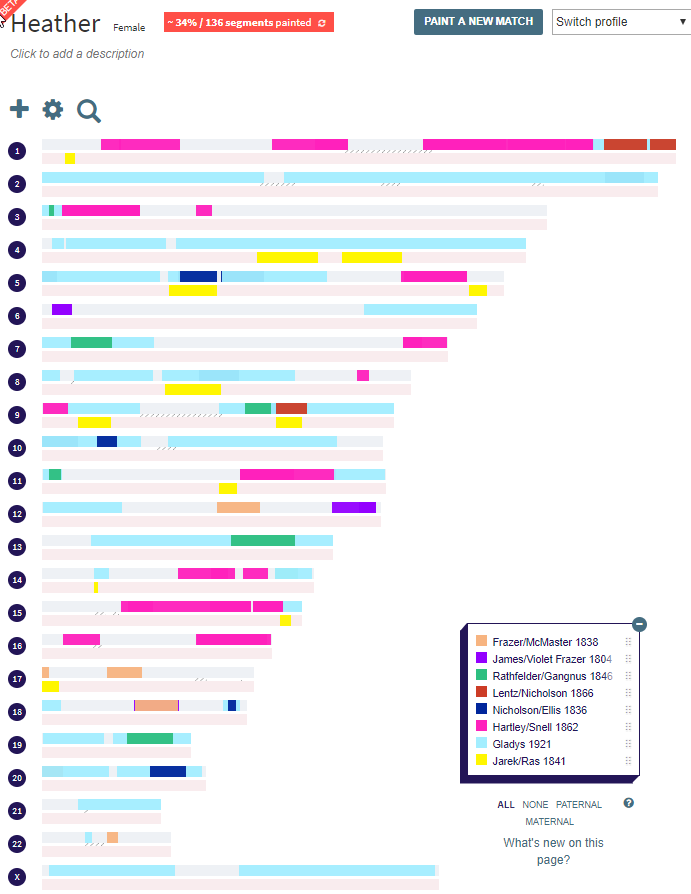
It is possible to paint these four matches to Heather using a web utility called DNAPainter. DNAPainter is quite easy to use. I set up a profile for Heather. Here is her blank canvas:

I just told DNA Painter Heather’s name and that she was female. DNA Painter wants to know if Heather is female so it can give her two X Chromosomes.

First, I painted in Heather’s match with Robert:

The common ancestors are Jarek and Ras and they appear on Heather’s maternal side chromosomes in yellow. I painted in the other three matches who appear to be siblings and got this:

That brings Heather up to 2% painted with 26 segment. That 2% includes her paternal and maternal side, so that would be more painted on just her maternal side.

Painting Heather’s Paternal Side

The fastest way to paint in Heather’s paternal side is to paint in her match with my mother:

This quickly gets Heather up to 26% painted. Heather’s X Chromosome should be all blue but for some reason she has a gap in the middle. I added some more paternal matches and got this:

This gets Heather up to 34% painted. Heather’s paternal side is 63% painted and her maternal side is 5% painted.

Betty at Genesis

Heather’s first maternal match after the known yellow Jarek matches painted is Betty. This looks to be Betty’s tree at Ancestry:

I’m skeptical of finding a match with Heather’s tree, but I’ll try Here is the tree I came up with:

I feel as though the connection may be with Annie Parson who was born in England – probably Lancashire County. But I don’t have a solid connection.

Summary and Conclusions

  • I was able to find Heather’s top AncestryDNA Jarek matches at Gedmatch Genesis.
  • I mapped these matches to Joseph Jarek and Marya Ras.
  • I also mapped many of Heather’s paternal matches using DNA Painter.
  • I tried figuring out how Heather’s first unknown match at Gedmatch Genesis fits in. I suspect that it is through Lancashire, England, but I haven’t made an exact connection.


Back to the 1700’s With Joyce’s DNA

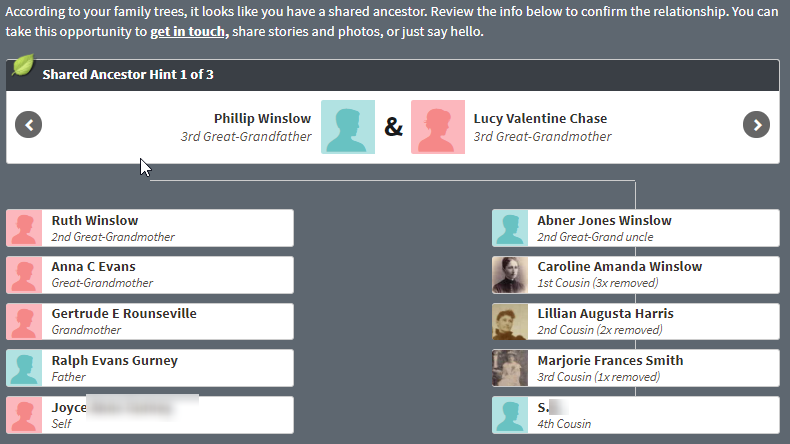
I was looking at Joyce’s Shared Ancestor Hints today at AncestryDNA. Joyce is my father’s first cousin. Here is an interesting match that Joyce had with Skylar:

This shows that 7 generations ago, Joyce and Skyler had the common ancestors of Samuel Snell and Mary Head. Samuel was born in 1708 and lived most of his life in colonial times. Samuel’s father was also a Samuel. He ran a tavern in Newport and is mentioned in many court cases. Here is a court case where the younger Samuel is also mentioned:

Samuel Snell of Newport, vintner, vs. Thomas Huxham of Newport, butcher, in the custody of the sheriff, for £17:2:9 due by book for money paid, wood, and drink sold and delivered and work done by book for money paid, wood, and drink sold and delivered and work done by the plaintiff’s son and servant Sam at sundry times beginning 16 October 1725 and ending 14 September 1726. Writ dated 16 February 1726[/7]. Accounting dated 8 March 1726/7 included a cord of walnut wood at 12s, money “paid John Platts on your account … my son Samuel helping you,” etc. Credit: mutton, veal, beef, etc. Several bills in the file.

The son and servant Samuel would have been 17 or 18 at the time of incidents mentioned above.

Colonial DNA

Along with the genealogical match there is also a DNA match to Skylar. I found Skylar also posted at Gedmatch. He and Joyce have this match:

Painting Joyce

This DNA can be painted to Joyce with a web tool called DNA Painter.

This is what Joyce’s colonial DNA looks like. This DNA is from Joyce’s Maternal side, so it is painted on the pink part of her Chromosomes 7 and 12. This is less than 1% of Joyce’s DNA. The further back in time the matches are, the smaller the matches are.

Some of Joyce’s English DNA To Go With the Colonial

Here is another of Joyce’s matches. I am more interested in her maternal side as that is where I am related.

This is a closer relationship. James Howorth was born about 1768 and lived in Bacup, Lancashire County, England. Anne is from New South Wales and is a 4th cousin once removed to Joyce.

This gets Joyce up to 1% painted:

Joyce’s Paternal Side

This is the side I’m not related on:

Here is Joyce’s 4th cousin. They appear to be related three different ways, but i’ll just pick the closest relationship. This appears to be Sumner at Gedmatch. Here is the DNA that Joyce and Sumner share at Gedmatch.com:

Now Joyce is all the way up to 2% painted:

The light green didn’t show up well, but it is on Joyce’s paternal side. It is possible that some of these segments could go to Joyce’s other common ancestors with Summer, but that would have to be sorted out later.

Sumner and Joyce Have an X Chromosome Match

Summer and Joyce also match here:

The X Chromosome is interesting as it can only be inherited certain ways. Here is Sumner’s maternal side:

I have circled the likely path of X Chromosome inheritance for Sumner. The X could not be from Philip Winslow as the father does not pass down an X Chromosome to the son. Therefor, it is likely that this match comes from Lucy Chase.

This gets Joyce up to 3% painted. However, I have made a mistake as Lucy is on Joyce’s paternal side.

Summary and Conclusions

  • I started painting Joyce’s DNA
  • I painted two maternal matches and one paternal match
  • The paternal match (Sumner) also had an X Chromosome match with Joyce. This made it possible to trace that match to one likely ancestor instead of an ancestral couple.
  • All this DNA is from people who were born in the 1700’s.

Raw DNA Phasing Six Siblings with One Parent – Part 1 Homozygosity

I have written many Blogs on raw DNA phasing with my siblings and my mother. I have done this phasing using a Whit Athby paper and MS Access. I had my last sibling tested this past Summer, so thought I would see how his phasing would work using this method. The goal of this phasing would be to get four files of data representing the DNA from my four grandparents. I have four such files already, but they were created by M MacNeill a while ago and he didn’t have all my siblings’ data at the time. I would like to learn how to upload these files on my own.

Jim’s Raw DNA

Jim was my last brother to be tested. He was tested at FTDNA as that was the kit I had at the time. The first step is to find Jim’s DNA download from FTDNA and extract it. However, before I do that, I need to know what build to download. As I look at my old blogs, it appears that I was working in Build 37. Gedmatch has historically used Build 36. However, Gedmatch is being migrated to Genesis. Here is a comment I found on Facebook:

All Genesis tools natively work in B37 *meaning that all matching is done based on B37), but we decided to map all of the B37 positions to B36 and B38 when printing out segment start/end positions, with the choice given to the user which to display.

We will begin to migrate this to other tools as soon as we can. I hope you find it useful.

Build 37 DNA

All this to say that I want Build 37. I assume that I used Build 36 for Gedmatch, so I’ll do a new download for Jim:

I chose Build 37 Raw Data Concatenated. Unfortunately, my computer wants me to find an app to extract this file.

In the past, I have used Notepad, so I’ll try that. The gz file is about 6.4 MB. I can see Notepad was the wrong thing to open this with:

So I guess I need Winzip. I downloaded that and then opened Jim’s file. It opened as a csv file, but I saved it as an Excel File as that is what I will be using in Access. Jim has double A DNA:

Actually the DNA at the first position of his tested Chromosome was AA. He got an A from his dad and an A from his mom. Jim has a lot of DNA

This shows that Jim has 720,450 tested DNA positions. That is pretty good. However, there are some positions that don’t have results indicated by –. Between my mother, me and my five siblings there are about 4 million autosomal results to look at.

One thing that I notice that is different from this AncestryDNA file:

AncestryDNA has a separate column for allele 1 and allele 2. That would be better for me as I am trying to separate these alleles out.

This looks better. However, when I try to import this into Access, I get this error:

My guess is that Access does not like the dashes where there are no results. So I’ll take out every dash in Jim’s DNA results. That was close to 60,000 dashes. I tried that, but I still got the error. One on-line suggestion was to compact and repair the database. That seemed to work, but there was this problem:

I didn’t realize that there was a new header at line 702542. That imported like this:

Also for the AncestryDNA files, the X Chromosome shows as Chromosome 23, which should work better. My import to Access took out the ‘X’. After I removed the internal header and changed the X Chromosome to 23, I imported Jim’s raw DNA with no problems.

Giving Jim some Maternal DNA

Now Jim’s DNA is in shape for doing something with it. The next step is pretty simple. Every time my mom has two alleles that are the same, we know that allele is maternal for Jim. I originally tested my mom at FTDNA, so it would make sense to download her DNA from there.

Importing Mom’s DNA to MS Access

I already learned a few things from downloading JIm’s DNA from FTDNA. I used the same steps for my mom, except that I didn’t delete the dashes to see if that would make a difference. That gave me an error, so I deleted the dashes. Now I am in business.

My mom has 711,398 locations tested at FTDNA. This is a bit less than Jim’s  720,450 tested locations.

Next, I want to see what happens if I compare Mom’s ID’s with Jim’s ID’s:

Here at Access I have an equal join between the RSID fields of both tables. That results in 709,632 positions that Jim and Mom have in common. When I compare the positions between the two, I get 712,452. That is more than my mom had, so that doesn’t make sense. Actually, I shouldn’t be comparing by position, because those are positions along each of the 23 chromosomes. There may be repeats. That is good to know.

Where is Mom Homozygous?

If Mom’s Allele #1 is the same as Allele #2, that is called homozygous. I’ll perform this simple query on Mom:

I asked Access to show my where my Mom’s Allele 2 is the same as Allele 1:

Mom has that in 500,995 places. However, next, I need to get rid of the blanks:

I added Is Not Null to the criteria on the Result Column:

That gets me down to 496,136 homozygous positions. That means that more than 2/3 or almost 70% of Mom’s results are homozygous. Those are the alleles that will be Jim’s maternal alleles.

Where is Jim Homozygous?

Where Mom is homozygous, we’ll add a Mom allele to JIm. But first, where Jim is homozygous, we will add a Mom and Dad allele. I created a simple query in Access:

I’m creating two new columns for Jim. One will give me the alleles that Jim got from his Dad and the other will give me the alleles that Jim got from his Mom. In the criteria row I have that Jim’s allele 1 must equal Jim’s allele 2. When that happens, put in Jim’s allele 1 into the column. That gives me this:


That gives me over 500,000 rows of paternal and maternal alleles for Jim. However, I do have blanks. When I filter the blanks out, I get 491759 rows. That is a fast way to get almost 1 million alleles for Jim. Next, I’ll make a table of this query in Access. When I do this, I notice that Access has changed my query:

Access liked this better as it was simpler. I would think that JImallele2 does not have to be there twice, so I took one out and got the same result:

Access is trying to teach me to make better queries.

Adding Maternal Alleles from Mom

Here is a summary of where we are for Jim:


Just by assigning Jim’s own homozygoius alleles to his paternal and maternal sides, he is now 71% phased. I also see that mom had 496,136 homozygous alleles. These need to be added to Jim’s homozygous results. However, I want to be careful:

  • When I add Mom’s alleles, I don’t want to erase the ones I already gave to Jim
  • There may be homozygous alleles that mom had that Jim didn’t even test for. These could be added to Jim as bonus alleles.
  • In adding mom’s homozygous alleles to Jim’s list, we also have to add in where the position of those alleles are on the Chromosome and the RSID.

First, I note that mom has 496,136 homozygous alleles. This is more than Jim’s homozygous alleles.

First, I’ll create a query for Mom’s homozygous alleles.

Here I want there to be a non-blank result and I want Mom’s allele 1 to be the same as allele2.

Next, I’ll check to see how many of Jim’s homozygous alleles are the same as mom’s homozygous alleles.

I’ll do this by an equal join on the RSID which is a unique identifier. Here is what I get from this query:

However, there are still blanks there. I had trouble getting rid of the blanks, but I can temporarily get rid of them by filtering the results.
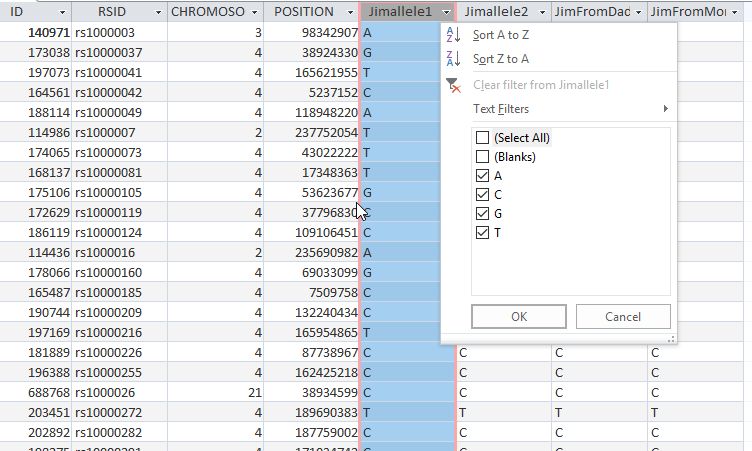
This gets rid of about 17,000 blanks.

This tells me that Mom has 496,136 homozygous alleles, but 381,721 of those Jim already has. That means we need to add 114,415 maternal alleles to Jim’s list. That would get his AllelesFromMom up to 606,174.

Next, I want to get a list of all of Mom’s homozygous alleles that Jim doesn’t have, so we can add them to Jim’s list. There is a little trick to getting this in
Access. First I create an unequal join:


On the query above on the left are all of Mom’s homozygous alleles On the right are Jim’s homozgous alleles that match Mom’s homozygous alleles. The #2 radio box is checked. That means I want everything on Mom’s side and everything where the RSID’s are equal. However, in the criteria, I’ll put an ‘is null’ on JIm’s side:

This adds 97,451 of Mom’s homozygous alleles to JIm. This is less than the 114,415 that I was looking for. One guess is that these are positions that Mom had tested that Jim did not. Somewhere I lost 7,000 of Mom’s homozygous alleles. Or this may have to do with the blanks in some of the tables. I was able to get rid of the blanks in Jim’s table and the new number came out right:

Adding 114,000 Maternal Alleles to Jim

Now that I’ve found 114,000 maternal alleles for JIm, I’d like to add them to his table. There are probably a few ways to do this in Access. One way is called Append Table. I’ll try that as I will need that later on in the process. If only I remembered how to do that. I could put Jim’s table into Excel and just add Mom’s table. However, I’m not sure Excel will appreciate the large files.

The directions that I found for Append Query said to use the data you want to copy first. That was in this Query:

What I want to add is from a Query called Mom Homo Jim Missing. These were Mom’s extra alleles. I chose to append these to a table called Jim Homozygous. But on second thought, I want it going to a new table, so I’ll copy Jim Homozygous and call it Jim Plus Mom Homozygous. First I want to review the results using the view button. I guess it looks right. It only shows the records to be added. Then I push Run and I get a warning saying that this cannot be undone.

Here is what the Appended Table looks like:

This is the point at which the appending took place. What I wasn’t expecting was that Access added the ID. This is the ID that Access originally assigned to the raw data. So now I have Jim’s ID’s and Mom’s ID’s in the same Table.

Phased Allele Update Alert

These two operations based on homozygosity alone put Jim’s phased alleles at over one million. Bing, bing, bing. Jim is already almost 80% phased. Maternally, he is close to 88% phased.

Other Phasing – Visual

I’m not the most experienced raw data phaser in the world, but I have worked on three, four five, and now six sibling raw data phasing. I have also done a lot of work with three, four, five and six sibling Visual Phasing. Here is Chromosome 1 using the Steven Fox Spreadsheet:

I can use the raw data phasing to confirm the Visual Phasing. I can also use the Visual Phasing to know where to look for crossovers. For example, I already see a problem with the map above in the bottom right corner. I will need to change the crossover designations there.

The other reason stated at the top of the Blog is that I should be able to create a file to upload to Gedmatch for each of these four grandparents. That could make searching for DNA matches easier.

Summary and Conclusions

  • I started phasing the sixth of six siblings based on homozygosity.
  • Using homozygosity alone, I got my brother Jim up to 80% phased.
  • Raw data phasing is considered an advanced topic, but the basics are quite simple. If you have two alleles that are the same, one must be from your father and one from your mother. If you are a parent and you have two alleles that are the same, you had to have passed down that same allele to your child.
  • I also used MS Access which is best suited for large databases.
  • My goal is to get four grandparent files to upload to Gedmatch (or Genesis). In the past, I have run out of steam on these projects.
  • I will be able to use my past work on visual phasing as a roadmap to finding crossovers and assigning grandparents.
  • I should be able to use my past raw data phasing experience to streamline the process.
  • With six siblings, I am expecting good results. However, as in the Visual Phasing process, the more siblings you have, you will have more combinations of sibling comparisons you have to look at.
  • Next up, I expect to look at heterozygosity.


Visual Phasing Six Siblings with the Fox Spreadsheet: Part 20: Chromosome 19

I feel like I’m getting near the end of this series. So far, I have been able to solve the first 18 Chromosomes plus the X Chromosome.

Chromosome 19

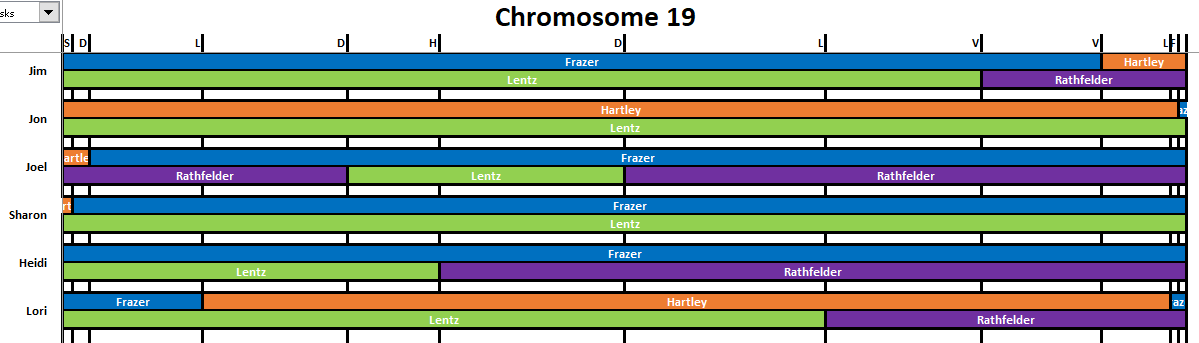
Here is my first cut at crossover lines assigned to me and my five siblings:

The crossovers seemed straightforward. Actually, I think that there is an additional crossover for Jon (F) at the very end.

Adding Position Numbers to the Crossovers

Next I add the position numbers to the crossovers:

I didn’t have any easy position answer for the first and last crossovers. I could get this from Gedmatch.

Cousin Matches

I hope that I have enough cousin matches to solve Chromosome 19. I need at least one paternal match and one maternal match to solve the Chromosome. It looks like I should have one of each, so that is good. One of the best cousin matches is with Rathfelder cousin Anita:

This is a conservative rendition of her match. Jim, Jon and Sharon will also have Lentz DNA where they do not match Anita (in the area where Anita matches Heidi).

Here is Hartley cousin James’ matches with my family:

This may be enough to solve Chromosome 19:

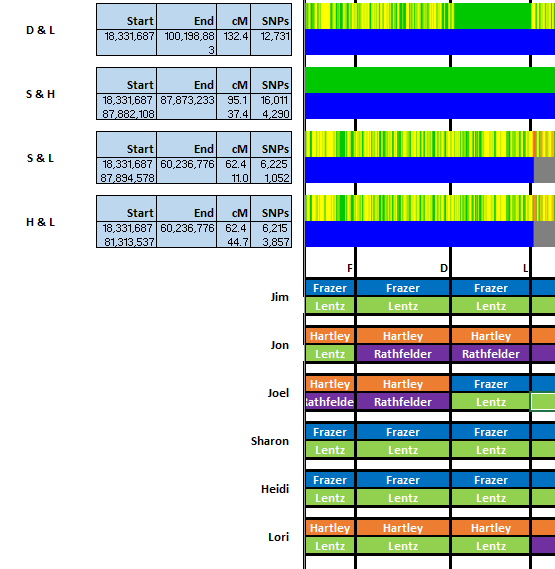
Note that Jon and Sharon have a HIR for most of the Chromosome:

This is true except for the very ends of the Chromosome where Sharon has a crossover on the left and Jon has one on the right. Here is how that works out:

To be HIR, that means that two siblings have the same DNA from one grandparent and that they have different grandparent DNA on the other side. It turns out that Sharon and Jon share the same Lentz DNA but Jon has Hartley DNA and Sharon has Frazer DNA on the paternal side.

I got this far:

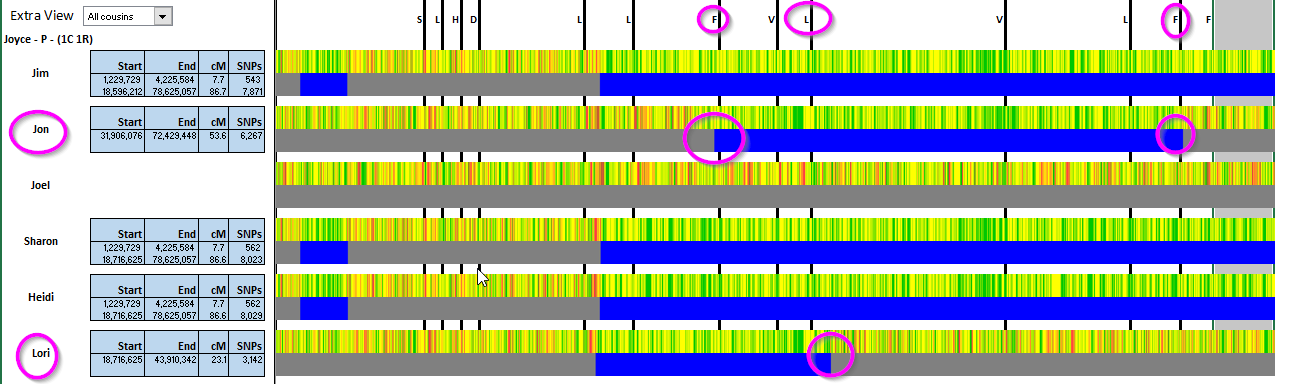
I don’t think that Jon really has a crossover on the right. Here is a close-up of the comparison of Jon (F) and Sharon on the right side of the Chromosome:

Jon and Sharon were HIR for most of the Chromosome. If Jon has a crossover, then their comparison would have to to either FIR or NIR. If this is a NIR, then I should see some red and I don’t. Now, I’m changing my mind back. Perhaps Jon does has a small FIR. If Jon has a Fully Identical Region with Sharon, then he would have a HIR with his other siblings:


The F & S comparison looks greener on the end compared to the other F comparisons.

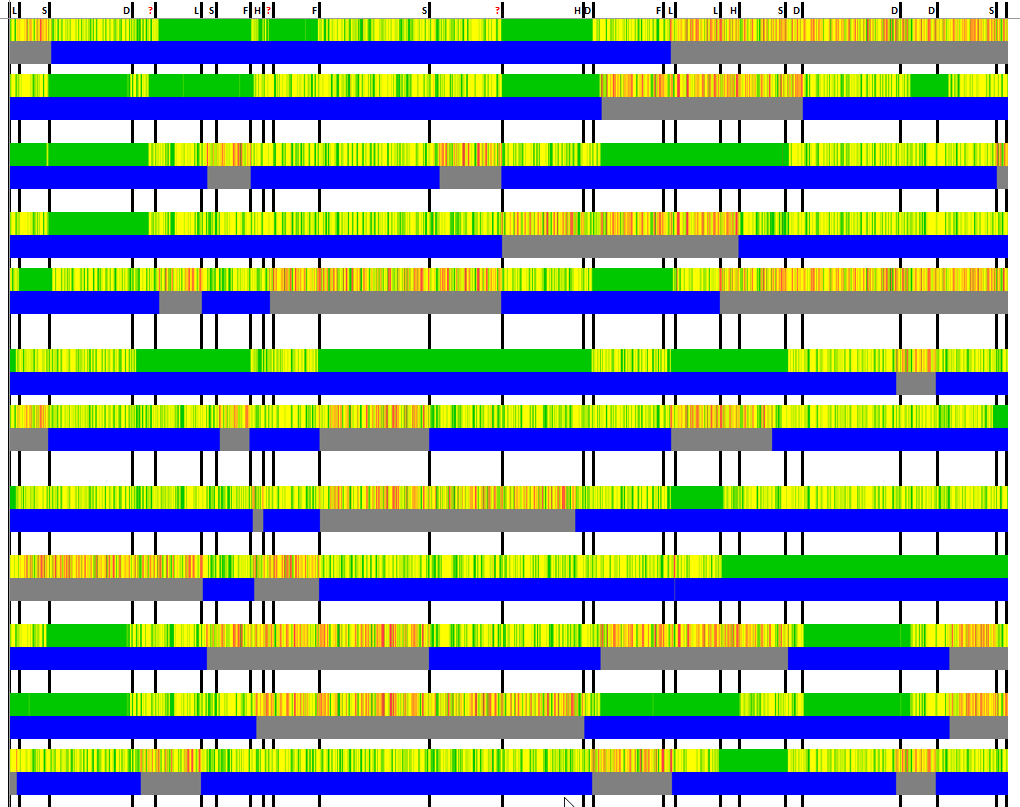
This image doesn’t give enough detail to see the small crossovers, but shows that overall, I had the right idea with the visual phasing:

Summary and Conclusions

  • Heidi had a full Frazer Chromosome.
  • Jon and Sharon both had a full Lentz Chromosome.
  • Jon either had a full Hartley Chromosome or nearly full Hartley Chromosome.
  • I spent some time figuring out whether or not Jon had a crossover near the end. It was a judgement call and amounts to bug dust as it is such a small inconsequential piece of DNA.
  • Anita was our only maternal match, so she was very important for the solving of this Chromosome.


Visual Phasing Six Siblings with the Fox Spreadsheet: Part 18: Chromosome 17

In my last Blog, I looked at Chromosome 15. This is because I took Chromosome 16 out-of-order by mistake. On to Chromosome 17,

Chromosome 17

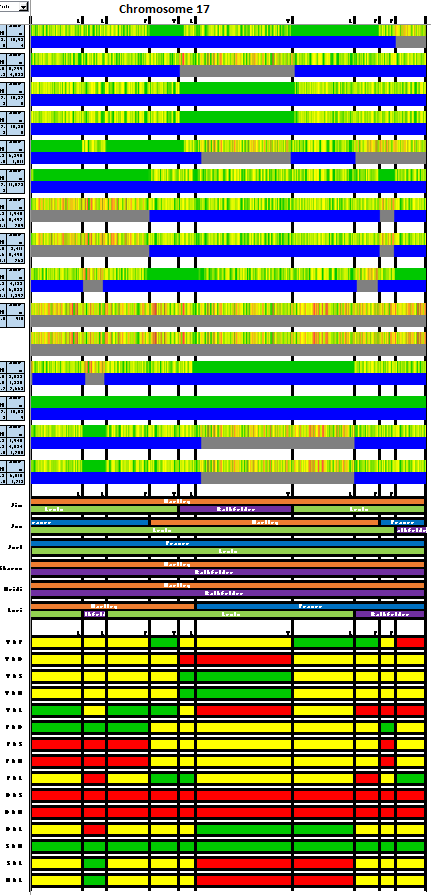
Here is my first cut:

The first four crossovers are fairly close together. However, Chromosome 17 is much smaller than Chromosome 1. The spreadsheets are all the same width. That means that the spacing is further apart on the higher numbered chromosomes. That makes the crossovers easier to see.

Next, I take a second look and enter the crossover positions in a spreadsheet:

I needed the first four positions during my first look to get the order of the crossovers right.

Cousin Matches

I like this part of the process as it makes things go faster and shows crossovers. Hartley 1st cousin once removed Joyce is the best match for these six siblings:

Joyce’s matches point out two paternal crossovers for Jon and one for Lori. This is what I get for Joyce’s matches:

[Note here that I added orance Hartley on the Lori’s first segment by mistake. This is corrected later in the Blog.]

I didn’t fill in between Lori’s L and L segment. That is because Lori has two crossovers and could go from Hartley to Frazer and back to Hartley again. Sharon and Heidi had only one crossover each and would have needed two to go from Hartley to Frazer to Hartley. As they only had one crossover each, I filled in the gap between the two Hartley areas of DNA with more Hartley DNA. Jim had no crossover in that area, so I was able to fill in his gap with Hartley DNA also.

A Maternal Match

If I have a maternal match, it may be enough to solve the Chromosome. Lentz cousin Judith matches three siblings on the right-hand side of Chromosome 17:

There are not many crossovers, so I can expand the DNA to the right. I also gave Rathfelder DNA to Sharon, Heidi, and Lori on the right as they didn’t match Lentz cousin Judith.

Lori has the most crossover, hence a few blanks. To fill in the blanks I go vertical. That means I go up to where the Gedmatch sibling pair comparisons are. However, before I do that, I take a glance at the Segment Map. It looks like I have at least one mistake. By reviewing my map, I see this:

I missed a crossover for Jim (V) at the pink circle. I was going from right to left, so I’ll erase Jim’s maternal DNA to the left of the circled crossover. I had already added Hartley to the left of the V crossover based on a match with Hartley cousin Joyce. That means that the crossover at the circled area should go from Rathfelder to Lentz going right to left.

I can shrink the Segment Map very small to see that I have fixed the problem:

Going Vertical for Lori

Now I can go above for Lori to fill in her missing DNA with FIRs and NIRs. Here is an issue:

The Jon (F) and Lori comparison has a green FIR at the top of the image above for the first segment. That means that Lori should have Frazer/Lentz DNA, but I have her with Hartley DNA already. I had added that above by mistake. Lori does not match cousin Joyce in that segment and should have Frazer DNA there:

Next, if I have Lori’s paternal side right (which I didn’t before), she should go from Lentz to Rathfelder  and then back to Lentz on her maternal side. Then at the last L crossover above, she would go back to Rathfelder.

On my computer, this is the solution to Chromosome 17 at 40% size:

To quote an old joke, “I thought I made a mistake once, but I was wrong”. I thought I saw an error, but I’m not used to this comparison. When I look more closely the top and bottom of the image above match.


My Previous Attempt at Chromosome 17

I first started working on Chromosome 17 in January of 2016. This is what I came up with:

At the time, I was working with three siblings and didn’t have as many cousin matches.

Here is the new analysis. The colors are different and the maternal and paternal are reversed. Not only that, the sibling order is different:

There are also more crossovers in the newer version due to twice as many siblings. However, despite all the differences, the results were the same. It seems a bit ironic that I used the same colors that Fox adopted for his spreadsheet.

Summary and Conclusions

  • I missed one of Jim’s crossovers, but was able to fix it.
  • I wrongly assigned Hartley DNA to Lori, but I was able to find that error and fix it.
  • Jim, Sharon and Heidi have full Hartley DNA on the paternal side of their Chromosome 17.
  • Joel has  a full paternal copy of Frazer.
  • Sharon and Heidi have full Rathfelder maternal copies of Chromosome 17.
  • When looking for Frazer or Hartley matches on Chromosome 17, I know the best people to go to to look for matches.
  • Between all six siblings we recieved the full amount of DNA from our four grandparents.
  • A comparison with an earlier attempt I did at solving Chromsome 17 for three siblings matches with my current results.


Visual Phasing Six Siblings with the Fox Spreadsheet: Part 17: Chromosome 15

I went a bit out of order as my last Chromosome solved was Chromosome 16. That just shows how easy it is to make a mistake or get mixed up.

Chromosome 15

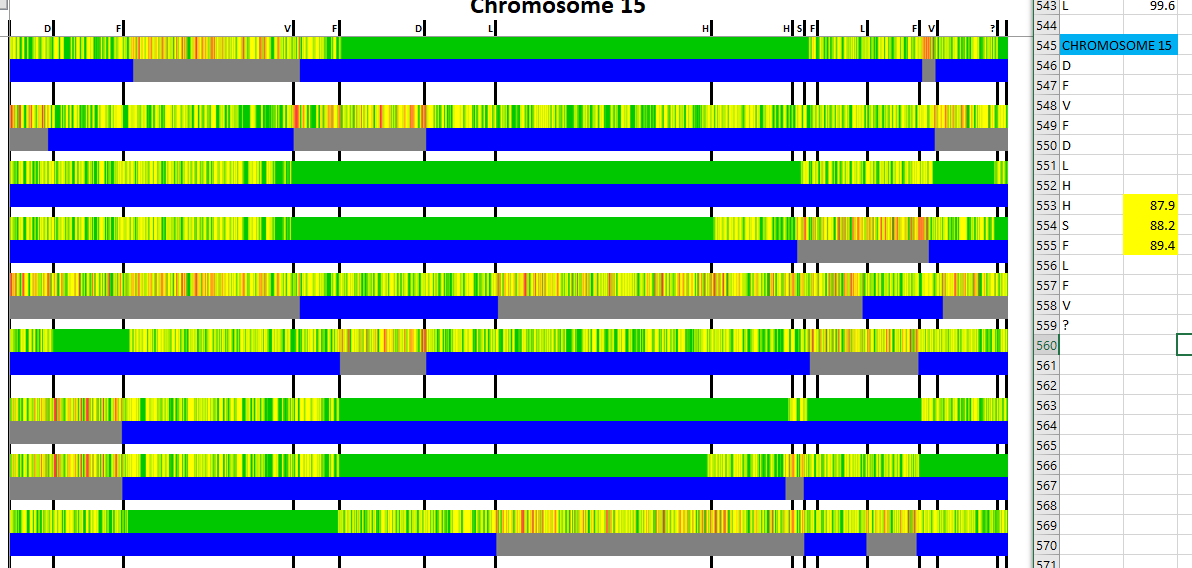
On the right, on a separate spreadsheet, I write down the initials and the locations of the crossovers. The three locations in yellow indicate that I am not sure of the order of the crossovers. I was also not sure of the last crossover. However, I have convinced myself that there is one there:

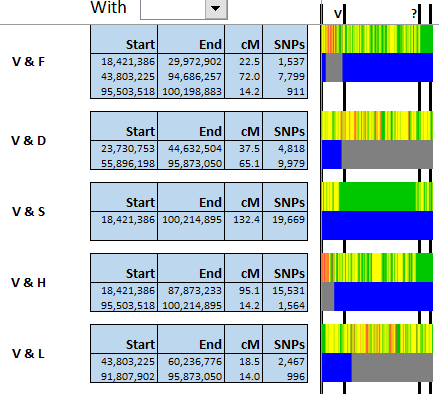
I believe that the last segment is a small HIR in the V & D and the V &L comparisons. This last crossover will go to Jim (V).

Next, I go through the crossovers again and write down the position numbers:

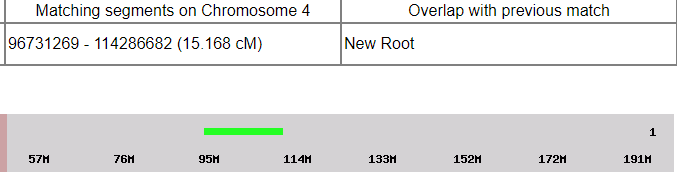
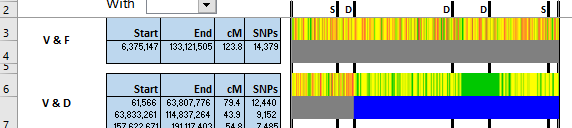
This gives me a second look at the crossovers. I think I have this right now. I am missing the last position number which is not a big deal. I can get it from the full resolution comparison between Jim (V) and Jon (F):

The beginning of the match is at 95.5M. Each ^ is 1M, so the beginning of the FIR (and thus the crossover) is as 99.4.

Cousin Matches

This Chromosome should be easy to solve. Here are matches with Hartley cousin Patricia:

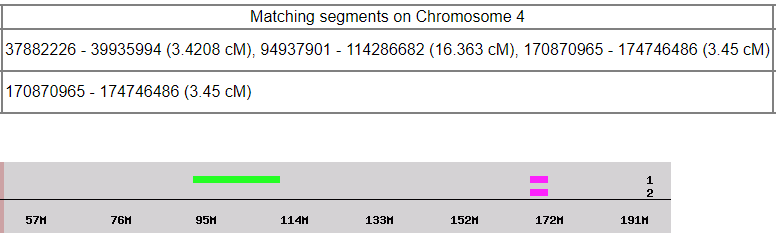
My first match ends at 41.4 while Jon and Lori’s matches end at 43.7M. That seems to indicate a crossover that I didn’t see on the paternal side. However, my match with Hartley cousin Beth clears that up:

Beth shows my match goes way beyond 41.4 to 53.9M. Here is how I fill in paternal DNA based on Beth’s match with me and my siblings:

Here I have assumed that a no-vote for Hartley is a vote for Frazer.

Match with maternal Rathfelder cousin Inese may be enough to solve the Chromosome:

Next, I should be able to finish by extending DNA to the crossovers and comparing the sibling pairs from Gedmatch:


However, when I get to the right-hand side, I see that I have done something wrong. The Joel (D) and Lori comparison show an FIR in the next to last segment. However, to do that would require a double crossover for Lori and she only has one. Perhaps the Segment Map will show my mistake:

Here I boxed some areas that are right in the sibling comparison, but wrong in the Segment Map (which represents my Chromosome Map). Interestingly, the first mistake is at V but at the F & D comparison.

The Segment Map pointed out exactly where the problem was. I have a crossover at V which doesn’t make sense. I should only have crossovers at D. I’ll take that V crossover out and carry it over to my next crossover:

After my next crossover, I see I have an FIR with Lori. That means that my crossover has to be on my maternal side (Lentz).

Next I won’t outline all the problems, but I do see one at the top:

This one starts with Jon (F). There should be an FIR, but I have NIR. I can fix this by reversing Jon’s crossover at F. This is confirmed by an FIR between Jon and Heidi:

When I reverse Jon’s crossover, I see that I have corrected the two errors:

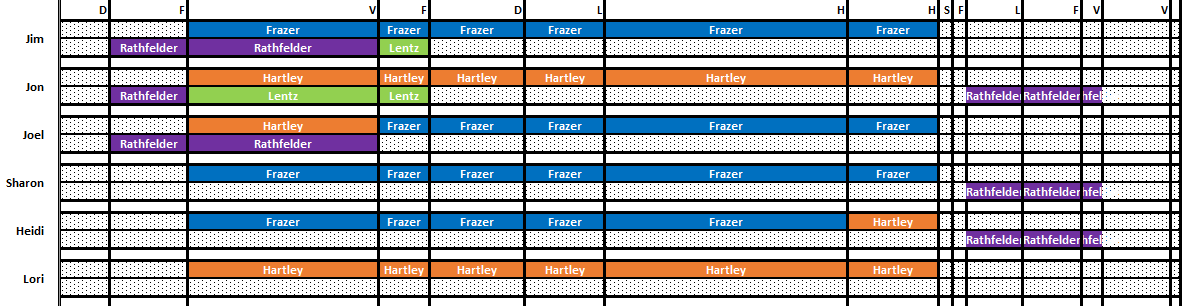
Here is what I get for a finished Chromosome 15:

This looks like a match:

Summary and Conclusions

  • Two mistakes were solved by comparing the Segment Map to the Gedmatch sibling pair comparisons.
  • Joel and Lori have recieved a full dose of Hartley on their paternal sides.
  • Sharon has a full dose of Frazer. Jim has 99% Frazer DNA on his paternal side of Chromosome 15.
  • A bit of Rathfelder is missing.
  • So far, it seems like the paternal Hartley and Frazer are the most popular for full Chromosomes. Maternal Rathfelder is least likely to be represented across the chromosome for some reason.  This may have to do with the fact that females tend to have more crossovers than males on average.


Visual Phasing Six Siblings with the Fox Spreadsheet: Part 16: Chromosome 16

The last two Chromosomes (13 and 14) went well. We will see what is in store for Chromosome 15. Actually, I see that I have been working on Chromosome 16, so I’ll go with that.

Chromosome 16

After a break with the two easy Chromosomes, it looks like I am back to a bit of a challenge:

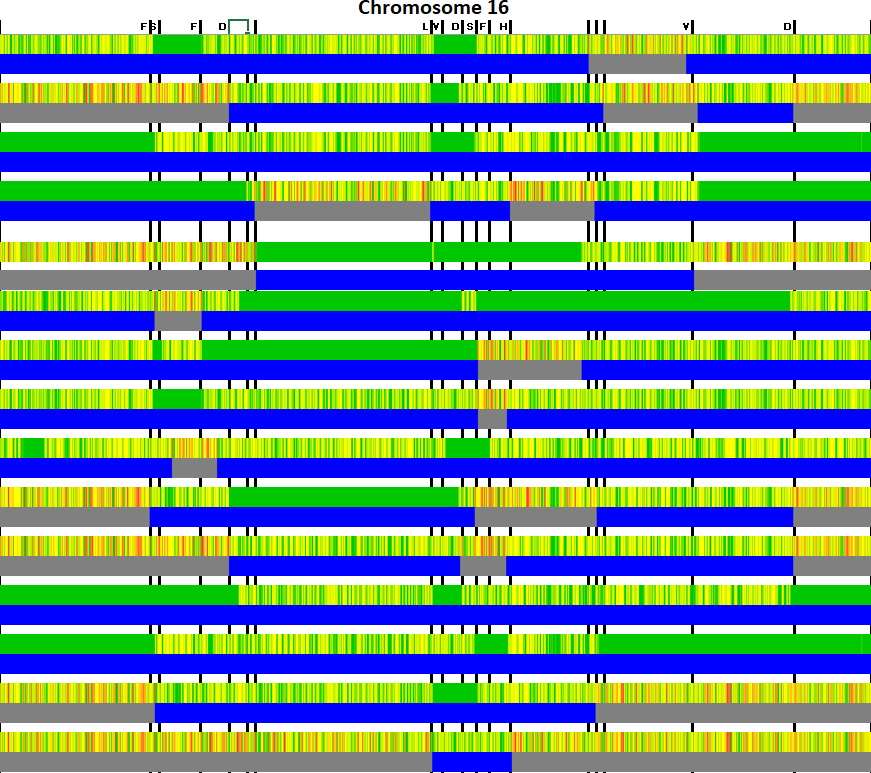
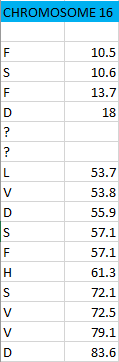
I have two difficult areas, signified by lack of siblings’ initials.

Cousin Matches – the Easy Way Out

It is my hope that cousin matches will define some of the confusing crossover areas. I’ll start with Hartley cousin Maury:

Maury shows that Jim has a crossover at 72.3 in the second problem area.


Once I saw that crossover, it appeared that there was only one other crossover (for S). This is what I get:

Back to Maury

That is what I get out of Maury’s match. I note that the end of Maury’s first match with Lori is at 20.1M and the end of the other matches is at 21.1, so there is a possible crossover for Lori there. I’ll hold off on that for now until I find other information.

Matches with Rathfelder cousin Anita fill in some maternal DNA:

Matches with Lentz cousin Joan give the other side of the maternal coin:

Figuring Out the Two Missing Crossovers with a Detailed Analysis

The first step is to look at the V & H comparison at Gedmatch full resolution:

This gives the positions of the crossovers at 20.4 and 21.6.

The V & L comparison has two very close changes:

This is because Jim (V) and Lori go from NIR and quickly to an FIR with a small FIR in the middle.

Here are the results:

The FD and DL are for the crossover for Joel (D) that I already have. I interpret the other matches to mean that there is a close double crossover for Jim (V). One is at 20.3 and the other is at about 21M.

Expanding Around the Double V Crossover

My next strategy is to work around Jim (V). This is because I’m not totally sure of the two crossovers.

I’ll use the gedmatch sibling comparisons to expand the DNA more:

At this point, I see that Jim (V) and Heidi are NIR in the larger missing segment above. That means that Jim needs to be Hartley /Rathfelder there which agrees with the proposed double crossover for Jim (V).

I don’t know how to fill in the little V-V segment. This would have to be either Frazer/Rathfelder or Hartley/Lentz. If it was Hartley/Lentz, then Jim would be FIR with Jon, Joel and Sharon in that little segment.

Here is Jim and Jon:

Here’s Jim and Joel:

Here’s JIma and Sharon:

The question is: Is there a FIR between about 20.8 and 21.2M? I can’t tell, but I’ll say there is:


Basically, it is not a big deal either way, so it’s a judgement call.

Here’s my crossover list:

After working the DNA a bit, I get this:

This comparison between the Segment Map and the Gedmatch sibling chart confirms Chromosome 16

Summary and Conclusions

  • Once the crossovers are accurately identified, it is fairly easy to solve the Chromosome.
  • Lori and Joel got a full dose of Hartley. Heidi got a full dose of Frazer.
  • There is a small segment of Rathfelder DNA missing.


Visual Phasing Six Siblings with the Fox Spreadsheet: Part 6: Chromosome 5

I’ll jump into Chromosome 5. Using the Fox Spreadsheet, I’ll make some potential crossover lines, assign them to people and put the crossover positions into a spreadsheet. As I start to do this, I see an issue already. It looks like I have a crossover near the very beginning of the Chromosome. I can find the position of the crossover by comparing myself with my sister Sharon at a low resolution:

My crossover with Sharon is at position 1.2M:

Here is my first try at assigning crossovers:

I had a bit of trouble figuring out the two crossovers in red:

In my spreadsheet, I called the trouble crossovers F/S and D/H.

Time to Look at Cousin Matches

This is one of my favorite parts of the process. I’ll start with two Hartley cousins. These will show some paternal crossovers:

Actually, they show the same crossover twice for Sharon at either 35.1 or 34.7. This solves the mystery of the first unknown crossover. It belongs to Sharon. I’ll show that on my spreadsheet:

I could tell that that crossover was Sharon’s first crossover as the one in question was at position 35M. Sharon’s next crossover that I had identified was at 39.5M.

Next, I’ll add all the cousin matches to the Chromosome Map:

Adding Maternal Matches

Next I’ll add maternal matches to see how I compare with the Segment Map. Cousin Carolyn on the Lentz side has some good matches:

I can see a maternal crossover for me (Joel) and one for Heidi. Here is a conservative rendition of Carolyn’s Lentz matches:


Catherine’s Cousin Matches and Two Inferred Crossovers

Here is how Joel, Sharon and Lori match Catherine on our Rathfelder side. Lori has a match to the left of where Joel and Sharon match Catherine. That implies crossovers for Joel and Sharon. Because there is no overlap between the match and the crossovers, I can’t exactly see the crossovers. However, I do know that both crossovers for Sharon and Joel are on the maternal side which is a big help.

Lori would need two crossovers to go from Rathfelder to Lentz and back to Ratchfelder and I only show one. I’ll assume that the one crossover for Lori on the right hand side of the Chromosome is right for Lori and say that belongs to her paternal side.

Check Your Work

This must be a saying I learned from High School. I have this:

Gedmatch has this:

That is a problem. I’ll add a Frazer match for Jim and then take another look:

The places I circled are D &S and D & L comparisons. The common denominator is me, Joel (D). I’ll fix that by just erasing my segments on the right side of the Chromosome.

Next, I work from the middle of the Chromosome where the DNA agrees with Gedmatch and work to the right:

This is the section to the right of the crossover that I haven’t put a name to yet. I didn’t have some information for Heidi also, so I didn’t fill her in. This looks to check with the segment map:

Next, I’ll fill in Heidi and Joel using the Gemdatch comparisons.

This points out the problem. I need another crossover near Lori’s last crossover. This crossover can be seen here:

The crossover is at the third line – currently for Lori. As I am D, this is clearly a Joel (D) crossover as there is a D in these three comparisons. In order to find the position of my crossover, I have to look at a full resolution image at Gedmatch. I’ll pick my match with Sharon and look around Lori’s crossover which is at 167.5M.

The left side of the bar is at 160M. Each ^ is one M. I’ll say the FIR ends at 167.3 which is right before Lori’s crossover at 167.5. Here is my list of crossovers:

The comparison for the right side should work as I used Gedmatch to produce the map:

Problem solved – for the right side of the Chromosome.

I’ll use the same principle for the left hand side. The unnamed crossover is based on the comparison between Joel and Heidi. I’ll fill in the other four siblings and then fill in Joel and Heidi based on the other four and see what happens.

Here, Heidi does not need a crossover, but I need a maternal one to go from purple to green. Here is my pre-fact checked answer:

The Moment of Truth

This is like comparing your test results to the answer sheet on the right:

Summary and Conclusions

  • I find it helps to work from the known to the unknown. To fix discrepancies, I identify where and who the discrepancy belongs to. I erase those results. I fill in other siblings around the discrepancy. This usually corrects the problem.
  • My brother Jim filled in a lot of missing Frazer DNA. This could be important for Frazer matching.
  • This is the first Chromosome with some missing grandparent DNA. There is a small segment of Rathfelder DNA missing between crossovers H and L or between 55.4 and 61.5M. Fortunately, my mother has been DNA tested, so it isn’t really missing. It was just not passed down to any of her six children.
  • The run of full non-recombinied grandparents continues. This time Jon has a full Hartley paternal Chromosome. Jim has a full Frazer paternal Chromosome. I have heard that males have fewer crossovers than females. This seems to confirm that.
  • My crossover position spreadsheet still comes in handy – especially for the crossovers that are close to each other.
  • I used the Gedmatch full resolution chromosome browser to find one close crossover and one crossover very near the beginning of the Chromosome.

Visual Phasing Six Siblings with the Fox Spreadsheet: Part 5A: Chromosome 4

I’m working on Visually Phasing myself and my five siblings. In my previous Blog, I took Chromosome 20 out of order. Now I am back on track.

Setting the Boundaries for Chromosome 4

First I look for crossovers and try to assign a person to the crossover.

I do the best I can, but will likely need some adjustments as I go along. For this Chromosome, I made a chart to keep track of the crossovers:

Here I had problems at positions 21.4 and 40.

Both these problem areas were in the comparison between Jim (V) and Lori. It didn’t seem like the ends of their first two matches lined up with changes in the other sibling comparisons. Undaunted, I shall continue. If I do everything else right, this will sort itself out.

Adding Cousin Matches

As I look down the cousin matches that I have in the Fox Spreadsheet, I see that I only have Hartley matches on the paternal side. I don’t see any maternal side matches. I can speed things up by looking at three Hartley cousin matches at once:

I have circled crossovers for (left to right) Joel, Jim, Heidi, Jim and Lori. The first crossover for Jim erases a question mark I had. I can see Jim’s crossover now zig zagging accross the ? Line:

Jim’s crossover as shown by match with Hartley cousin Maury is interesting:

This shows that I need another crossover for Jim (V) or my Joel (D) crossover is wrong. Jim’s crossover is at 114.3M. I had my Joel crossover at 114.6M. I’ll say that they are separate crossovers. That means I solved a problem I knew I had and solved one I didn’t know I had. That leaves one other known problem.

Adding Paternal DNA to Chromosome 4

Based on the three Hartley cousin matches above, I get this:

I would put in Frazer to either side of the Hartley crossovers and above and below the orange segments.

In Need of Maternal Cousin Matches

Seven out of seventeen of the cousin matches that I brought into the Fox spreadsheet are maternal. Time to search for more. I searched around on my mom’s one to many list at Gedmatch and found one match with Lentz cousin Joshua:

Chances are my mom sent down some of this Lentz DNA to at least one of her six children:

My mom’s segment only made it down to Heidi.

Add Joshua to the Fox Spreadsheet

Joshua is helpful, so I’ll add him to the Fox Spreadsheet. I went to the first tab and typed in his information at the bottom of the CousinTable:

Note that there is no box to the left of Joshua which means that he has not been incorporated into the Fox Spreadsheet yet. Under the Action drop-down menu, there is a place for Add which I assume is appropriate. The leads me to type in my Gedmatch password. This opens Internet Explorer and compares Joshua to me and my six siblings automatically. Joshua may be a help for other chromosomes, but he is critical for Chromosome 4.

I had missed a Jim (V) crossover near the beginning of this Joshua match, so I added that in. Then I added Joshua’s Lentz shared DNA on Heidi’s maternal Chromosome 4 segment. Next, I filled in some Rathfelder DNA:

  • Jim did not have his first crossover above on the paternal side, so it must be on the maternal side
  • Jim’s second crossover was on the paternal side so the maternal purple Rathfelder will carry through there.
  • I didn’t carry the Rathfelder to the right on my maternal chromosome as I have a crossover there.

I’ll make other similar assumptions:

Thanks to one little match between Joshua and Heidi, I have the middle of Chromosome 4 mapped. I stopped extending to the left as I have a question mark there.

Checking the Segment Map

Before I go on, I’d like to know if this part is right:

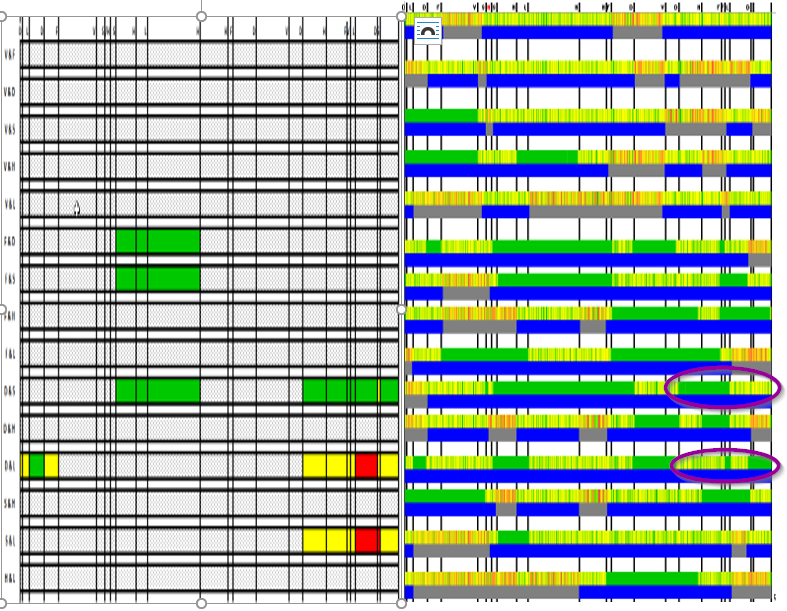
Here I have the images reversed. The left side represents the mapping I did. I want it to match the right side. The Gedmatch comparisons are on the right. The two sides look to match.

Chromosome 4 Right Side

I’ll continue on to the right, as I have no question mark on that side:

Jim, Heidi and Lori had no crossovers to the right, so I continued their segments to the right unchanged. Sharon and Heidi have a FIR. That means I can copy Heidi’s DNA to Sharon’s. That puts Sharon’s crossover on the paternal side. I have three crossovers.

I finished Sharon’s right hand side. She had another crossover before the end. After that she had an FIR with Lori which put Sharon’s last crossover on her maternal side.

I have FIRs with Heidi and Sharon in my first unmapped segment. That puts my first crossover on my maternal side:

I am opposite of Heidi on the right:

For the last segment, I match my brother Jim (V):

So close:

At this point, I would like to work the left side back to the question mark. I will also stay away from Lori and Jim as that is where the issue of the question mark was:

Progress Check

This tells me I am on the right track:

I’ll fill in from the left to right:

This is interesting as the top row shows that Jim needs another crossover. It also appears that there will be a Jim maternal crossover where the question mark is. Lori already has a crossover to get her from Lentz to Rathfelder.

Adding JIm’s First Crossover

Jim’s first crossover is at 6.4M which is right after Sharon’s at 6M:

This gets us to a small segment for Lori at the beginning. However, I note that Heidi and Lori don’t match in the Gedmatch comparison. That puts Lori’s first crossover on her paternal side. I’m hoping this fully filled out Chromosome 20 will be the right answer:

The Final Fact-Checker

It’s difficult to see every tiny comparison at once, but this looks overall OK.

Summary and Conclusions

  • The maternal part of this map would not have been possible without one match between Heidi and Joshua. He is my 2nd cousin twice removed. I would have had to have put in just maternal grandparents one and two.
  • So far every chromosome has had one sibling  who has inherited a a full the length of the chromosome from one grandparent. These are cases where recombination does not take place. On this Chromosome, Jon has all Frazer on his paternal side. He appears to have the record for non-recombined Frazer DNA.
  • I tried to work the areas that I was more sure of first and then the unsure areas solved themselves with the good areas that were confirmed by the Segment Map from the Fox Spreadsheet.
  • I used a spreadsheet of crossover positions for each sibling to keep these straight and in the correct order.


Visual Phasing Six Siblings with the Fox Spreadsheet: Part 5 – Taking Chromosome 20 Out of Order

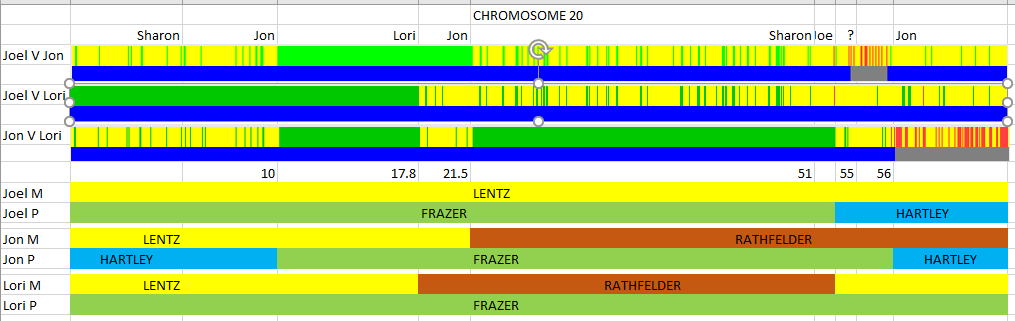
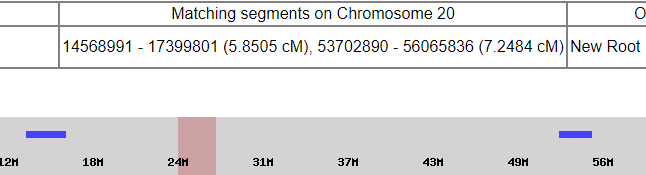
I’m taking Chromosome 20 out of order. This one has been a problem Chromosome in the past in that I have had so many matches. And they have all seemed to triangulate. Blaine Bettinger had a recent poll on Facebook on how many new matches people had at Gedmatch. I had 41, but my largest new match was on Chromosome 20. My previous free-hand mapping showed this:

However, my match spreadsheet seemed indicate I had Hartley DNA at the start of my Chromosome where the new match was:

Putting the Fox Spreadsheet to Work

I start with a blank slate on the Chromosome 20 tab and quickly go to the ‘all cousins’ option at the bottom left. I like this option as I can go from the known to the unknown. I’ll start with the first Hartley cousin on my list – Joyce. This view will immediately point out crossovers for five siblings:

From this, it already appears that I either have no Hartley DNA at the beginning of the Chromosome or very little. Certainly not between 2 and 10M where Jon has Hartley DNA. I have circled crossovers for all siblings except for Lori. Based on my old mapping, Lori had all Frazer DNA on her paternal side of Chromosome 20.

Setting the Crossover Lines

I forgot to do this first. I made some lines, though I may have missed a few and they didn’t all line up perfectly:

Above, I put in orange Hartley above for Joyce’s Hartley matches in blue on the lower half of the image. Then on the other side of the Hartley crossovers, I put in Frazer as that is the only choice on the paternal side. Above and below where there was no Hartley match, I also put in Frazer. I’ve mapped quite a bit of the paternal side already. However, some quality control will be needed.

Maternal Lentz Cousin Carolyn Mapped

Carolyn’s match ends at 56.2M. Jon’s crossover is at about the same place, so I shouldn’t go past that crossover. I’ll add in Rathfelder above and below where there are no Lentz matches:

Next, I’ll carry some of these matches to the left and right based on the crossovers that I have:

Here I have a problem already. Lori is on the bottom row above. She shows a crossover, but no changes in her maternal or paternal side DNA.

Quality Check with the Segment Map

This shows I am off:

I went back and erased the extra maternal DNA I mapped. Then I focused on the sections from V to F:

Obviously the comparisons with Lori (L) in them were wrong. Next, I compared Lori with Joyce and Carolyn at Gedmatch and got this match with Carolyn:

This second match is right at Lori’s crossover: 53.7M. I take that to be more than a coincidence:

This solves the problem at Lori’s crossover.

Next, I’ll extend all siblings over to the right except for Jim and Jon – as they have crossovers to the right:

A glance at the segment map compared to the Gedmatch comparisons seems to show I am on the right track. Then I filled in JIm and Jon based on the Gedmatch comparisons:

Here is the check. It shows that the right side of Chromosome 20 was mapped correctly.

Finishing the Left Hand Side of Chromosome 20

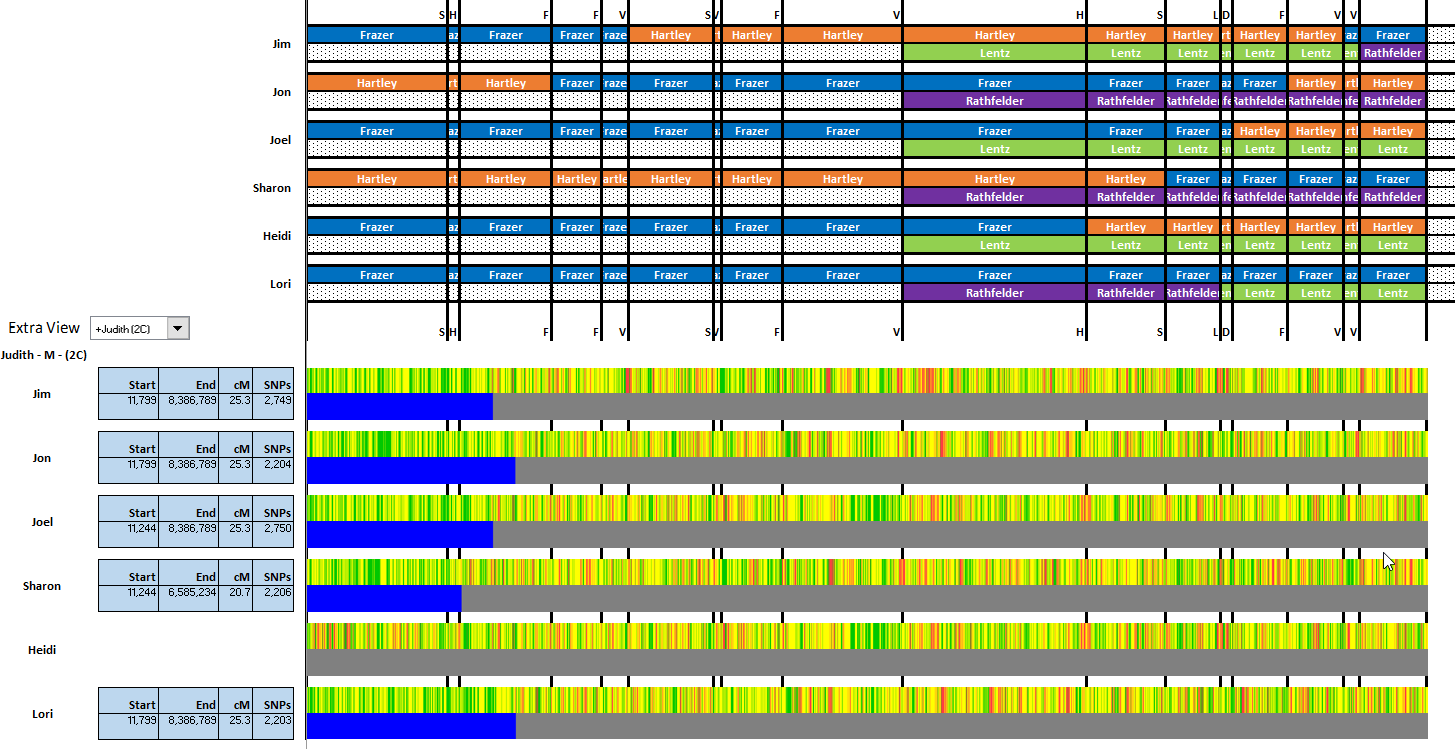
The above represents the right hand side of Chromsome 20 for the six siblings. Next, I can either go with the Gedmatch comparisons or look at more cousin matches. I’ll try cousin matches. Judith is another Lentz relative:

The blue lines don’t line up well, so it is best to look at the match numbers. Judith matches Sharon up to position 6.6M. She matches the others up to 8.4M. That means Sharon has a crossover from Lentz to Rathfelder at 6.6M.

That brings up a potential problem as I had it that Sharon had another crossover between purple and purple. However, as I look at the Gedmatch comparisons again, I see that the Sharon crossover should be a Lori (L) crossover. I’ll change this and try filling in the rest:

I got this far, but didn’t finish filling in Jim (V). He has three crossovers in the blank area and I only have need for two. If all the other segments are right, I can fill in Jim’s missing segments using the Gedmatch comparisons. Now I have it down to here:

[Note: In review, I see that here I should have just carried the Lentz through the first V crossover to the second V crossover. That would have saved time and made the corrections below unneccessary.]

That corresponds with these comparisons:

V&S is FIR, that would put Rathfelder in the narrow segment for Jim. That would mean that Jim (V) has no crossover after L. That gives me this:

Just looking at this, I see a mistake on Lori’s maternal bottom Chromosome 20. She goes from Lentz (green) to purple Rathfelder on Jim’s crossover, so I need to fix that. Next, I’ll do a final quality check:

This shows I still have Jim’s outlined segments wrong. That’s all right, because Jim is the last DNA tested sibling. I want to get his right. By Gedmatch, V-L should be all HIR. I have four no matches and one FIR. I see that there is a problem on the left side of the boxed area. I have green to red and red to green with no transition. There has to be a small HIR between a red no match and a green FIR. The other issue is here:

I show Jim having a double transition with only one transition or crossover line. I know from Jim’s match with Joyce that his crossover should be on the paternal top side. That means that there should not be a maternal change at V above. It also means that I should not have taken out the other Jim (V) crossover.

The Final Answer for Chromosome 20?

These two images below should now agree:

Summary and Conclusions

  • I was able to map Chromosome 20 using the Fox Spreadsheet after a few corrections.
  • It is easy to make mistakes with all the crossovers and segments.
  • Each of the four grandparents are fully covered between the six siblings.
  • I (Joel) have a full maternal Chromosome 20 of Lentz and no Rathfelder on Chromosome 20.
  • The comparisons don’t always line up visually. You have to look at the actual position numbers.
  • I was able to confirm earlier mapping I had done.
  • Using the Steven Fox Segment Map helps to correct any mistakes that I may have made.