A Second Look at Pauline’s Newfoundland DNA

In my last post on Newfoundland DNA, I looked at Pauline and how she matched others in the Dicks DNA Project I have been working on. I found that she was in 3 Triangulation Groups (TGs), but I wasn’t totally convinced which family those TGs represented as there was some ambiguity whether they were Dicks TGs or Joyce TGs for two of the TGs. The other TG she was in was with my wife’s Upshall family which has Dicks ancestry also. However, due to questions in the Upshall ancestry I wasn’t totally sure those were Dicks TGs either. Pauline expressed a desire to find out more also, so I though I’d take a second look at Pauline’s DNA

People Who Match One or Both or Two Kits

This is a utility at Gedmatch that is helpful in DNA analysis. I’ll use this to find out more about Pauline. From my previous Blog, here are Pauline’s top matches with the Dicks DNA Project:

paulines-closest-matches

Her top 2 matches are with Molly and Kenneth of the Joyce Line. Coming in at #3 is Esther who is my wife’s great Aunt.

Pauline’s matches with molly

First I’ll run the Gedmatch Utility for People who Match Both Kits. Those kits being Pauline and Molly. I understand this utility as similar to the Ancestry Circles. Another term I have for it is ‘Where there’s smoke there’s fire”. In other words, these people match both Pauline and Molly, so maybe they have common ancestry. The difference is that Gedmatch can find the fire, so to speak. The fire is the TGs that show that there are common ancestors.

After finding all the people that match both Pauline and Molly, I look at those matches at gedmatch’s chromosome browser. Here is Pauline’s Chromsome 5 which I looked at in the last Blog, but now the net is spread a little wider. The matches are to Pauline.

chr5-tg

Matches #1 and #2 were identified previously as being in a TG. They are Molly and Kenneth of the Joyce Line. #3 is also in the TG, or at least in one with Molly. This is someone called opcarrie at gedmatch who I don’t know. opcarrie is a lead which Pauline may contact to find common ancestry. Perhaps this person will be the tie breaker and indicate whether this DNA is from the Joyce Line or Dicks Line.

To the right of Chromosome 5 is another smaller likely TG. 3 of 4 of those matches have the name of Pike which may be recognizable. This TG is probably not a Dicks TG as it was not found in my previous look at Dicks descendants.

Common matches: Chromosome 15

Pauline has more interesting matches on Chromosome 15.

chr15-pauline

#1 is Molly again. #2 is Richard who I don’t know. I looked him up on Ancestry, so Pauline may find some common ancestry there. He also matches my wife’s Aunt Esther and they have a common ancestral surname of Kirby. This looks like a strong TG for Pauline also.

Pauline and Chromosome 21

I found this Chromosome interesting even though there was not an apparent TG.

pauline-chr21

Here Pauline has large matches with #1 Molly and #2 Kenneth. Both of these are on the Joyce Line. The reason I find this interesting is that it looks like there is a break right around the 23M mark. Assuming that these segments represent Rachel Dicks and her husband James Joyce, it could be that one segment is the James Joyce Segment and the other is the Rachel Dicks Segment.

People Who Match Both Pauline and Kenneth

Next I run the Gematch utility again for Pauline and Kenneth. This resulted in a smaller group of matches than Pauline had with Molly. I didn’t see anything much new here that was not already in the group of people that matched Pauline and Molly.

People Who Match Both Pauline and Esther

Here I would expect different results as Esther is not from the Joyce Line unlike Molly and Kenneth. Actually, when I look at the results, they look similar to the first 2 looks at results. There is one difference at Chromosome 15.

chr15-pauline-esther

Now look at the Chromosome 15 matches Pauline had when looking at her Molly in common matches.

chr15-pauline

#1 above is Molly, #2 is the Richard who was not in the Dicks DNA Project. #5 is Jennifer. I’m also unfamiliar with her. This Jennifer also did not come up when I looked at the people who matched both Pauline and Kenneth.

Summary and Discussion

After taking a second look at Pauline’s DNA there is a little clearer picture of what is going on. I set the net a little wider. But with a wider net comes some more questions.

  • The new TG at Chromosome 16 appears to be a non-Dicks TG. However, Pauline may want to follow-up with some of the names there to make sure. One of the people in that TG shares a Kirby surname with my wife’s great Aunt. However, that may not be the surname of the shared ancestor with Pauline and Molly.
  • There is a new person to follow up with on Pauline’s TG on Chromosome 5
  • Pauline matches Molly and Kenneth on Chromosome 21. Assuming that these 2 matches represent Rachel Dicks and James Joyce, it would appear that the dividing line between these 2 matches represents the dividing line between the DNA that Pauline received from her 3rd great grandparents Rachel Dicks and James Joyce.

Raw Data Phasing Via Access, Athey and MacNeill: Part 2

In my last Blog on raw data phasing, I went through 3 principals that Whit Athey laid out in a paper on phasing raw data when one parent’s DNA results were missing. Using those principals, and the MS Access program, I was able to sort many of my bases and 2 sisters’ bases into ones we received from our mom and ones that we received from our dad. I checked a few of my results with a chromosome map made for me by M Macneill.

Paternal Patterns

I had gotten to the part of the Athey paper where he talks about paternal patterns of bases that the sibling combinations received. I noted a space between the first two paternal patterns that I looked at. Below the pattern goes from an ABA pattern to an ABB pattern.

change-in-dad-pattern-hilite

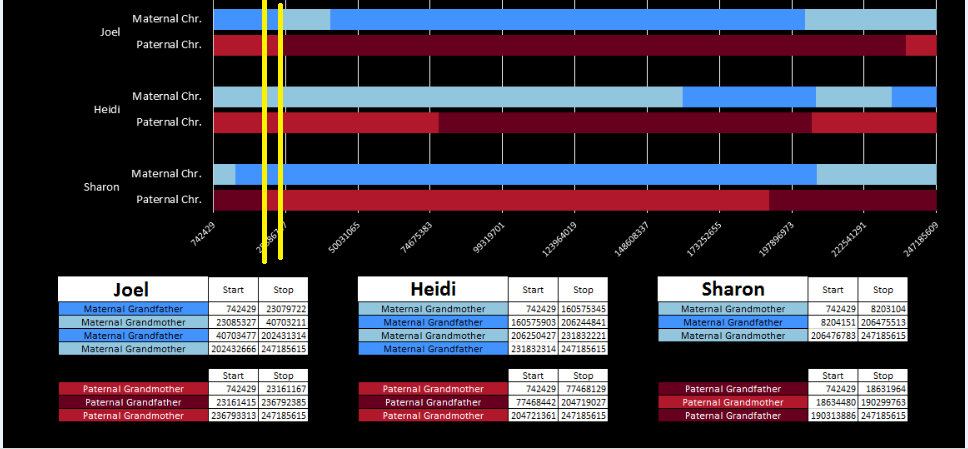
There was a gap between the ABA and ABB pattern where there was no ‘pattern’ as my 2 sisters and I shared the same base there. When my sisters and I all share the same base, that is an AAA “pattern”. That AAA area corresponded exactly to the area between the 2 yellow lines below in the chromosome map made for me by M MacNeill – prairielad_genealogy@hotmail.com .
macneill-chr1-hilite

In the map above, MacNeill was able to determine that my 2 sisters and I got our DNA from our paternal grandmother in the area between the 2 yellow lines. Further, the first yellow line described Sharon’s first paternal crossover point and the second yellow line described my (Joel’s) first paternal crossover point.

Finding All the Paternal Crossover Points

At this point in the Athey Paper, he recommended looking at the paternal pattern and filling in the missing bases based on the known pattern. I was looking for an easier way to do this, so decided to take a different approach. I decided that I would find all the paternal crossover points first. Then, armed with that information, I would create a formula that would fill in most or all of the missing bases for each pattern.

However, this required a modification of my database to make the work easier. I wanted a number to define the range of patterns, so that I could apply an easy query to add missing bases. I already had this but I hadn’t used it. Back when I imported the 4 sets of raw data into Access, Access assigned an ID to every row of data. That meant that I needed to add that ID into all the queries that I had done previously to make tables and further queries. This took a while, but I believe that it was worth it.

table-with-id

The ID is the first column.

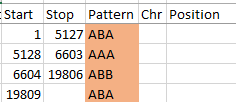
I started going down all my data and noting the change of each pattern. I put the results into an Excel table. Here the Start and Stop numbers are the Access assigned ID numbers. The ID’s corrrespond with the number of DNA locations looked at. In this case there were a bit over a total of 700,000 of these locations for my mom, my 2 sisters, and me.
excel-pattern

Then I noted the patterns are repeating as would be expected. For example, my first pattern was ABA, but 3 patterns later, that same ABA repeated. My thought was to create a query just for ABA patterns. Then when scrolling down looking for changes, the separation between rows should be greater and it would be easier to see where those changes were.

Here is what my Access query looks like. I changed the query name to DadSpecificPattern.

dad-specific-pattern-queryquery

This particular query gives me the ABB pattern. I have the HeidifromDad base equal to the SharonFromDad base. That makes me the A and Sharon and Heidi the BB of the ABB Pattern. If you think about it, that also means in these areas that Heidi and Sharon will have their base from the same paternal grandparent and mine will be from the other paternal grandparent. I’m learning as I go. I’m sure that information will come in handy later.

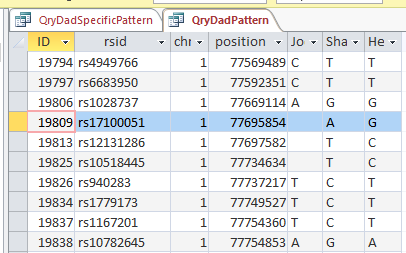
My plan seemed to be good, but there was one catch. Once I refined my query, most or all of the blanks disappeared. That meant that the start and end points might not be exact. Here is an example of what I mean.
change-in-pattern-rouch

This is from my old Dad Pattern query with the blanks still there. The change from ABB to ABA happens at ID or line 19809. However, the new query takes out the blanks to make it look like the change is at ID Line 19826.

Here is what my DNA results look like so far without a filter (or query). The last 3 columns are the bases from Dad columns. There is a lot going on between lines 19809 and 19826.
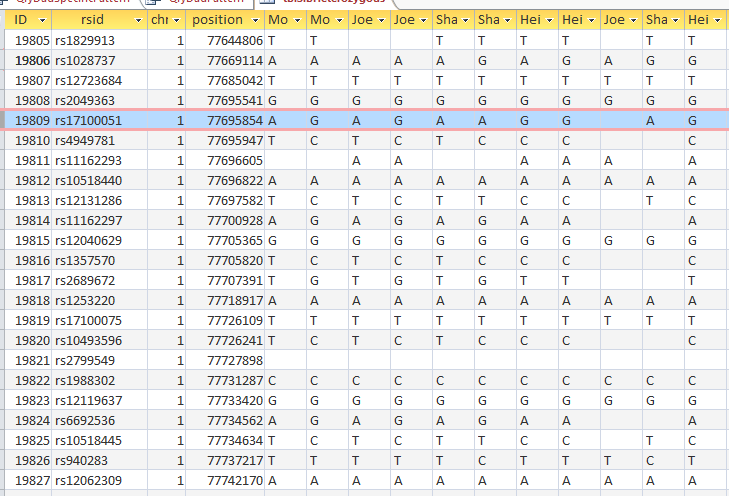
pattern-unfiltered

Once I apply a formula to add bases, it will say something like: In the lines that have the ABA pattern where there is a blank at either A spot, replace the blank with the A that is there. If I apply the rule too late, I will be missing an area. Worse, If I were to use the 19826 cutoff, I may be still using the previous rule. That rule would say basically the same thing except, “Where the row is ABB and one of the B’s is missing replace the missing B with the one that is there.” If I apply an ABB rule to an ABA area, I’ll get bad results.

Long story short, I ended up recording a rough start and stop in my Excel Spreadsheet.

revised-spreadsheet-for-pattern

I started naming the segments, but realized that was not necessary. Some of the patterns were only at one point rather than in a long segment. I believe that is an anomaly due to a bad read, mutation or some other problem. Those are the ones in the spreadsheet that had no end point. It took me part of a morning to get all the paternal crossover pattern points for all 23 chromosomes. Fortunately for 3 siblings, the patterns are only ABA, AAB and ABB.

I just went back and checked the error points/aonomalies. I reran the Heterozygous Sibling Query and it fixed at least the first problem and hopefully the others. When I added the ID’s in, I had to redo all the queries quickly, so I suppose that is where the errors came in. That is not a problem as long as the problem can be found a fix can usually also be found. There actually weren’t that many errors. There are still some anomalies that are just anomalies. I have left those in yellow in the spreadsheet image below.

So in my spreadsheet, I have all the rough starts and ends for all the crossovers for my 2 sisters and myself. Here is the top part of the spreadsheet sorted by rough start:

rough-start-sort

Next, all I need are more exact start and end points. Here is the start of what I have:
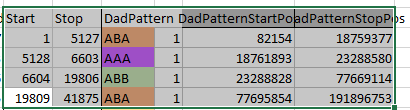
pos-and-id-and-pattern

I picked this section because it looks pretty complete already. Note that my Start and Stop numbers are pretty close to each other. That means that there are no other AAA segments in-between. I had to do an additional Access query to add in the position numbers for the Start and Stop of each chromosome’s pattern change. This was important if I want to convert the results from Build 37 to Build 36 to compare to MacNeill’s work or to gedmatch.com.

Starting to Find Paternal Crossovers and Assigning to Siblings

Previously I had been calling the start and end of my patterns crossovers. These two terms aren’t totally interchangeable as the start or stop of a pattern may happen at the beginning or end of a Chromosome and therefor not be a crossover at that point. It seems like it should be pretty easy to find the crossovers. Look at the image above. The first and second rows show ABA going to AAA. The order in me and my siblings are JSH or Joel, Sharon and Heidi. The only letter that changes is the B to A. That is the position that Sharon is in, so the paternal crossover has to go to her. From row 2 to row 3 the pattern changes from AAA to ABB at Chromosome 1, position 23,288,828, Build 37. That doesn’t mean that 2 siblings have a crossover there as we are looking at the patterns, not the letters. It is actually the letter that stayed the same that represents the crossover here. AAA to ABB means: all the same (AAA) goes to one different and 2 the same (ABB) – in this case Sharon and Heidi). The one that is different is me and I get the crossover at this location. The next change is from ABB to ABA. This is a little harder to see. I would say that that this crossover goes to Heidi if my reasoning is right. BB was the same before and goes to BA. It must be Heidi that changed because now she matches Joel who didn’t change. I’ll need to figure out how to make better bar graphs in Excel, but here is how the beginning part my father’s Chromosome 1 broke up for 3 of his children. Or another way to look at it the vertical lines are where my father’s maternal and paternal chromosomes combined in each of his 3 children that we are now looking at.
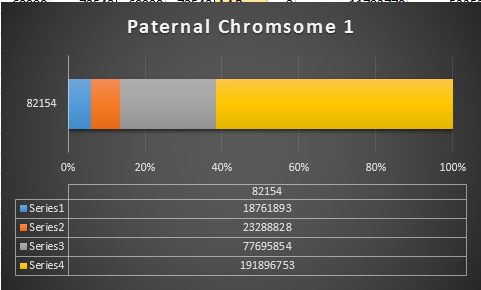
excel-bar-chart-chr1

Where:

  • Series 1 is Sharon. Where the color goes from blue to orange is where Sharon has a change from one paternal grandparent’s DNA to another paternal grandparent’s DNA. The number to the right of Series 1 is the Build 37 Chromosome position number for Sharon’s crossover.
  • Series 2 is Joel’s first crossover (between orange and gray) and
  • Series 3 is Heidi’s first crossover position between gray and yellow [The same explanation under Sharon above applies to Joel and Heidi]

I’ll go back to the M MacNeill Standard. It’s like having an answer sheet to my questions.

macneill-chr1-hilite

According to MacNeill, I have assigned the crossovers to the correct siblings. In the above chart, just look at the red. I haven’t gotten to the maternal part yet, which MacNeill has in blue. The first 3 crossovers are where the red changes from light to dark or dark to light red. The difference in the MacNeill Chart is that his chart is split out one bar for each sibling. The other difference is that MacNeill has build 36 Chromosome position numbers and the numbers I have are from Build 37.

The Process

  1. Phase the siblings into maternal and paternal DNA using the principles that Athey outlines
  2. Find the paternal and maternal crossovers by pattern changes
  3. Assign the crossovers to the correct sibling using the pattern changes
  4. Assign the segments to the correct grandparent. This requires knowledge of cousin matches on the appropriate grandparent side.

That is the big picture which I am understanding as long as I don’t get too lost in the details.

Back to the Details: Fill in More A’s, G’s, C’s and T’s

I have been setting up my data for this, so hopefully, this will be easy. I now have 3 areas to look at:

  • AAB
  • ABA
  • ABB
AAB paternal update

Now I go back to my spreadsheet and sort it by Dad Pattern:

sort-by-pattern

The Start and Stop areas are the ones I want to update. First, I’ll copy my most up to date Table in Access which is tblSibHetorzygous. I’ll rename that tblDadPatternUpdate. Then I want to look for missing data and update the blanks using the AAB pattern.

In Access, I create a query with the new table.

dad-pattern-update-1

I chose the position fields and Paternal Pattern fields. I will change this to an update query which adds an Update To row. The criteria I want is when JoelFromDad = Sharon from Dad (AAB). Actually, I forgot, I was going to use ID criteria. So in the ID field, I need a lot of information. For the first AAB segment, I need everything between ID 45393 and 54155. This is what the criteria looks like:

aab-first-area

When I choose that area, I get over 8,000 lines. However, I only want to update when there is one missing value in the first 2 and the one that isn’t missing is not equal to the third. Here is the result of the above query in my first AAB area:

aab-patterns

I assume that the first blank should be a T. This would be one of the AAA results by chance in an AAB area. I don’t want to fill in the second line as I don’t know if it will be GGG or something else. That is what I meant by saying I don’t want to fill anything in unless there is only one missing value. In the 5th line there is A?G. That would have to be AAG (in an AAB Pattern area). There are some lines that have everything missing that I don’t want to touch.

How to create a query?

First, I want the situation where Joel doesn’t equal Sharon or Joel Doesn’t equal Sharon. That would create an AAB situation:

heid-not-joel-or-sharon

This query results in 1,666 rows of data including rows that are already filled in. Note that I had to write the range of ID’s twice because in order to get an OR situation I needed to put Joel not equat to Heidi and Sharon not equal to Heidi on separate lines. A simpler query is this one:

heidi-not-joel-or-sharon-one-line

The above achieves the same results in one line. Now, for this query, if Joel is blank, replace it with Sharon’s results. If Sharon is blank, replace it with Joel’s results. Here is the query prior to the updating part:

joel-sharon-blanks

This shows that there are 29 blanks for Joel and Sharon meeting this AAB criteria in the first range of AAB’s:
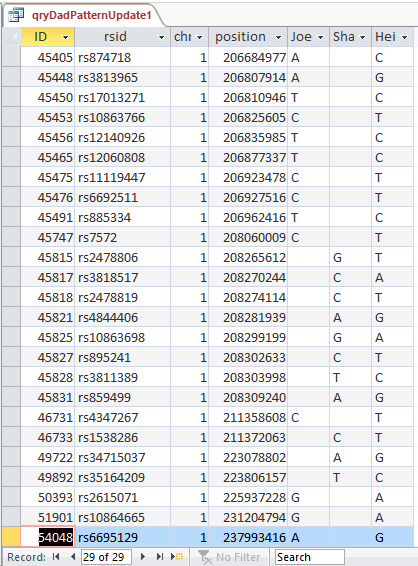
29-records-aab

Next, I apply the same logic to all the AAB segments. In the Expression Builder of Access, I type in this simple formula:

Between 45393 And 54155 Or Between 60990 And 72548 Or Between 207109 And 220679 Or Between 313271 And 317516 OR Between 326845 And 326912 OR Between 389395 And 390311 OR Between 400045 And 405578 OR Between 419982 and 427158 OR Between 433191 And 446672
OR Between 482297 And 492542 OR Between 532520 And 539292 OR Between 571557 And 579594 OR Between 589614 And 589666 OR Between 630037 And 630314 OR Between 630319 And 630378 OR Between 658744 And 659375 OR Between 670533 And 672360 OR Between 673325 And 682544

Simple but long. This has the AAB Starts and Stops for 23 chromosomes. Then I copy it into the next ID criteria line and get this result:

all-missing-aabs

It took a few minutes to type the criteria, but the goal is to update 1,514 lines of missing Paterrnal Pattern data with the push of one button. I still think it is quicker than going line by line and will be more accurate if I got the criteria right.

Next, I change the above Select Query to an Update Query.

paternal-aab-update-query

When my (Joel’s) base from Dad is missing, I update to Sharon’s base. When Sharon’s base from Dad is missing her base is updated with mine. Isn’t sharing great? I didn’t look at the case where Heidi’s base from dad was missing, because if that was missing we wouldn’t be able to see any AAB Pattern.

Let’s UPdate

I push the run button and check the results. Here is my standard dire warning:

standard-dire-warning

Now I will check if it worked. I’ll try ID or Line # 682124:

bad-aab-results

Unfortunately, that was an undesirable result. Before I had A?G. I changed this to ?AG. It appears that my query both replaced my value with Sharon’s, but replaced Sharon’s with my blank. I hadn’t expected that. Next, I’ll check ID# 682182. I had ?AG and replaced it with A?G. So until, I can think of a solution, I’ll need to split the 2 queries.

Fix it! Quick!

First I recopied by Heterozygous Sibling Table back to the Dad Pattern Update 1 Table. This got the table back to the way it was. Here is my simpler query.

dad-aab-simpler-query

Here if my base from Dad is null, replace it with Sharon’s base from Dad. I’ll check ID# 682182 again:

second-mistake

This gets into the category of trial and error. Sharon’s result still got replaced with nothing. See in the previous query I still was telling Access to put update Sharon’s results with mine. I needed to take that out:

fix

There. Now the SharonFromDad Update To is blank. I go through the same procedures and now it looks right.

right-results

We now went from ?AG to AAG in the last 3 columns. These are the bases from Dad columns.

The next step is pretty easy:

sharon-missing-aab

I took out my criteria and put criteria in the SharonFromDad field. When she has a blank, replace it with Joel’s base from Dad. I hit run and it updated over 600 rows. Here is my original check spot at ID# 682124 with better results in the last 3 columns:
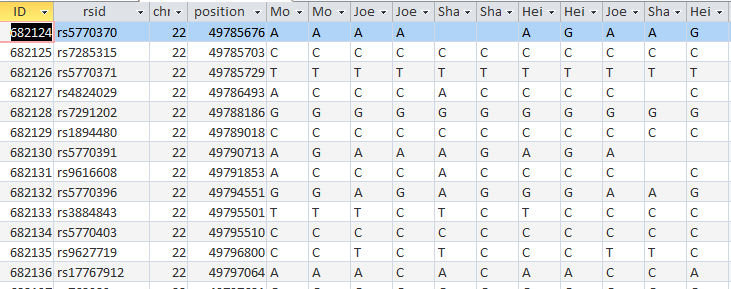
better-results

It took a while, but at least I got it right. The moral of the story is to not ask Access to do 2 things at once when those 2 things involve the same 2 people.

The Next Step: ABA

This time I’ll try a different query. I want there to be a B from the ABA in each case, so I’ll make sure that Sharon’s base from Dad is there:

aba-query

Maybe I’ll figure what went wrong last time or come up with a new error. Above, I want the criteria on the first line to be for my blank base: If Sharon’s base from Dad is not equal to Heidi’s Base from Dad Put Heidi’s base from Dad in my blank spot. For Heidi, When Joel’s base from Dad doesn’t equal Sharon’s base from Dad, put Joel’s Base in Heidi’s spot.

I’m so tempted to try this query, but before I do, I’ll copy the previous table of the DadPatternUpdate to a new Dad Pattern Update ABA Table.  This will preserve what I have in the now older DadPatternUpdate Table in case anything goes wrong. Hey, what could go wrong?

query-aba-dad

I pushed the Update Button and updated over 30,000 rows. The results don’t appear to be any better, so I’m back to my 2 step process.

Here is my new slimmed down query:

slimmed-down-query

This new Update Query should update my Line 18 in the new UpdateABA Dad Pattern Table and it does:

lne-18

I now have a full ABA pattern on that line. According to Access over 30,000 Lines were updated, so it wasn’t a total waste of time.

heidi-aba

Run and check Line 149:

check-149

We have ABA in the last 3 columns, so that is good. Line 18 is still OK. I checked it just to make sure.

Query AAB Revised

After seeing how well the ABA Query went, I decided to revise the old AAB Query:

aab-query-rev

This is now looking at over 37,000 rows. This updates my AAB Blanks to tblDadPatternAAB. I don’t know if it is a better query, but at least I’m being consistent.

sharon-missing-aab-rev

This was over 80,000 rows, so I’ll assume that bigger is better.

I copied that resulting Table to tblDadPatternUpdateABA and reran the 2 ABA Update Queries. Here is one of the rerun queries updating the ABA Paternal Table:
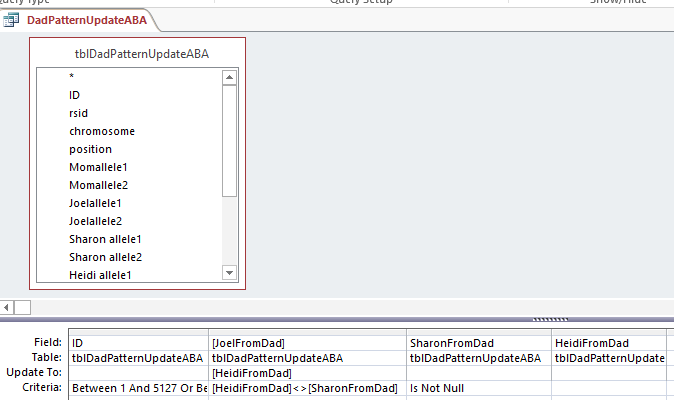
rerun-aba

Down to ABB

My Last updated Paternal Table was updating ABA, so I’ll copy that to a new Table called tblDadPatternUpdateABB. I’ll also copy my last query and put in the appropriate Starts and Stops for the paternal ABB patterns. Again,
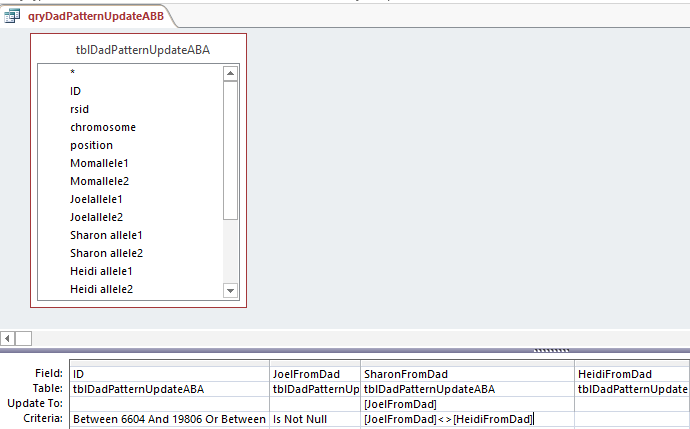
abb1

This says when Joel’s base from dad is not the same as Heidi, put that Joel from Dad into the space. Probably a more precise query would have said when Sharon from Dad is null and Joel from Dad is not equal to Heidi from Dad. I suppose technically the above query could be writing over a base with the same base in most cases.

I’ll fix that and notice that I had the wrong table in the top, so I’ll change that also.

abb-rev

This only updated 944 rows, so maybe bigger is not better. Here is Part 2:

abb2

This was almost 3,000 rows updated. Now I should check if it worked. I scrolled for an ABB Pattern in an old query and found this:

dad-pattern-abb

Here is my check:

abb-check

I guess I’ve been working too long. Here I have an AAB instead of the ABB I wanted. That is because I had Heidi updated to me (the A) instead of Sharon (the B). Here is the correction:

abb-corrections

I made a fresh Table of ABB. When I opened up the Query, it was saved this way:
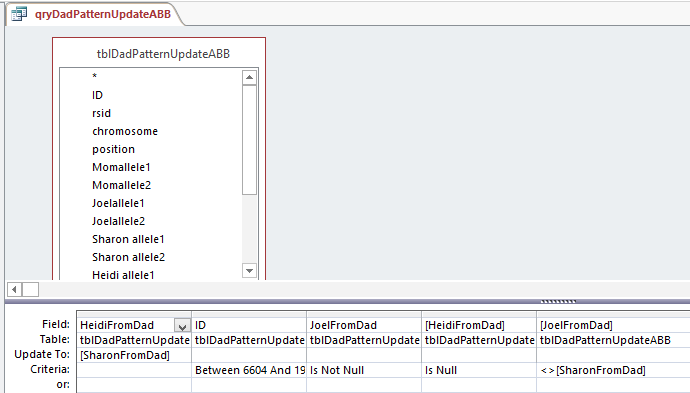
corrected-abb

So Access changed my query. Note that there are 2 fields with HeidiFromDad in them. One is for the Update To and the other has Criteria. That is probably a clearer way to do it. Who should argue with Access?

I updated that and I take a cue from Access for Part 2:

access-abb-part-2

In English, the above says, “For this range when JoelFromDad is not blank but Sharon from Dad is, and Joel from Dad has a different value that Heidi from Dad, put that Heidi from Dad value where Sharon had the blank. It sounds a little complicated.

Back to Row 197704 and I’ll look at 197709 while I’m at it:

corrected-abb-pattern

Oh no, it is still wrong! I checked the previous ABA Table and that was the reason for the error. The error is also in the old AAB Table. However, the error was not in the file before that. My guess is that the AAB rule got applied to the wrong range of rows. I don’t see an error there, so I’ll have to rerun all the queries.

That’s OK, because I’m brushing up on the queries and will use the Is Null value so we will only be filling in the missing bases.

rev-aab-query

I had more problems, so I deleted the AAB Table and recopied the previous Table into it. I reran the Revised AAB Query halfway and it looked OK. However, when I ran the second half of the AAB query – filling Sharon’s results, the problem came back at ID# 197704. Very mysterious. The problem was where I thought it was originally. Look at the ID Criteria for the AAB Pattern Query:
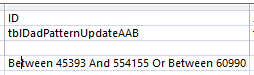
the-problem

There is an extra digit in the first between. The range goes from 45393 to 544155. The second number should be 54155. So this query was performed on 450,000 more rows than intended. I updated the AAB query with fewer rows. Again fewer is better. After many requeryings, I got the desired result for ID# 197704:

197704

That should be the end of the first phase of nit picky work on the Paternal Side.

Summary, Conclusion and What’s Next

  • This was a lot of work, but the good news is that this update is for all the Chromosomes at once.
  • The bad news is that I have to do this again for the Maternal Side
  • Next up should be easy. That is just re-applying the Principles that Whit Athey Outlined on the new bases that I added from knowing the patterns. This should update missing maternally received bases from the updated paternally received bases.
  • I haven’t filled in blanks for the AAA patterns yet.
  • I am a little ahead of the game as I looked at how some of the first paternal crossovers will look.
  • Also with some basic phasing, I was able to deduce who those first paternal crossovers belonged to – one each to my two sisters and one for me.
  • If anything can go wrong it will

Back to Newfoundland DNA: Dicks Family Joyce Line Update

It’s been since last Spring that I have written about Newfoundland DNA – specifically the Dicks Family of Newfoundland. Since that time two things have happened:

  1. There is now a new Facebook Group called Newfoundland Gedmatch. The purpose is to find those with Newfoundland heritage who have tested their autosomal DNA and uploaded those results to Gedmatch. At that point people compare their DNA results and their genealogy.
  2. I believe that as a result of 1 above, Pauline has joined Newfoundland Gedmatch and also this Dicks DNA Study Group.

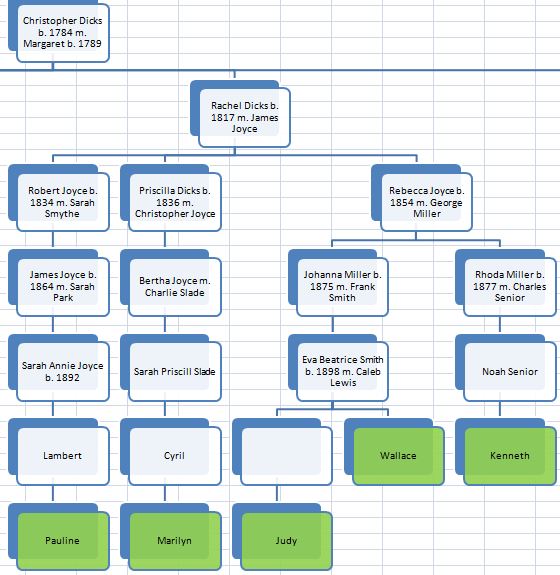
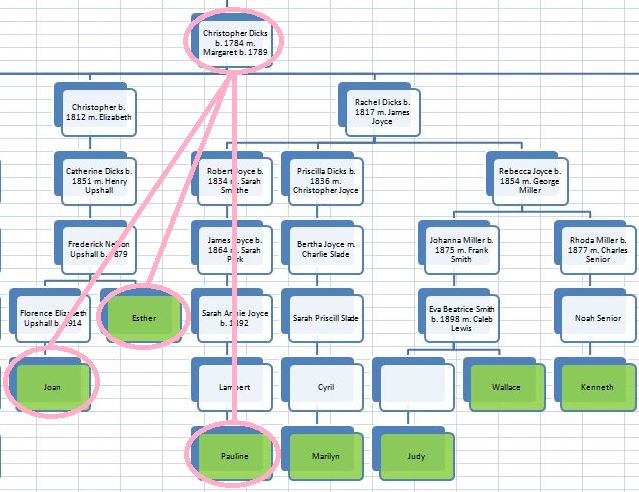
Both of the above are great news. We now have 12 in the Dicks Study group that have tested their DNA. That is plenty of DNA for comparing results. The chart below makes it look like 13 people but Marilyn is in 2 lines. There are two other people that have tested from another Dicks Line. They probably descend from a brother of the Christopher Dicks in the second box from the top below. Due to the large size of the Dicks family, they provide a good study group.

Here is an overall view of Dicks descendants that have tested.

dicks-testers

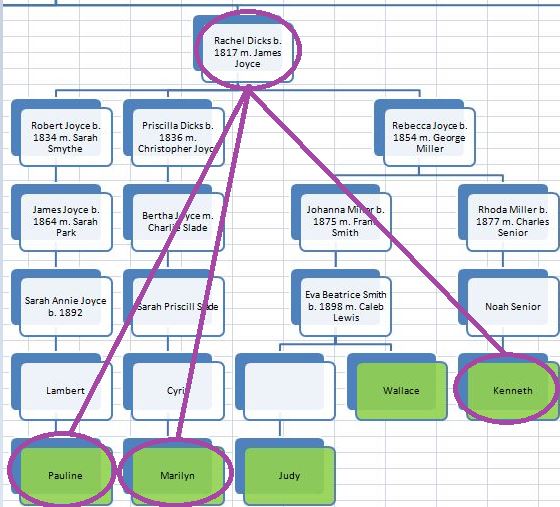
Those in green have tested their DNA. Pauline is descended from Rachel Dicks. I call her Line the Joyce Line because Rachel married James Joyce. The Joyce Line was already the largest Dicks Line – now it is bigger with 5 DNA tested members.

Here is a closer view of the Joyce Line:

joyce-line

Our new member, Pauline, is in the lower left.

Let’s Get Into the DNA

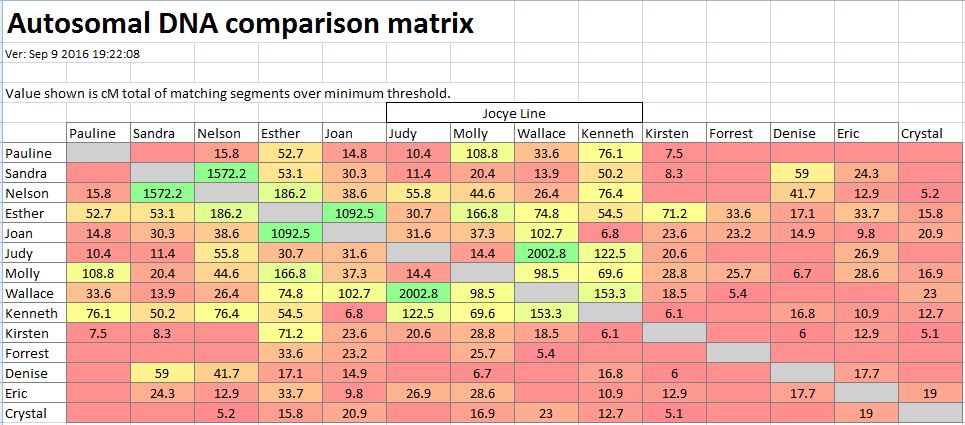
First I’ll do a comparison of everyone to everyone.

autosomal-comparison-pauline

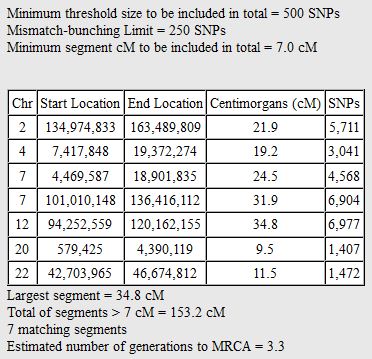
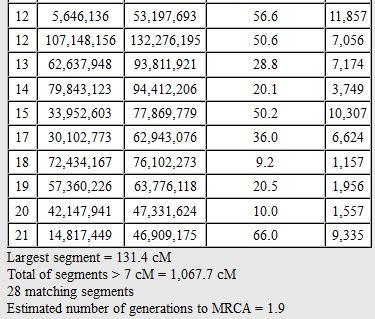
It looks like Pauline hit the jackpot with Molly at almost 109 cM shared. Eric and Crystal were from the more remote Dicks Line and don’t show any shared DNA with Pauline. Esther is my wife’s great Aunt. Wallace and Kenneth are a generation closer to a common ancestor than Judy, so they have higher DNA shared amounts. This doesn’t mean that all the DNA shared above is Dicks DNA. However, as the Dicks are the common ancestors, it would explain a lot of the matches.

Triangulating with Pauline

I like to look for triangulation groups (TGs). That is when Person A has a match with B and C. Then Person B also has a match with C. Hopefully it will become clear. When this happens, it pretty much locks in the common ancestor. It’s not needed if we are sure about our genealogy, but if there is any doubt these TGs help clear up the doubt.

There are a couple of ways to look for TGs. One is by spreadsheet and the other is by chromosome browser. I’ll try the chromosome browser method. For example, here is Chromosome 5:

chr5-pauline

The bars represent DNA matches with Pauline. Molly is in yellow, Kenneth in green, Nelson is in blue and Eric from the faraway Dicks branch has a tiny pink match. I won’t bother looking at the small pink match. So it looks like Pauline, Molly and Kenneth are in a TG. All we need to know is if Molly and Kenneth match each other.

molly-and-ken

Yes, they do, from about position 76M to 122M. Here is what our first TG looks like:

joyce-tg

However, there is only one problem with this TG. Well not a problem, but is it a Joyce TG or a Dicks TG? All these people descend from James Joyce as well as Rachel Dicks. I tend to lean toward the Joyce TG as there are other Dicks descendants that could have matched here but didn’t. Either those Dicks descendants didn’t match by chance or this is a Joyce TG. I suppose if Pauline, Marilyn or Kenneth match any of their Joyce relatives that aren’t related to the Dicks that would prove that this is a Joyce TG.

Another Joyce tg at Chromosome 7?

Here is the next potential TG at Chromosome 7

tg7-pauline

#1 is Kenneth, #2 is Wallace. #3 is a tiny match with Crystal on the faraway Dicks Line. Kenneth and Wallace are both Joyce descendants. But do they match each other’s DNA?
ken-and-wallace

They need to match near the beginning of Chromosome 7 and they do from position 4M to 19M. I won’t do the circle and line thing as it is similar to the previous image. Kenneth and Wallace are 2nd cousins.

Chromosome 12 TG on the Upshall Line

On Chromosome 12 Pauline matches my wife’s family: her mom Joan and her great Aunt Esther.

esther-joan

#3 is a small match with Sandra. I would think that even though Esther is Joan’s 1/2 Aunt that they still should match here at the end of Chromosome 12:

esther-and-joan

They have too many matches to show them all, but Joan and Esther do match Pauline from 107M to 132M which matches with the Chromosome Browser. Here comes another triangulation image:

tg12-pauline

Except I have another potential problem. Pauline tells me that some of her ancestors were from Harbor Buffet. This could be a Dicks TG or some other TG. Perhaps there is a clue here to bolster some of the missing ancestors in my wife’s Newfoundland genealogy. In cases like this, I tend to assume the match is with the known ancestor rather than the unknown. However, it is good to keep an open mind.

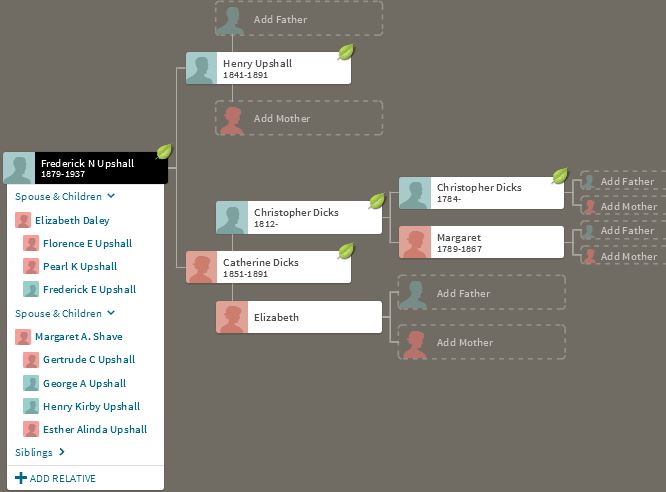
Here are some of the missing ancestors on my wife’s Upshall Line:

missing-upshall-ancestors

Summary

  • Pauline has shown good matches to others in the Dicks DNA Project – especially to those in the Joyce Line which she is a part of.
  • Pauline is in 2 Triangulation Groups (TGs) with the Joyce Line. These TGs point to the James Joyce/Rachel Dicks couple. Further testing may show which specific person of the couple that the DNA comes from.
  • Pauline is in 1 TG with my wife’s mother and great Aunt. This TG likely represents DNA from Christopher Dicks b. 1784. As some of my wife’s Harbour Buffet ancestors are unknown, there is also a chance that this TG represents some of those unknown ancestors.


Phasing Raw DNA with MS Access a la Whit Athey: Part 1

In this Blog, I would like to look at my raw DNA data. Those are the A’s, T’s, G’s and C’s. I have tested at AncestryDNA as has my mom and 2 sisters, so I will use those results. Whit Athey has a paper that describes how to phase your DNA when the DNA from one parent is missing:

Journal of Genetic Genealogy, 6(1), 2010
Journal of Genetic Genealogy
Fall 2010, Vol. 6, Number 1
T. Whit Athey
Many have used MS Excel to phase their raw DNA results. However, it occurred to me that perhaps MS Access would be a better tool for phasing than Excel. When I download my AncestryDNA data, I get about 700,000 lines of data. That is a lot more data than Excel can handle easily. I will go through the Athey Paper and use Access to get results. However, I will not be giving a tutorial on Access as that would take too long.

Downloading AncestryDNA: Getting Rid of Zeros

Many people have downloaded raw data to upload to gedmatch.com. Ancestry raw data is in text form. Access gets along with Excel well, so first I import the AncestryDNA text data into Excel. Perhaps if you are curious, you have taken a look at your raw data to see what it looks like. Unfortunately, it takes a while to open up such a large file. Here is what a few lines of my AncestryDNA text file look like:

ancestry-text-file

It is important to note in the information above that Ancestry uses Build 37. That means that these results need to be converted to compare to Build 36. For example, Gedmatch uses Build 36. I remove the information above the column titles and bring it into Excel. However, I put my name on the top of the last 2 columns because eventually there will be columns for 4 people’s results (mine, my mom’s and my 2 sisters’). I will need to distinguish between each person’s alleles. It is important to note that when importing this text file to Excel, Excel retains the file as text. This is probably such a file as note that the no-calls have been changed to zeros. To save the file as an Excel file, you must specifically do that step.

Here is a file with the no-calls as blanks, like I want them, and with my name at the top and the verbiage removed:

joelallele12-text

Here is the file in Excel. I have used the search and replace in the last 2 columns. I want blanks for no-calls and not zeros which Excel likes to add.

ancestry-raw-excel

Using Access

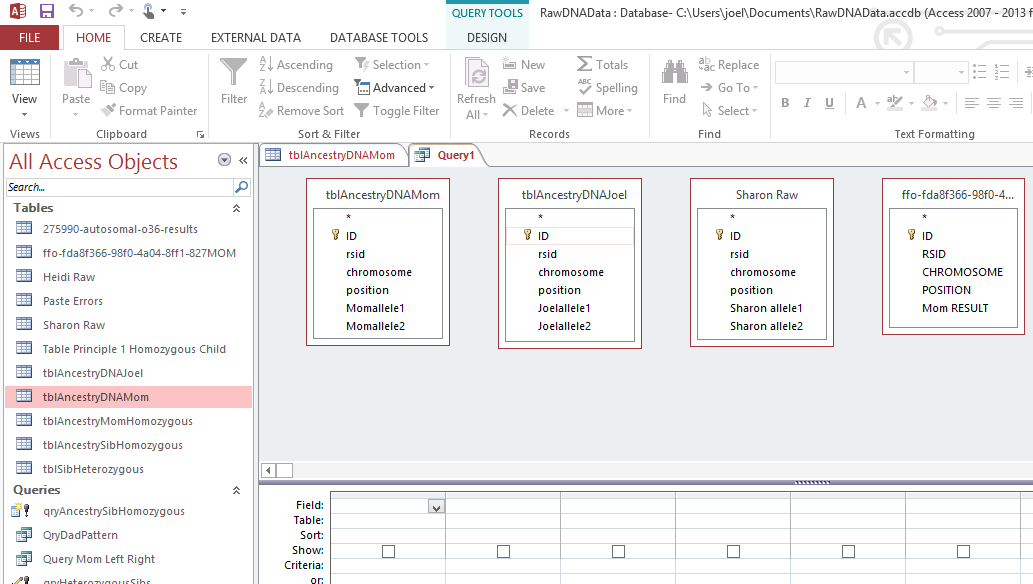
At this point, I had to switch to my laptop as I don’t have Access on my desk top. I open up Access and name a new database. I go to External Data and choose the Excel icon with the arrow pointing up to import my 4 Excel Files of Raw DNA for Mom, my 2 sisters and me.

access-import

Next under Create, I choose Query Design. I choose the 4 Excel files that I have imported to Excel.

4-tables-in-query

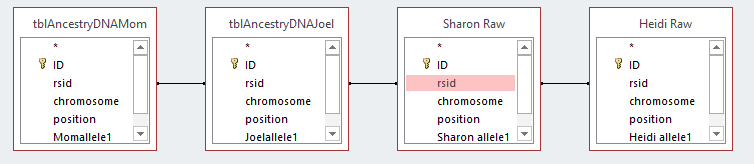
I should note that when I imported the Excel files, that Access creates a unique ID for each row. I let Access do that. It has set that ID as a key identifier. I could have used the rsid as a key that is somewhat as a unique constant. Next I will connect each table by the rsid’s with something called an equal join. That is the dark line I added between the rsid Field for each persons DNA data.

equal-join

This means return the results when the rsid is the same for each file. Note the last table ( 2 images above) was wrong, so I took that out and added my sister Heidi’s Raw data table on the right. It is important to get the initial importing right and in the right format as this will save a lot of time later. Here is the form that I want the data in:

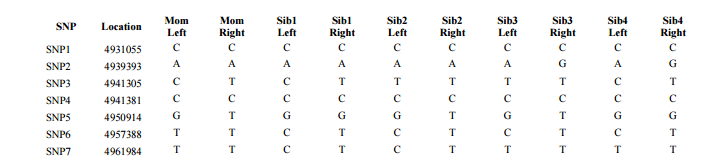
whit-table-1

This is a portion of Table 1 from the Whit Athey Paper. The difference is that Whit only had part of Chromosome 16. I will have all Chromosomes at once. In my Access query I choose the Excel Titles as Fields. I need the rsid, chromosome and chromosome position only once. Then I add the 2 alleles for each person. FTDNA uses right and left alleles. AncestryDNA uses allele 1 and 2. They are the same undifferentiated alleles.

fields-for-query

When I run the view the query results, I get this:

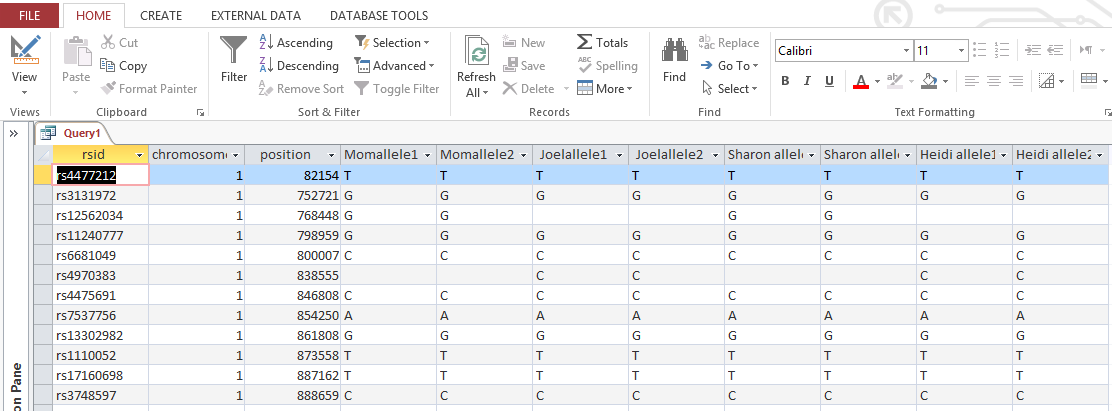
view-first-query-results

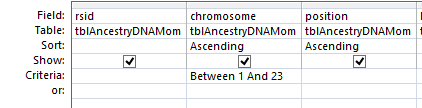
So with one push of the button, I have all the raw results of 4 people in my family in one area. I actually have more information than I need. AncestryDNA includes chromosome 24 and 25 which is YDNA and mitochondrial information that I don’t care about here. This is easily filtered out in the criteria section of the design view. I choose ‘Between 1 and 23’ there. That gives me each chromosome between and including 1 and 23.

chromosome-criteria

Now I am down from roughly 701,000 lines of data to the 700,000 lines that I want. It is important to save these results as a Table in Access as we will be using that Table to make more tables. Also save the query. Even though I say to do this, I didn’t. but just saved the results under the next step.

Whit Athey’s Principle 1

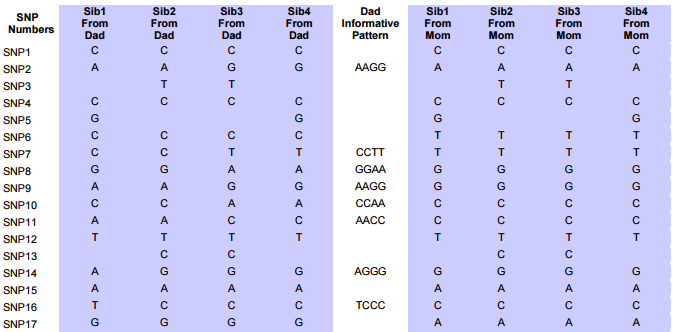
This Principle is simple and straightforward. It says that if you have two letters the same in your results, one of those came from one parent and one came from the other. In line 1 of my results above I have TT. All my siblings have this result also. My mother is already shown as TT as she was tested. My father who was not tested must have had a T which he gave to me and my 2 sisters. Here is Table 2 from Athey showing the next set of data that we need to produce the AncestryDNA raw data. Ancestry didn’t tell us which side each of our bases came from, so we will figure that out.

athey-table-2

I have only 3 siblings that I’m looking at right now, so I need 6 more ‘Fields’ in my database. There are a few ways to do this in Access. Here is one way that I did it.

Athey Principal 1 in Access: Homozygous Siblings

Homozygous is just a fancy term for my TT result found in the 1st position tested of my 1st Chrmosome. I created 6 more fields. These are to show what allele (letter) I got from my dad and my mom when I had a TT or other such homozygous results. Here is what the first field out of six that I added looks like on the Access Query Screen.

homozyous-sib-query

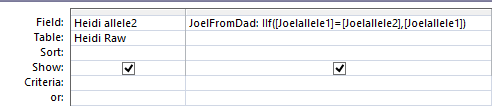
JoelFromDad is the first new field name. After the semicolon is the criteria. In English is says that if my allele1 is the same as my allele2, then put my allele1 in as the result I got from my dad. I used the same reasoning for a field called JoelFromMom and in similar fields for my two sisters. I viewed the results to make sure they made sense. I chose Make Table as I want the results in a Table to use later.

make-table

 I hit the Run button and created a Table called tblAncestrySibHomozygous. Here I have squished the results together.
tblsibhomozygous
The results are as above: MomAllele1,2, etc. Then I added in the last 6 columns: JoelFromDad; SharonFromDad; HeidiFromDad; JoelFromMom; etc. In the first line above, The T’s that we all had were added as contributed from our mom and dad. There appears to be an error on line 3. Note that there were no-calls for Joel and Heidi. What we got from Dad was right, but we shouldn’t know what we got from our mom, just based on our own results. I must have saved my next step to this table also.
Fortunately, when I view the original query, the results are correct:
qrysibhomozygous
Note now that the blanks that should be there in the end of the 3rd line are there. Now I have 700,153 lines of results showing where my 2 sisters and I got our DNA from each parents just based on our own ‘homozygous’ results. Good old Principle 1.
Another tip is that when you make a Table from a query, the order may be slightly different than what you want. To keep the same order, in the Sort row, choose Ascending for the chromosome and position.
sort-order

This will make sure that the chromosomes and positions within the chromosomes stay in the correct order. Otherwise, Access may try to sort by the first field which is the rsid.

Principle 2 in Access: Homozygous Parent

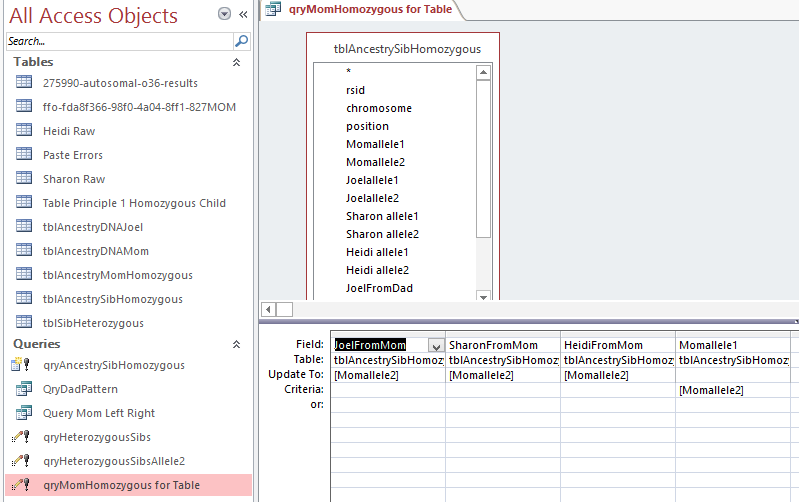
In my case, the homozygous parent is my mom. I spilled the beans already by my mistake above. In Line 3 above, my mom is GG. That means she had no other choice than but to contribute one of those G’s to each of her children at that location on Chrmomosome 1. Now I will put that Principle into Access language. For this portion I will use an Update Table. An Update Table will add new information to an existing Table. In this case, I added it to my tblAncestrySibHomozygous Table. That is why it showed the results already above. Here is what the Update Query looks like in design:

update-for-momhomozygous

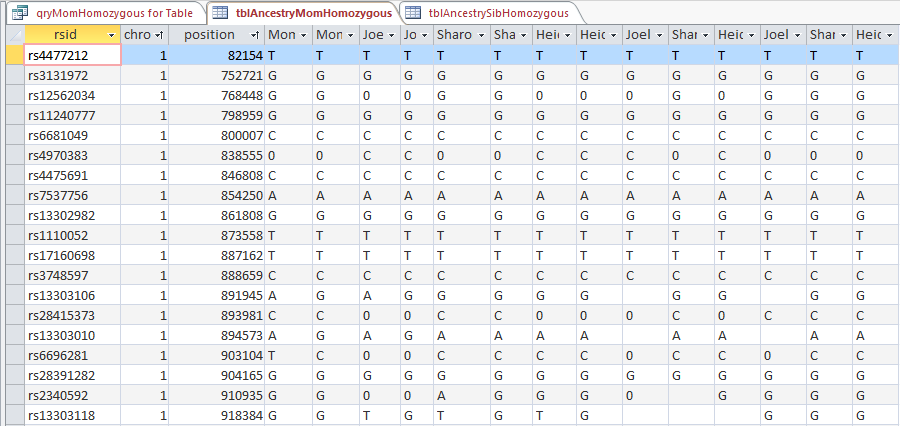
Here I have the tblAncestrySibHomozygous Table which I reran (or un-updated). This query says for the criteria where Momallel1 equals Momallele2, update the JoelFromMom, etc Fields with the Momallele2 value. Obviously I could have chosen either of her alleles to update the fields as they are the same. In the bottom left of the image above there is a pink highlighted query called qryMomHomozygous for Table. That is this update query. the ! means that it is going to create something. I assume that the little symbol to the left of the ! means that it is an update query. I ran the query and then created a new table with the results called tableAncestryMomHomozygous. Again, what I had forgotten was that by running this query, I also updated tblSibAncestryHomozygous. It’s always good to do quality checks – especially when you are dealing with over 700,000 rows of results at one time.

I did the update and got a warning from Access that I was updating over 400,000 rows.  And that action cannot be reversed. Here is my old tblAncestryMomHomozygous to show the zeros that I didn’t like:

old-mom-homozygous

I’ll delete that table and replace it with the update on tblAncestrySibHomozygous that I just did. Here is the new table without zeros.
new-momhomozygous
I still had to sort the table to get it right. The trick is to sort the position first and then the chromosome and everything comes out in the right order. Notice that I got rid of my old zero problem. Now I have over 700,000 rows of phased DNA based on homozygous results. Next, I look at heterozygous DNA. Whoa.

Principle 3: Heterozygous Child

I’ll copy the Athey Principle as he stated it as it is slightly more complicated than the previous two:

Principle 3 — A final phasing principle is almost trivial, but it is normally not useful because there is usually no way to satisfy its conditions: If a child is heterozygous at a particular SNP, and if it is possible to determine which parent contributed one of the bases, then the other parent necessarily contributed the other (or alternate) base. This principle will be very useful in the present approach.

How to put Principle 3 into access?

Here is an example of heterozygous children alleles where the mother’s contributing base is known:

heterozygous-example

We know that each sibling got a G from mom as she only has G’s at this location. All the siblings have TG for their raw results, which means the T must have come from dad. I can go through over 700,000 lines and apply that rule or try to use the Access Update Query to produce the same results. This time I copied the tblAncestryMomHomozygous to a table called tblSibHeterozygous before I did the update to maintain the integrity of the older table. In the Update Query, I combined 2 steps. First I set a criteria that there has to be something in the JoelFromMom for this to work. So I said that JoelFromMom is not Null. Next, my allele1 is T. I want this to go into my JoelFromDad spot. If this T doesn’t equal the G I got from my mom, I am already heterozygous, so I don’t need an extra query for that. [That was the step that I didn’t need.]

Here is what I have for an Update Query:

query-heterozygous-allele2

However, note that instead of looking at allele1 here I chose allele2. I am thinking that this will be a 2 step process for each allele. This query is updating over 70,000 rows, or a little over 10% of all the data. I’m trying to show that this Update Query did not address my example above which had to do with allele1 and it didn’t:

allele2-query-heterozygous

The first line was my example. The 3 blanks in the first line are the bases from Dad that were not produced from the query as expected. However, it did work for the second line. In that case, my allele2 was not equal to the allele I got from my mom, so it inserted that allele (G) as the allele I got from my Dad. Next I’ll copy the query: qryHeterozygousSibsAllele2 and rename it as qryHeterozygousSibsAllele1. Then I changed 6 of the allele2’s to allele1’s. This is to cover my original example where allele 1 wasn’t the same as the base contributed from Mom.

allele1-query-heterozygous

In English: When allele1 doesn’t equal the allele that you got from Mom, put it in as the allele you got from Dad. This results in over 76,000 row changes. By the way, if I haven’t mentioned it, in the Update Query, the row that says Update To is the one where the update to your data is happening. So in the above example if Sharon’s allele1 doesn’t equal the one she got from Mom, that allele is then known to be the one from dad and is inserted in the correct place in a new table.

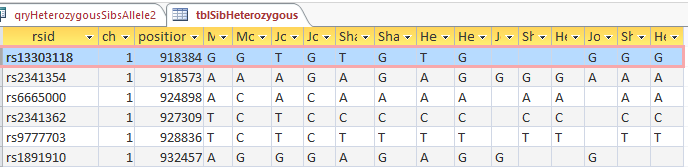
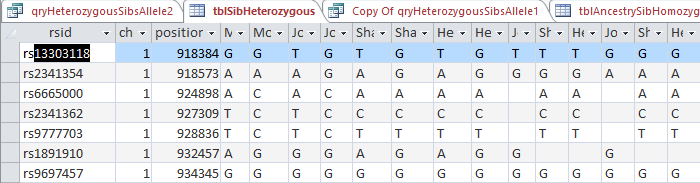
I check my updated table for good old rs13303118 and find:

update-allele1-sib-heterozygous

So I think that it looks pretty good. The first line is now filled in with our Dad’s contributing base. Also all the applicable following lines out of 700,000. There are some situations there should be blanks. In the third line, my mom is AC and I am AC. That is the situation where it is not possible to know what base came from what parent. So the base for each of my contributing parent is left blank – meaning that it is unknown.

One Last Step: Looking for Patterns

This is about as far as I’ve gotten and understood. The next issue that Whit Athey looked at in his paper were patterns. In his example there were 4 siblings tested, so more patterns. He added a column between the allele inherited from Dad and one from Mom called Dad informative pattern.

dad-informative-pattern

The idea is that there will be a pattern that lasts for a long time as we go down the results sequentially. These are the patterns of the segments that we inherit from our grandparents. Where the patterns change are the crossovers. Whit says to use those patterns to fill some of the missing letters. I haven’t started filling in the missing bases yet for a few reasons. One is that I’m not sure why I need to. In scanning the Athey paper there is a repetitive procedure of going back and forth between the data using the base from Dad’s side fill-in’s to help with the base from Mom’s side and then back again. First I’m not sure how to automate this yet. And if I could, how much better would the data be? I have quite a bit of data already. Once I get some answers of why I need to do this, I will continue on.

Here is a paragraph from the Athey Paper concerning the above Table 2:

Note the pattern of inheritance from Dad shown in Table 2 for the four siblings in the leftmost four columns. The first few rows show an AABB base pattern, but this gives way in about lines 12-13 to a new pattern, ABBB. Even though we only can see the pattern showing in some of the rows, these patterns persist over hundreds or thousands of SNPs, and can be assumed to exist also in the intervening rows where no pattern was discernable (and in the underlying sequence). Note that often there will be the same base in every location, a case of “accidental matching” which does not contribute to or detract from the pattern we are looking for. When two or more bases are different in a row, however, this represents an informative pattern—if any two are different, then since there are only two possible chromosomes contributing, it means we can see the chromosomal origins of the bases.

One of the reasons that I quote the above is to address the accidental matching where there was the same contributing parent base for each sibling. However, what I didn’t see addressed is that there are cases where that is not just accidental which I will discuss later.

Finding the crossovers

I do know the importance of finding the crossovers. I wrote a query in Access to cull out the patterns that Whit mentions.

query-for-patterns

Above is my query in design view using the table that has Principles, 1, 2, and 3 already applied. This query basically filters out the situations where the 3 siblings have the same base. The thought is that if one sibling has one base that is different from one of the others, then the three siblings’ will not share the same base.

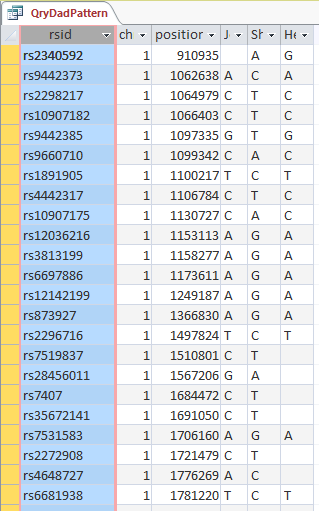
results-of-dad-pattern-query

Above is the start of the results of the query. Note the XYX pattern. This should make it possible to fill in Heidi’s missing bases from Dad. It looks like multiple choice test answers, but I would add C, G, C, C, C and A in the last column for the bases that Heidi got from Dad.  My homework assignment is to find a formula to fill in those letters so I don’t have to do it manually 10’s of thousands of times.

Another thing I want Access to do is find where the crossovers are. Here I scrolled down all the bases the my sisters and I had from Dad. I can see where the XYX pattern changes to XYY:

change-in-dad-pattern

But there was a problem. the XYX pattern stopped at position 18,759,377 and the XYY pattern started at 23,288,828. That means we have a large area with no pattern. Exactly. That is the area of XXX pattern that I just queried out. That has to be the area where all three siblings match the same paternal grandparent.

Checking my results with m macneill’s work

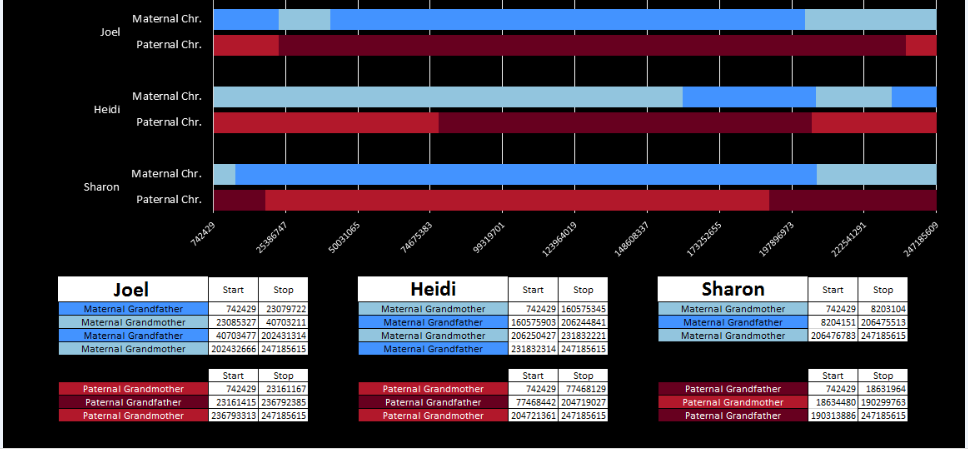
Fortunately, I have secret weapon. M MacNeill – prairielad_genealogy@hotmail.com has also been looking at my raw DNA using his own Excel spreadsheet method. Here is what he has for Chromosome 1:

macneill-chr1

Now just look at the first 3 red bars above. They represent my paternal side. The first break would be on Sharon’s bar – the third red bar from the top. The end of her dark red bar is at 18,631,964:

sharon-chr-1

Look at Sharon’s bar in that region and then scan up the 3 red bars. There is an area where all three siblings match on the paternal grandmother side (lighter red).

That is my paternal XXX Pattern.

To satisfy my curiosity, I went back to my unfiltered/unqueried table at the spot that the first pattern changed from XYX to XXX. The end of the first base pattern from Dad is highlighted in blue.

xyx-to-xxx

Line 2 is a no-call. Line 3 is one of the random XXX matches in the XYX pattern area that Athey mentioned above. Note that I could not likely fill in line 4 with what I know as I don’t know if that should be AAA, AGA, or something else. Actually, I could fill in Heidi’s with an A. If her results are AAA or AGA, Heidi still gets the A from Dad. It is only Sharon’s base from Dad that I don’t know.

However, starting at CCC, it seems like it would make sense to fill in all the letters in the XXX pattern area – even if there is only one known base out of three.

Converting Build 37 to Build 36 positions

At the top of the Blog I had mentioned that AncestryDNA results were in Build 37. M MacNeill’s work is in Build 36. I really didn’t want to have to convert results and thought that I was being clever by using all AncestryDNA results. However, to compare to M MacNeill’s Map above or to Gedmatch results, I still have to convert positions. Hey, life is tough.

NCBI genome Remapping service

Fortunately there is a way to convert positions here.

conversion

Assuming we are all homo sapiens, we select that choice and we select that we want to go from Build 37 to 36:

build-37-to-36

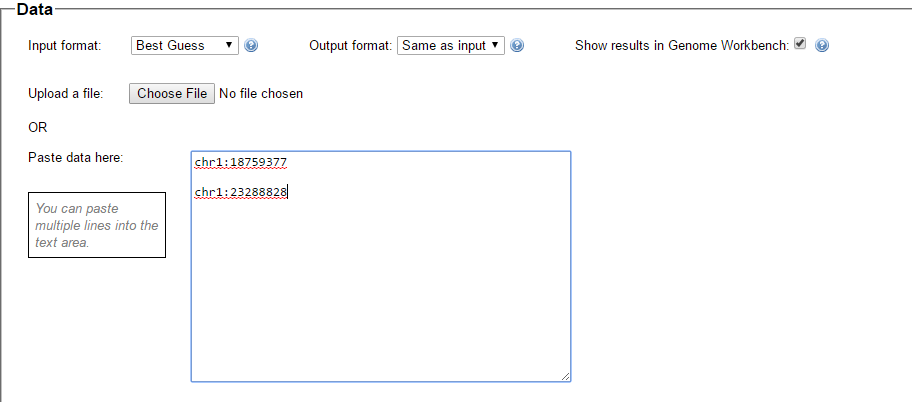
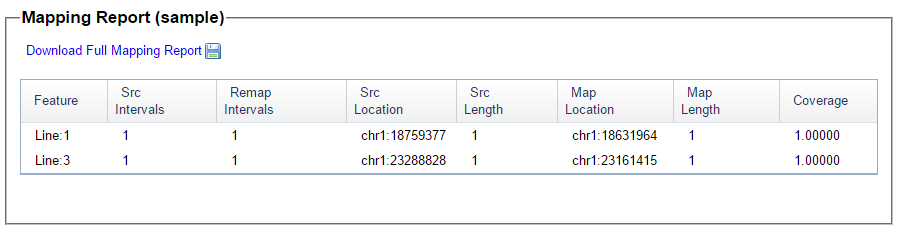
Here is the place to enter the data we want converted. It has to be in the format below – “chr1:” followed by the position number.  There is also a place to upload a file which I haven’t tried.

data-for-conversion

These are the 2 positions from my query where one pattern stopped and another started. Here is what they look like in Build 36 under Map Location:

chr-conversion-results

These Build 36 position numbers match up perfectly with M MacNeill’s map positions which gives me some confidence. This is where I’ll end Part 1.

I have found 2 paternal crossover points. However, I have not yet figured out which siblings they belong to – unless I cheat and look at the MacNeill Map above. I can easily do the same thing and find the pattern changes for the maternal side. I have shown 2 crossovers, but all the others exist in my query for 23 chromosomes. I just haven’t looked for them yet.

Summary

  • The Whit Athey Paper has been very helpful in phasing my raw DNA based on my mother and 2 siblings test results.
  • M MacNeill has piqued an interest in raw DNA data that I never thought I would have
  • M MacNeill’s Chromosome Maps are very helpful in checking my work
  • MS Access appears to be a great tool to use to quickly phase a lot of raw DNA
  • There is probably no way around DNA remapping or conversions
  • I still need:
    • An easy way to find all the crossover points
    • A formula to fill in the various patterns
    • A good reason to fill in those missing bases
  • I have a lot more to learn about DNA phasing using raw DNA data


Can 83 cM Last for 7 Generations?

Recently, I came across a DNA match at Ancestry. This match was on my mother’s side. Here is how the match showed at AncestryDNA:

Nigel at Ancestry

The match, Nigel, showed as a predicted 4th cousin. However, the range stated he was possibly a 4th to 6th cousin to my mother (and my sister). Further, the matching surnames looked familiar based on my mother’s ancestry. However, the Ellis on Nigel’s side was a female from the early 1700’s. Any possible Ellis connection would be before the Nicholson/Staniforth connection.

Shared Surnames

The Common Ancestors

I wrote to Nigel and mentioned that it looked like we were related on at least one line. I had a bit of trouble figuring out exactly how we were related as did Nigel. It helped me to map it out – especially as Nigel has 4 Johns in a row in his ancestry.

moms-nicholson-ancestry

It turns out that Nigel was not just a 4th cousin as predicted by AncestryDNA, but a 4th cousin, 2 times removed to my mom. Our common ancestor based on the chart above is John Nicholson baptized 1765. That is where the 7 generations comes in. John Nicholson is 7 generations before Nigel and 5 generations before my mom. However, my sister Heidi and Nigel have the same DNA as my mom and Nigel and Heidi is 6 generations away from the probable common ancestors of John Nicholson and Sarah Stanisforth.

Nigel at Gedmatch

I mentioned my Nicholson webpage to Nigel which he enjoyed. Nigel was willing to upload his DNA to Gedmatch for my research. Here is how his match looks like with my mother:

Mom to Nigel Gedmatch

Here is where the 83.8 cM comes in. Hence the title of the Blog: “Can 83 cM Last for 7 Generations?”

A chromosome 1 map

Here is a map of my Chromosome 1 kindly produced by M MacNeill – prairielad_genealogy@hotmail.com. The top portion of this map was based on raw data DNA. It shows how my 2 sisters and I inherited our DNA from our 4 grandparents.

chr-1-and-nigel

The four light blue bars at the bottom of the above image show the DNA matches that Nigel has to my mom, my sister Heidi, myself and my sister Sharon near the beginning of Chromosome 1. Nigel is related on my mother’s mother’s side. Notice how Nigel’s light blue matches below correspond to the DNA mapped to my mother’s mother’s light blue regions above. Heidi inherited a large maternal grandmother segment in this area of Chromosome 1 from our mom that had the large match to Nigel. The entire segment mapped to my maternal grandmother’s side appears to make up the match I have with Nigel.

A Nicholson Triangulation Group

My mother forms a Triangulation Group (TG) with her 2nd cousin Carol and 4th cousin, twice removed, Nigel. The TG is on Chromosome 3. To show the TG, I have to take the Gedmatch threshold down a little.

My mom’s match to Nigel

mom-nigel-tg

Likewise, the threshold was reduced to show the match between Nigel and Carol.

Nigels’s Match to Carol

nigel-carol

No threshold change was needed for the match between my mother and her second cousin Carol.

Mom’s match to carol

mom-and-carol

Here is what the TG looks like with the likely common ancestors of Nicholson and Staniforth:

tg-mom-nigel-carol

Are There Other Possibilities?

83.3 cM is way off the charts for 4th cousin or 4th cousin, 2 times removed. I brought the question to the ISOGG Facebook Group. The prevailing wisdom there is to check for other closer relatives (which makes sense). If there are missing ancestors on either side of the match (my family or Nigel’s), that may leave room for other more recent common ancestors.

my ancestry

First, the match is on my mother’s side. So that narrows things down. Secondly, my mom is 1/4 English. Therefor, I am only looking at 1/8 of my ancestry and 1/4 of my mom’s.

Mom's ancestry

Above, I have circled in yellow the one out of 4 grandparents of my mother that could match Nigel as Nigel has not shown any German ancestry. Annie Nicholson is 2 generations back from my mom (my mom’s grandmother).

Here is an enlargement of Ann Nicholson’s ancestors:

Ann Nicholson Ancestors

This shows that in the 5th generation from my mom where the assumed common ancestors of our match is found, most of the ancestors are identified. Mary doesn’t have a last name and I’m missing parents for Charles Ellis. So even if the new common ancestors were in this generation, they would be in the same generation of our currently assumed common ancestors. But what if Nigel has an unidentified ancestor in his 6th generation that matches someone in my mom’s 4th generation? That would be a closer match. So let’s look at Nigel’s tree.

Nigel’s tree

Nigel’s father’s side appears to be from Scotland. His mother’s side is from England. Nigel’s maternal grandmother is from the Derbyshire area and his maternal grandfather is from the Sheffield area. So that narrows things down to 1/4 for Nigel. My mom’s only English ancestors were from the Sheffield area, so we will concentrate on Nigel’s maternal grandfather’s side.

Here are Nigel’s maternal grandfather’s Sheffield ancestors:

Nigel's Maternal Grandfather's Line

The tentative common ancestors between Nigel and my family is one generation off this chart. The John Nicholson married to Martha Jow had as parents another John Nicholson who married Sarah Stanisforth. The ancestry above shows that Nigel has 6 out of 16 Sheffield ancestors 6 generations away. Is this a problem?

Nigel’s missing ancestors

Above, I had said that if Nigel had missing ancestors in generation 6 that matched with my mom’s generation 4 ancestors, then there could be a closer match. I’ll look at thee various possibilities and we will decide if they pose a problem.

  1. A problem that I hadn’t considered previously would be if Nigel’s unknown 6th generation matched with my mom’s 2 unknown ancestors in her 5th generation. Those unknowns are the parents of Charles Ellis born 1795. I don’t think that scenario is very likely. First, it would not likely be on the Ellis side. Charles Ellis’ father would also be an Ellis and Nigel doesn’t have any Ellis’s in his known generation 5 ancestors. But what about Nigel’s unknown female ancestors in generation 5? They were already married and having the children that are known in Nigel’s generation 4. So any unknown common ancestor there would have to be in Nigel’s generation 7 which is back where we started.
  2. Another scenario would have a missing female ancestor of Nigel remarrying. However, usually in this case, there would only be a 1/2 match and thuse 1/2 the DNA coming down to Nigel and my family. I would rule this scenario out based on the very large DNA match between my family and Nigel.
  3. When I look at other scenarios the reasoning seems to be similar as what I mention in #1 above. The options appear to bring us back to Nigel’s generation 7 again. That means that we either have an additional set of common ancestors in addition to the one that we have identified or we don’t. It makes sense to me to go with the ancestors that we do have rather than worry about missing ones we may have. Put another way, I’m gambling on the possibility that there were not additional common ancestors in Nigel’s generation 7 and my mom’s generation 5.
ON the other hand: Our non-conformist ancestors

One thing that Nigel and my family’s Sheffield ancestors had in common were that they were non-conformists. This means that they attended a church that was not the official Church of England. In their case it was the  Congregational Church. Perhaps there were other types of churches that they attended during the family history. What I don’t know is if people in these these groups married cousins to keep within the faith, or if there were enough of these non-conformists around that this wasn’t necessary.

So, Where Are We?

  1. The prevailing wisdom is that if there are missing ancestors, then the matches could be in a closer generation in those missing spots.
  2. I would like to push back the prevailing wisdom a bit. Even if we are missing some ancestors, there are things that can be deduced about those missing ancestors based on known ancestors in the next more recent generation.
  3. In genealogy research and DNA matching, things are not usually known 100 percent. I believe that there is a high probability that John Nicholson and Sarah Stanisforth are the common ancestors between Nigel and my family represented by a relatively large amount of DNA that made it down through both of our lines from the 1700’s.

Kitty Cooper’s Chromosome Maps

Above I have shown the genealogy and a Triangulation Group for the Nicholsons. I have also shown that the match between Nigel and my family is through my correct grandparent’s (mother’s mother’s) DNA. Now that I have convinced myself that John Nicholson and Sarah Stanisforth produced the matching DNA between Nigel and my family I will add that couple to my Kitty Cooper generated Chromosome Map:

joel-new-chromosome-map-kitty

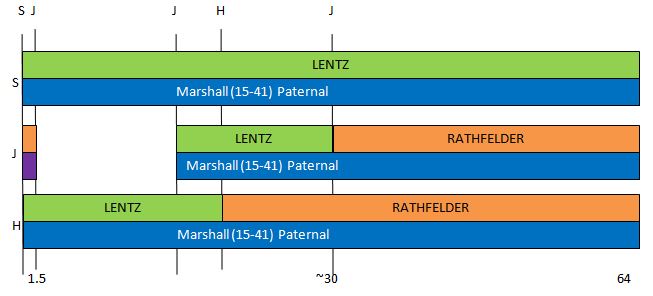
The Nicholson/Staniforth connection on my map above is shown on Chromosomes 1 and 3. Note that this is not the oldest DNA that I have and that the matches are in line with 2 other ancestors (Frazer in Green and Rathfelder in purple) from around the same time period.

Of course, I can’t leave it at that. Now I need to show my mom’s updated Chromosome map:

moms-chormosome-map

Note the following:

  • My mom’s segments are larger than my corresponding maternal segments as she is one generation back from me
  • My mom’s Nicholson/Stanisforth DNA is shown in purple.
  • My mom does not show DNA from that couple at Chromosome 3. That is because her match came in at 6.9 cM which is just under the 7.0 Gedmatch threshold. If I wanted to be more accurate, I would have added that match also – especially as that is the match that resulted in the triangulation group.

Finally, Triangulation Groups for the James Frazer Line of Roscommon County, Ireland

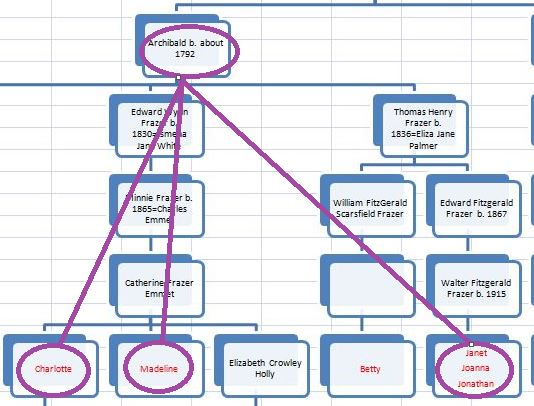
Recently, Kathy from the James Line of our Frazer DNA Project notified me that her Aunt Madeline had been tested for DNA and would I look at the results? I will take a look at the results in this Blog. Here is where Madeline fits in on the James Line Tree. She is on the second row from the bottom and the 3rd box from the left.

New James Line Chart

Above, the James Line Descendants that tested their DNA are in red. So now there are 14 people that have tested. There is one person below Clyde on the bottom left that I don’t show. I don’t analyze the children of people that have tested their DNA because they got all their DNA from their parents. Betty hasn’t uploaded her results to Gematch.  As a result, I am comparing 11 people to each other on the James Line.

Let’s Triangulate

First, I’ll say that I won’t bother triangulating Charlotte, Madeline and Mary. That triangulation would only point to the parents of Charlotte and Madeline and they already know who their parent are. Plus one of their parents is not a Frazer.

Chromosome 2

Here are the matches that Madeline has on Chromosome 2:Mad Chr2

Madeline’s sister Charlotte is #1 in red. Notice a large match. Madeline’s niece Mary is #2. As expected, the matches are smaller and more broken up, but still fairly large. #3 is my 2nd cousin, Paul. He is actually on the Archibald line, but I believe that he and I have some James Line ancestors that haven’t been identified. Paul has a very small pink match with Madeline and Charlotte and another fairly small blue match with Madeline, Charlotte, and Mary.

I won’t go down to the pink level at this time but will look at Paul’s blue match. Even that is below the normal gedmatch.com threshold of 7 cM. In order for this to be a true triangulation group, Paul would also have to match Charlotte and Mary. And Charlotte and Mary would have to match each other. Paul’s blue match is at position 174 to 178M on the image above. We already know that Charlotte and Mary match each other in that region.
Chralotte and Mary match

Here are Paul’s matches with Charlotte:

Paul Charlotte Chr2

Note that on Chromosome 2 where we wanted him to match Charlotte (around 175M). he doesn’t. At least not down to 4 cM and 400 SNPs. This match does appear to be in Paul’s pink match area that we didn’t consider.

Just to make sure, I will see if Paul matches Mary.
Paul and Mary

Here there are no matches at Chromosome 2, so I would say there is not a triangulation group there and Paul’s match with Madeline was by chance. Let’s move on to another Chromosome.

chromosome 4

Mad Chr4

Again, the top 2 matches to Madeline are her sister Charlotte and her niece. #3 is Clydie (also known as Clyde). #4 is my sister Heidi, but we won’t consider that match right now. Here is how Cyldie matches Charlotte:

Clydie Charlotte

Unfortunately, there is no match on Chromosome 4. Again, there is no match between Clydie and Charlotte’s niece, so no triangulation at Chromosome 4:

Clydie and Mary

chromosome 5 – Two TGs

Mad Chr5

  1. Mary
  2. Charlotte
  3. Bonnie
  4. Judith
  5. Jane (from the Archibald Line. I’ll ignore this small match for now.)

Here is more TG potential with Bonnie and Judith, both of whom have a paper trail on the James Frazer Line. From previous testing, Charlotte and Bonnie match in the area of Chromosome 5 that we are interested in:

Mary Bonnie Match

Here we have our first James Line only TG. This means that Madeline, Charlotte and Bonnie all have a common ancestor. It would be tempting to think that this DNA comes from James Frazer:

New James Line Chart Bonnie TG

However, there are other possibilities. We don’t know the spouse of Archibald Frazer born around 1792. That could be area of the match. Alternatively, one of the genealogies could be wrong.

Next, let’s look at Judith’s small match. Here is where she matches Charlotte:

Charlotte Judith Match

Here is how our new Chromosome 5 TG could look:

Judith TG

Again, there are other possibilities. Note that Charlotte and Madeline are 5th cousins to Judith – assuming we have the chart right. Also, taken together, these 2 TGs infer a common ancestor between Charlotte, Madeline, Mary, Bonnie and Judith.

Chromosome 6

Mad Chr6

  1. Charlotte
  2. Mary
  3. Jonathan
  4. Janet

Here is the comparison between Jonathan and Charlotte:

Charlotte Jonathan

So this does not look promising for triangulating. I compared Mary and Jonathan – no match there either. As Jonathan and Janet are siblings, there should be no match between Janet and Charlotte or Janet and Mary.

Chromosome 7 – a non-James Line TG?

Chr7 TG

Above are Madeline’s matches with Charlotte, Mary and Bill from the Archibald Line. It appears that Madeline, Charlotte and Bill are in a small TG. Bill has a small match with Madeline right at the area that he needs to (from position 127 to 130M) in order to form a TG.

TG at Chromosome 10

Chr10 TG

Here are Madeline’s matches with her close relatives Mary and Charlotte, and her matches with her more distant relatives Jonathan and Janet. It looks like there should be a TG between Madeline, Mary, Jonathan and Janet.

Here I don’t even have to lower the Gedmatch thresholds for the match between Mary and Jonathan:

Mary and Jonathan

The match between Mary and Janet is slightly smaller at 9.0 cM. This is another case where Madeline has tipped the scales and resulted in another TG.

Chr10TG Chart

Chromosome 12

Chr12 TG

Above is the representation of Madeline’s matches with Mary, Charlotte and Prudence. Let’s look for a match between Charlotte and Prudence:

Prudence Charlotte

They do have a good match right where we need them to to form a TG. This is an important TG as it adds a new line:

TG12 TG Chart

On paper, Charlotte and Madeline are 4th cousins with Prudence. The Edward Frazer Line is well documented, so this supports the genealogy that links Charlotte and Madeline up through Archibald Frazer and Catherine Peyton.

Chromosome 15

Chr15


As usual, Madeline is matching with Charlotte and Mary. The next 2 blue segments represent Madeline matching siblings Jonathan and Joanna. If Joanna and Charlotte match, that will be one TG. They do:
Joanna and Charlotte

Now, we need to check if Jonathan matches Charlotte and Mary. He doesn’t match Charlotte on Chromosome 15:

Jonathan Charlotte

Chances are, he won’t match Mary here either. I checked and he didn’t. This is why it pays to check each connection. From the Chromosome Browser above, it looked like Jonathan could be in a TG, but only his sister Joanna was.

Joanna TG

Chromosomes 16-22 only have matches between Madeline, Charlotte and Mary.

The X Chromosome

The X Chromosome can be confusing as the male only inherits an X Chromosome from his mother. The female inherits and X from both parents. That means where there are 2 male Frazers in a line of inheritance, the X cannot represent a Frazer match. That is, unless there is intermarriage of the Frazers. Just to show I’m not afraid of being confused, here are Madeline’s matches on the X Chromosome:

X of Madeline

As above, I’ll ignore the small pink matches. The first 2 of Madeline’s matches are again Charlotte and Mary. The 2 yellow matches belong to my sisters Sharon and Heidi. In the past, I have explained these by an unknown Frazer in my ancestry that is likely in the James Line. #8 is Bonnie. #10 is Clydie. This is an interesting match because it is almost 20 cM. Also Clydie does not have 2 Frazers in a row in her ancestry until before William Fitzgerald Frazer and Margaret Graham. This means that Madeline, Charlotte and Clydie could have a Graham in common or perhaps an ancestor of Margaret Graham in common.

Summary of the Five New TGs

Here is the summary of the new James Line TGs not including the X Chromosome:

James Line TG Summary

The numbers in the top right are the Chromosomes where the James Line TGs are. The names in the bottom left indicate the likely common ancestor(s) for the TGs. For simplicity, I left out the new TGs that had James and Archibald Line people in them.

Summary and Conclusions

  • The addition of Madeline to the James Line DNA Test Group tipped the scales and resulted in previously unknown TGs for the James Line.
  • Out of the 11 people, considered, 9 were in James Line TGs.
  • The newest member of our James Line DNA Group, Madeline, was in the most TGs: four
  • Charlotte helped form 3 new TGs
  • Even though Mary is a niece of Madeline and Charlotte, she also helped form 3 new TGs
  • Bonnie, Judith, Jonathan, Janet, Prudence and Joanna were each in one new TG
  • The 2 that weren’t in TGs were Clydie and Beverly. However, Clydie was in an X Chromosome TG. Beverly shows as a 3rd cousin to Bonnie and Judith. As a result, her relationships can be inferred through them.
  • These new TGs add certainty to the relatedness of those on the James Line.

More Hartley DNA – Patricia’s DNA

This blog is a follow-up on my last Blog: My Hartley Autosomal DNA. I was inspired to write that blog following this year’s Hartley reunion in Rochester, Massachusetts. I intended to send around a little poster I made up about Hartley DNA and get a DNA sample from my father’s cousin Martha, but didn’t get a chance to. Instead I wrote a blog. I did talk to Patricia though. She is my second cousin and the sister of my childhood best friend, Warren. She had taken an AncestryDNA test. I think her daughter bought it for her. I asked if she could upload her DNA to gedmatch.com and she said that her daughter would be good at doing that.

Here are Patricia’s 2 brothers and Patricia. The one in the middle was my best friend in my first 6 years of school. I remember seeing home movies of Curtis, Warren’s older brother. He came to one of my older siblings’ birthday party when he was about this age.

Patricia and family

In my last blog, I wrote about the Hartley DNA matches my father’s first cousin Jim had with me and my 2 sisters. I was surprised to find out that every match that we had represented one of my four 2nd Great Grandparents. They were all born around the 1830’s. It turns out that Patricia’s matches with cousin Jim represent the same four 2nd great grandparents. In addition Patricia’s DNA matches with my 2 sisters and me represent the same four old timers.

Here is what my DNA match to Patricia looks like at AncestryDNA:

Patricia Ancestry

Here, AncestryDNA has it right that we are 2nd cousins. They show we match for a total of 206 cM (centimorgans) across 14 DNA segments. That is about all you can get out of ancestry. They won’t tell you which chromosomes we match on or how much we match on each chromosome. That is why people upload their results to gedmatch.com. Ancestry does show other people that match DNA to both Patricia and me. These are my 2 sisters and 5 others. All these people also descend from the same Rochester Hartley ancestors, but none of them have uploaded their results to gedmatch.com, so we don’t know their detailed DNA matching information.

Here is the same match between Patricia and me at Gedmatch:

Pat Joel Gedmatch

Ancestry has 14 segments vs. the 8 at Gedmatch. But at Gedmatch we know on which chromosome we match, how much on each chromosome and the exact start and stop location on the Chromosome. However, even with Ancestry’s 14 segments, their total is a bit smaller. Here is how I match Patricia on Chromosome 15 in the Gedmatch Chromosome Browser:

Joel Pat Chr 15

The blue areas represent the two DNA matches Patricia and I have on Chromosome 15.

Patricia on the Hartley Family Tree

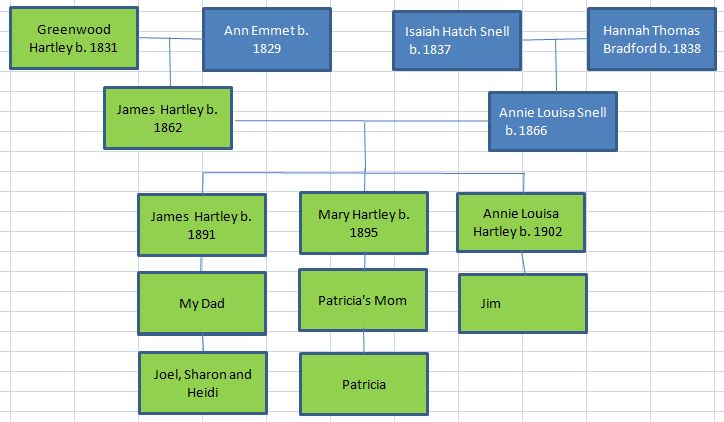
Growing up, Patricia’s grandmother was my great aunt and also one of my neighbors, my Aunt Mary.

Patricia's Tree

The bottom box in each row are the people that have tested their DNA and uploaded to gedmatch.com. I now show 3 of the 13 children of James Hartley and Annie Louisa Snell (James, Mary and Annie). I now can check how my sisters and I match Patricia’s DNA as well as how Patricia matches Jim’s DNA.

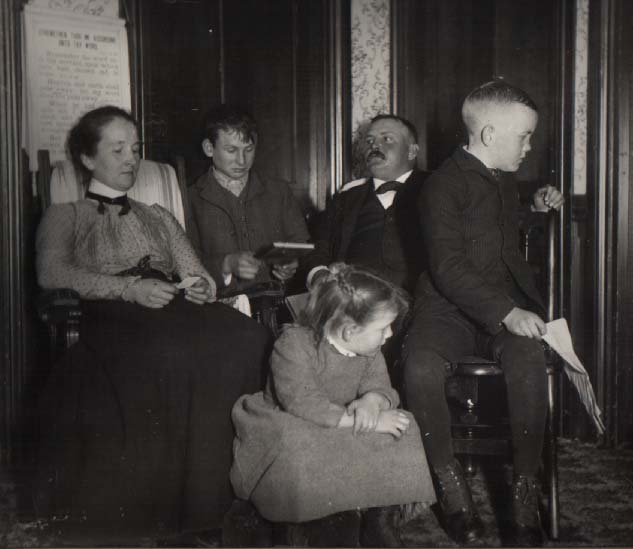
Here are my great grandparents and three of their older children.

James and Annie Hartley

It is in interesting photo. Two of the children are looking away. I think that one is my grandfather James. The mother, Annie, is looking at something in her hands. The older son Dan is looking at a book and the father James doesn’t look comfortable being dressed up.

Patricia’s DNA at Gedmatch

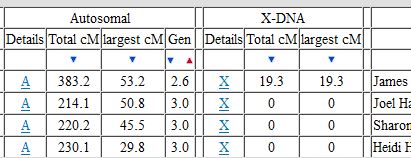
One of the basic functions at gedmatch is called ‘One to Many’. In this case, I took Patricia’s DNA and compared them to everyone else that has ever uploaded their DNA results to gedmatch. Here are her 1st 4 matches:

Patricia's 1st 4 matches

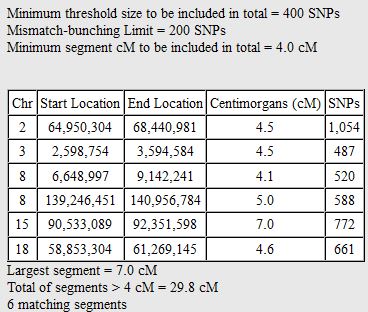
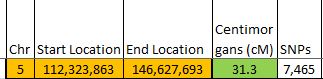
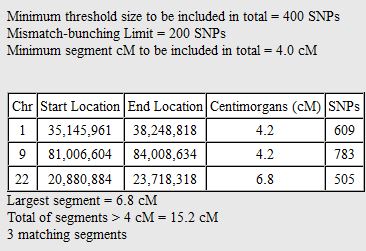
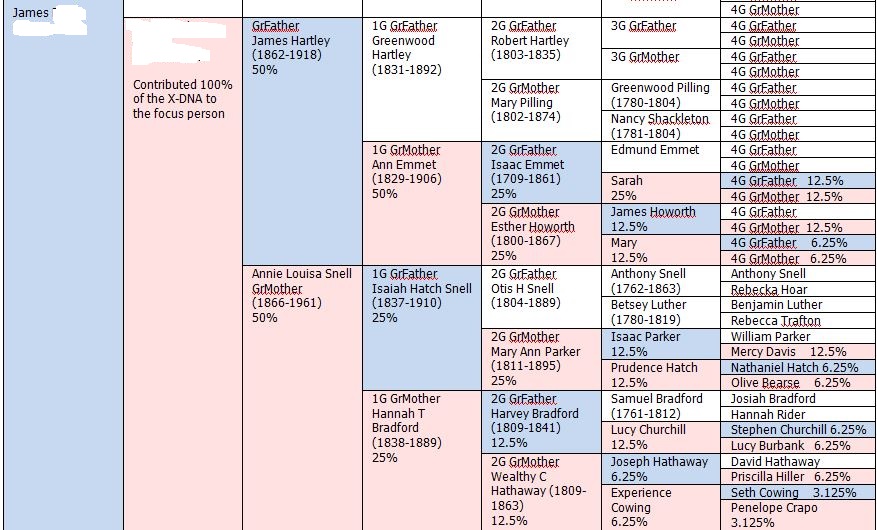
Not surprisingly, her top matches are her 1st cousin, once removed, Jim, me and my sister’s Sharon and Heidi. The Gen column lists how far away gedmatch thinks Patricia’s matches are to a common ancestor. Patricia and I are 3 generations to James Hartley and Annie Snell, so that is right. Patricia shows 2.6 generations to a common ancestor with her match to Jim. A first cousin once removed would typically be 2.5 generations, so she shares a little less DNA than average here with Jim. Patricia also shares 19.3 cM of the X Chromosome with cousin Jim which I find interesting.

The Hartley X Chromosome

I’m taking the X Chromosome out of order because I find it interesting. There is one most important thing to know about the X Chromosome. If you are a male, you get one from your mother. If you are a female, you get one from your mother and one from your father. My father only got an X chromosome from his Frazer mother, so he doesn’t match anyone further up on the Hartley line by the X Chromosome. However Patricia and Jim both have maternal matches that carry up the line.

Here is how Jim got his X Chromosome from his mother and her ancestors:

Jim's X Inheritance

Jim only inherited his X Chromosome from those ancestors in pink or blue. So, for example, he got no X Chromosome from any Bradford before Harvey Bradford.

We need to compare Jim’s chart with Patricia’s X Inheritance Chart:

Patricia's X Inheritance

Here I didn’t show the X Chromosome that Patricia got from her father as this won’t match Jim. Then of what I show, only the bottom half will match Jim. This means that going back 4 generations from Patricia, she could match Jim by the X Chromosome on the Emmet, Snell or Bradford Line. One other difference between Jim and Patricia is that Jim got 100% of his total X Chromosome from his mother and Patricia only got 50%. However, that is a confusing way to put it because Patricia did get 2 X Chromosomes. So her one 50% must be similar to Jim’s 100% if that makes sense.
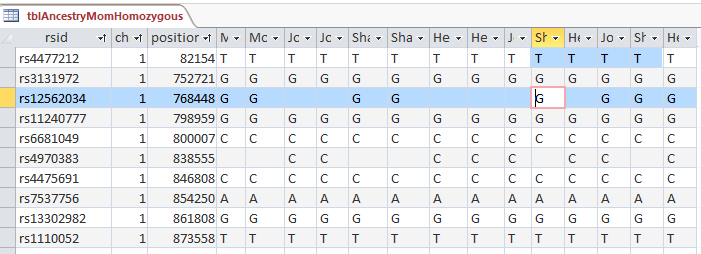
Here is what the X Chromosome match looks like between Patricia and Jim at gedmatch.com on their browser:

Jim Patricia X Match

The yellow part with the blue under it is where they match at the end of the X Chromosome. That is enough on my X diversion for now.

Back to the Hartley DNA Matches on the Other 22 Chromsomes

At gedmatch, I go to the Jim’s ‘One to Many’ matches to see how he matches my family and Patricia. Here are Jim’s top 4 matches. You may have already guessed who they are:

Jim's top 4 matches

Above, I said that Patricia matched Jim a little less than expected. My sister Heidi at the top of the list matches him a little more than average.

Here are Jim’s DNA matches on Chromosome 1

Pat Chr 1

  1. Me
  2. Heidi
  3. Sharon
  4. Patricia

Here Patricia has identified a new piece of DNA in green that is a Hartley ancestor that we didn’t know about before. Again, this “Hartley” ancestor may be Hartley, Emmet, Snell or Bradford.

Here is another new Hartley segment on Chromosome 2:

Pat Chr 2

Patricia matched Jim on Chromosome 2. My sisters and I had no match with Jim on that Chromosome.

It looks like Patricia got a double segment of Hartley DNA on Chromosome 5:

Patricia Chr 5

Patricia is #1 above. Where the color changes from orange to yellow likely represents a change from Greenwood Hartley to Ann Emmet DNA or Isaiah Snell to Hannah Bradford DNA.

Patricia Helping Me Map My Chromosome 7

I’ve tried to map all my chromosomes as well as my 2 sisters’ to my 4 grandparents. I got a little stuck on Chromosome 7:

Chr 7 Map Pat

My chromosome 7 depiction is the one with the J to the left of it. On my paternal side (which is the blue (FRAZER) and red bar), I have the DNA I got from my dad’s mother in blue and my dad’s Hartley dad in red. Above that is the gedmatch depiction of how I match my 2 sisters by DNA and how they match each other. The bright green bar is called the Fully Identical Region or FIR. This means wherever that occurs a sibling matches the other sibling by getting the same DNA from the same 2 grandparents (one maternal and the other paternal). So in comparing Sharon to Heidi, they have that FIR from 0 to 25. It turns out that their 2 grandparents were their mother’s mother (Lentz) and their father’s father (Hartley). In the tiny section between 0 and 4, I have what is called a Half Identical Region or HIR. That means that I shared one grandparent’s DNA  with my sisters and the other grandparent I didn’t get any of their DNA. In this case I had to share either the Lentz or Hartley grandparent with my 2 sisters, but I didn’t know which.

That is where Patricia’s results came in handy. Here is how she matches Sharon, Heidi and me:

Patricia Chromosome 7

Patricia has 3 good matches with Sharon and Heidi and one tiny one with me (#3 on the Chromosome Browser). However, the tiny one is the one I need. The pink match shows that my Chromosome 7 from 0-4 (in millions) is where I got my DNA from my Hartley grandfather and not my Frazer grandmother.

Here is my completed Chromosome 7 thanks to Patricia. I extended the Rathfelder on my Chromosome 7 all the way to the left or beginning and added a small chunk of red Hartley from my grandfather.

Chr 7 complete

Another Type of Chromosome Mapping

There’s is another type of Chromosome Mapping developed by Kitty Munson. The way the Munson Mapping is generally used is to map out your relatives’ common ancestors. In the case of Patricia and Jim our common ancestors are James Hartley and Annie Louisa Snell. Here is what my new Chromosome Map looks like with the addition of Patricia’s DNA matches with me shown in blue.

New Kitty Map for Joel based on Pat

Well, that’s about enough for Patricia’s DNA for now.

Summary and Conclusions

  • Patricia shared the first Hartley X Chromosome match that I’ve seen.
  • The X tends to shy away from the male line, so Patricia and Jim’s match is more likely down somewhere in the Massachusetts colonial line rather than the English Line.
  • I would like to use Hartley DNA to break through the Hartley genealogical brick wall. Right now I’m stuck in the early 1800’s in Trawden, England. There were too many Hartleys there with the same first name to figure out who was who. Patricia’s DNA may help in finding matches to other Hartleys
  • Patricia’s DNA helped me in mapping my chromosomes in 2 different ways.


My Hartley Autosomal DNA

I have written many blogs on DNA but I don’t think that I have written about my Hartley autosomal DNA. Autosomal DNA is the kind of DNA test of which Ancestry claims they have tested over 2 million people. Autosomal looks at the DNA we get from both our parents and their parents and so on until the DNA runs out. And it does run out for some ancestors at some point. Due to this effect, very little of my DNA is actually Hartley DNA. If you think of it, I got half of my DNA from my father, but he got half from his father, his father got half his DNA from his father and so on.

Paternal DNA from Maternal DNA

The best way to get your paternal DNA is to test your father. This avenue was not available to me. However, I was able to test my mother. Gedmatch.com has a utility available that will separate out the DNA I got from my mom from that which I got from my dad. That utility does not recreate my dad’s DNA, but it does recreate most of the portion of DNA that I got from him.
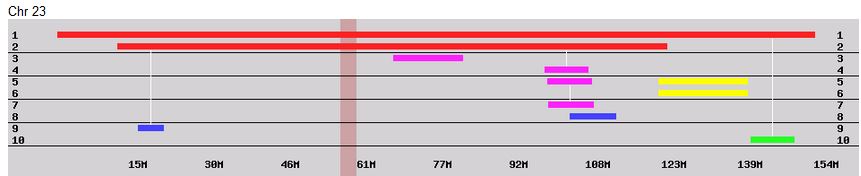
Here is what the utility looks like. It is quite simple to use and works quickly.

Phased Data Generator

Once I have this information, I can run the results against all my matches to find out which of my matches are from my dad and which are from my mom. There are also those that match neither which may be considered false matches. This takes out a lot of the guesswork with our matches. It makes life twice as easy.

Paternal DNA from Testing a Paternal Relative

The other way to find paternal (that is Hartley) DNA is to test a paternal or Hartley relative. That is when I went to my father’s cousin Jim and asked him to take a DNA test. He was willing and I have some Hartley matches. I also had tested myself and my two sister’s. Here is what Jim’s DNA results look like compared to me and my 2 sisters on a Chromosome Browser:

Hartley DNA

I find this graphic interesting. It shows that Jim matches me and my 2 sisters on almost every chromosome. The last chromosome is the X Chromosome. It was cut off a bit. However, Jim could not match us on the X as my father only got his X Chromosome from his mother who was a Frazer and not a Hartley. On Chromosome 13 my 2 sisters and I have pretty much the same match with Jim. The 3 bars are of equal length. On Chromosome 20, only my sister Sharon matches Jim. On Chromosome 11 we all match but at different amounts. My sister Heidi has the largest match there. The places where we don’t match, my family is busy matching the other 3 grandparents. Or perhaps Jim is busy matching on his father’s non-Hartley line.

What Do All Those Matches Mean?

All those matches represent Hartley DNA. But remember that I said that even our Hartley DNA consists of other families. So the answer is a bit more complicated. First I will show the Hartley genealogy relative to the DNA match between Jim and my family. That will help explain all these DNA matches. In the first line below, Greenwood Hartley was from Trawden, England. Ann Emmet was from Bacup, England. Isaiah Snell had non-Pilgrim colonial ancestors. Hannah Bradford had Pilgrim Colonial ancestors.
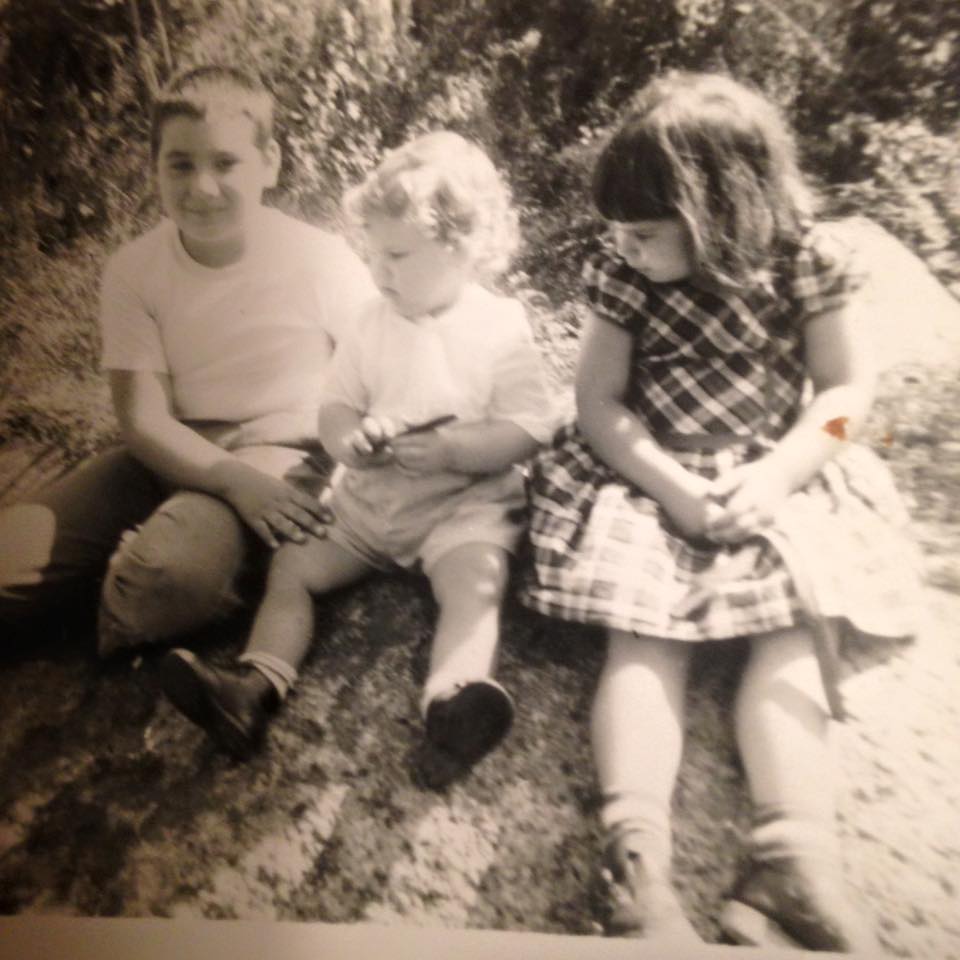
Greenwood DNA

I have those with Hartley DNA in green. Those that have no Hartley DNA are in blue.

Here is Greenwood Hartley and Ann Emmet:

greenwood

Probably Hannah Bradford and Isaiah Snell at their house in Rochester, Massachusetts:

Hannah Isaiah

Every match between Jim, me and my siblings represents a specific Ancestor from the 1st line above

The common ancestors between Jim and me are James Hartley born 1862 and Annie Louisa Snell born 1866, but the DNA represented between Jim and me is actually their parents who were all born around the first third of the 1800’s. This was just made clear to me within the last few days. I know, it gets confusing. That means that out of the 1/4 of my DNA that is Hartley (as I have 4 grandparents), only 1/4 of that quarter is Hartley when we go back to where the DNA came from. That means that every orange, blue or green bar in the first image represents one of the 4 ancestors from the early 1800’s above.

How We Get Our DNA

When we were conceived, we got our own blend of DNA. That DNA was really from our 4 grandparents. We got equal amounts from our mom and dad, but the amounts we got from their parents was blended and we may have not gotten an exact 25% from each our grandparents. We all actually have 2 of each chromosome. One is paternal and one is maternal. For example, the siblings James Hartley b. 1891 and Annie Louisa Hartley b. 1902 received on their paternal chromosome alternating segments of Greenwood Hartley and Ann Emmet DNA. Likewise, on their maternal chromosomes, they had alternating DNA from Isaiah Snell and Hannah Bradford. Those mixtures of their 4 grandparents was passed down to Jim, me and my 2 sisters and is represented in the Family Tree DNA Browser that I show above and again below.

How Can We Tell Which Segment Matches Which of the Four Ancestors?

For example, it would be nice to know if Heidi’s Chromosome 11 match with Jim shown in green below represents  Hartley, Emmet, Snell or Bradford.

Hartley DNA

The best way to find out which segment represents which ancestor is to do additional testing.

Test:

  • A Hartley relative not related to Emmet, Snell or Bradford
  • An Emmet relative not related to Hartley, Snell or Bradford
  • Etc.

Well, I think you get the picture. Once one of these people is tested, they would be a reference and any match Jim or my family had with them would be from the Hartley, Emmet, Snell or Bradford lines. The problem is, where are these people? There may be Snells around not related to Hartleys, but I dont’ know of many Hartleys not related to Snells. Sorry for the double negative.

Another way is to wait until one of these Snells not related to a Hartley shows up on a DNA match list. This doesn’t work for Ancestry matches because AncestryDNA doesn’t tell you which chromosome you match on. However, if they were to upload their results to gedmatch.com, then the segments could be identified.

why do we want to identify these segments?

Well, for one, some find it interesting to know where they got their DNA from. Another reason is, that once these are identified, then we know right away where to look for an ancestor match. For example, if we knew a match was on the Bradford side. We would look for a common matching ancestor descending from the Mayflower perhaps.

Summary and Conclusions

  • When I tested my Hartley father’s 1st cousin, I got a lot of DNA matches on most of my chromosomes
  • These matches represent 4 of my 2nd great grandparents
  • These four 2nd great grandparents represent Trawden and Bacup, England and Colonial Pilgrim and non-Pilgrim lines.
  • So far, I have not been able to figure out which colored bar represents which 2nd great grandparent.
  • There may be some advanced techniques that could help me tease those out. Or I may be able to find those out by testing appropriate relatives if found.
  • The older generations are the best for testing as the further you get from your ancestors, the less autosomal DNA you carry. It reduces by a factor of 4 every generation.
  • Those relatives that have tested at Ancestry should upload their results to gedmatch.com for comparison.
  • One of my Hartley 2nd cousins has uploaded her DNA results to gedmatch.com and that will be the subject of my next Blog.

My German DNA Success Story [Continued]

In my last Blog, I wrote about finding a significant DNA match on my mother’s paternal side. This is my rarest grandparent as far as DNA matches. My mom’s dad was a German Rathfelder from Latvia who emigrated to the US in the early 1900’s. As a result, this side of the family appears to have few US relatives. When I left off, I was having trouble finding a common ancestor between the match and my mother due in part to there being more than one Wilhelmine Rathfelder in the mid-1800’s Hirschenhof, Latvia.

The Two Wilhelmine Rathfelders

To recap, my mother’s DNA match had as their ancestor Friedrich Bernhard Spengel. Fried’s birth record in 1859 listed his mother as Wilhelmine Rathfelder. When I looked up the birth record of Wilhelmine Rathfelder, I found that she was born in 1844. This would make her only 15 at the birth of her son. That same record stated that her godmother’s name was also Wilhelmine Rathfelder who was an unmarried woman at the time. For this reason and others, I decided that the 15 year old Wilhelmine Rathfelder was a poor choice to be Friedrich Spengel’s mother.

Since my last blog, I found an 1855 Spengel/Rathfelder marriage that had potential:

Spengel Rathfelder Marriage 1855

The next to the last entry appears to be a Joh. Peter(?) Spengel and Aldene Wilhelmine Rathfelder. One problem here is that Friedrich’s father was Johann George Ludwig Spengel and this groom appears to be Johann Peter Spengel.

I then found this birth record from 1838:

Adeline Wilhelmine Birth

Here is cousin Inge’s rendering:

born on Januar (January) 17. abends (in the evening)

baptized the 19th of January

No. 2 Adeline Wilhelmine Rathfelder

V (father) CW (which means Colonie Wirt = farmer) George Rathfelder;

M (mother) Cathar(ina) Elisabeth geb. Hofmann

Taufzeugen (godparents): Gottlieb Raschefsky und Frau (wife) Anna Charlotta geborene Erhard,

Adeline Wilhelmine geborene Schulz.

Note again the custom of naming the child for the godmother – in this case Adeline Wilhelmine Schulz.

Two Johann Georg Rathfelders

It appears that not only were there 2 Wilhelmine Rathfelders, but also two brothers with the same name of Johann Georg Rathfelder. Just to make it confusing they were both the sons of my ancestor Johann Georg Rathfelder aka Hans Jerg Rathfelder. Here is the genealogical reference with Inge’s note: “Hans Jerg”.

Hans Jerg

This means that Adeline Wilhelmine Rathfelder was the daughter of Johann Georg (but he apparently went by Georg) born 1792. Her uncle was Johann George (my ancestor) b. 1778 and her grandfather was also Johann Georg (aka Hans Jerg). That puts the common ancestor of my mom and her Spengel descendant DNA match back to Johann George (aka Hans Jerg) Rathfelder b. 1752 and his wife Juliane Bietenbinder. Hans is my mom’s 3rd great grandfather in the upper right box below.

Ancestry Alexander Rathfelder

This means that AncestryDNA was somehow right in assigning my mom’s Spengel/Rathfelder descendant 4th cousin status.

The Spengel/Rathfelder Story

I find that if I am able to put genealogy into a narrative and it makes sense, then there is a likelihood that the story may be true.

Hans Jerg Rathfelder and Juliane Bietenbinder had several children in the German Colony of Hirschenhof in Latvia. Two of their sons had the same name: Johann Georg Rathfelder. The older son went by Johann and the younger went by Georg. The elder son Johann was my ancestor. The younger, Georg, married Catherina Hofmann in 1813. 25 years later in 1838 they had a daughter named Adeline Wilhelmine Rathfelder. In 1838 Wilhelmine’s mother would have been about 42.  This daughter may have been a 6 year old godmother at the birth of another Wilhelmine Rathfelder in 1844. In 1855, as a young 17 old girl, Adeline Wilhelmine Rathfelder married Johann Peter Spengel. At about age 21 in 1859 the elder Wilhelmine had a son named Friedrich Bernhard Spengel. However, at this time, Friedrich’s father is called Johann Georg Ludwig Spengel.

So that’s my story and I’m sticking to it. I’m betting that Johann [somebody] Spengel married a Wilhelmine Rathfelder in 1855 and that they were the same couple that had a Friedrich Bernhard Spengel in 1859. I do note that the Spengels were also related to the Gangnus family in Hirschenhof. Gangnus is the name of my Rathfelder grandfather’s mother. So that may explain my mom’s larger than average match with her 4th cousin.

Let’s Map Mom

Now that I have a reasonable common ancestor for my mom and her new Spengel/Rathfelder match, I can update my mom’s Chromosome Map using the Kitty Munson tool:

Mom's Chromosome Map Aug 2016

This fills out her paternal side a little more and also gets her first 1700’s chromosome mapping. All the others were “only” in the middle third of the 1800’s! Hans Jerg Rathfelder and his wife Juliane Bietenbinder are now shown in light blue.

My Chromosome Map

It turns out that even though my mom had a large DNA match as well as my 2 sisters, my gedmatch one to one match wasn’t that large. This is one of those rare cases where Ancestry gives me a larger match than Gedmatch. Here is how my match with the same Spengel/Rathfelder descendant show up at AncestryDNA:

Joel Ancestry match

Here is my one to many match at gedmatch:

gedmatch one to many

Gedmatch warns me to do a one to one match which brings my total cM match down from 25.1 to 18.9.

Joel Hilweg one to one

I just found out that the gedmatch SNP threshold went from 700 to 500, so a few days ago, my match would have been only 8.3 cM total. I may have other matches also as my sisters and mother match this same person in areas where I am below this threshold.

Here is my updated Chromosome Map:

Joel Chromosome Map Aug 2016

It seems like my maternal and paternal mapping is evening out. I didn’t think that this would ever happen.

Comparing my mom’s map and mine, I got most of Hans’ and Juliane’s DNA from my mom on my Chromosome 6 and 9, but I didn’t get any of the large amounts of DNA from my mom’s Chromosomes 17 and 18.

More Mapping

While I’m at it, I’ll see what else I can do.

Chromosome 1

Here is how the Spengel descendant matches with my mother, me and one sister on Chromosome 1:

Chr 1 Rathfelder

This is probably one of those segment matches that AncestryDNA had but was below the gedmatch threshold. The first match is my sister Sharon, then my mom, then me. Here is how I had it mapped out (with Kathy Johnston’s help):

Chr 1

The area of interest is from 62 to 68. Kathy has it correctly mapped out that Sharon and I have Rathfelder in there in blue and my other sister Heidi has the other maternal grandparent (Lentz) from 62 to 68.

Chromosome 6 Revised

Here is how the Spengel/Rathfelder descendant matches my mom and all three of her DNA tested children on Chromosome 6:

Chr 6

Note all the matches are between 155 and about 161. Here is my Chromosome 6 map:

Chr 6 map

When I was working on this map, I had noted an inconsistency in my paternal side on the right hand side and hadn’t yet resolved that problem. This proves I was wrong on my maternal side also after 155. Instead of 3 blue maternal Lentz segments after 155, there should be three orange ones as proven by the Spengel/Rathfelder match. I’ll just do a quick fix. There appears to be a double crossover for my 2 sisters where I previously had one for me at 155. I’ll add Sharon and Heidi’s crossover at position 155 and take out mine:

Chr 6 map rev

Perhaps this is not a perfect Chromosome 6 map, but it is much better than it was.

Chromosomes 17, 18 and 19

I covered Chromosome 17 in my previous blog.

Spengel/Rathfelder only matches my mom on Chromosome 18:

Chr 18 mom

Perhaps that DNA went to one of my other three siblings that haven’t tested for DNA yet.

Lastly, here is how mom, sister Heidi and I match Spengel/Rathfelder on Chromosome 19:

Chr 19

The matches are from 56 to 59, so the scale in the image isn’t perfect. Let’s see how my mapping looks.

Chr 19 Map

It looks like I had some trouble on my family’s Chromosome 19. I couldn’t figure out a section and couldn’t map my maternal side to a specific grandparent. Well, now, thanks to our Spengel/Rathfelder descendant match, things will be clearer. Heidi and Joel match a Rathfelder and Sharon doesn’t from location 56 to 59. That means that I can map the orange to my Rathfelder grandfather’s DNA. That leaves my maternal grandmother Lentz who will be in the green areas.

Chr 19 map rev

So here we have identified Maternal grandparents 1 and 2. This information should be useful. For example, if my sister Sharon in the top bar has a Chromosome 19 DNA match on the maternal side, I will know not to look for any Hirschenhof ancestors.

Summary and Conclusions

I believe that this is how it is supposed to work. The DNA helps target the genealogy and the genealogy identifies the DNA. One side leverages the other and back and forth we go between DNA and genealogy. Hence the term genetic genealogy.

Whitson and Butler YDNA and Signature STRs

Two Types of YDNA: SNPs and STRs

As many know, YDNA is the DNA of the male line.

SNPs can be seen as the trunk and branches of the tree and the STRs can be seen as the twigs and leaves. Before we analyze the twigs and leaves, it is good to know if we are in the right tree. However, even when looking at the leaves, it is sometimes possible to guess the type of tree.

maple-leaf

For example, in the Family Tree DNA (FTDNA) Whitson project, there are officially nine people listed. There are more that have tested, but not with FTDNA. In the list below, there are three broad groups represented by the colors orange, teal, and yellow. These are the SNP groups, or the tree types. These three groups are I1, I2 and R1b.  These SNPs break down into finer and finer distinctions. However, there is no connection between I and R in the range of 10,000’s of years. There are also a huge amount of years between the I1 and I2 SNP Haplogroups.

Whitson FTDNA Project Results

Once people are grouped in the SNPs, then it is possible to compare the STRs. These are the numbers to the right. These are what I was referring to as the twigs and leaves. However, these are only compared within the other major groupings of SNPs.

Why Are There Three SNP Types for the Whitsons?

There are various reasons:

  1. When surnames were being developed, this name could have developed independently at different locations.
  2. An adoption could have taken place at some point. This is under the category of Non-Paternal Event (or NPE) as are #3 and #4 below.
  3. An unwed mother could have had a child that had her name. However, as the father has the YDNA, his YDNA would be carried on to the male child in the line.
  4. A relationship outside a marriage would tend to break the YDNA line also.

The SNP Types or Haplogroups

SNP groupings are called Haplogroups. Here are some of the Whitson Haplogroups:

I1>I-M253

The first Haplogroup above are the I1>M253 Whitsons. There are 2 Whitsons in that Haplogroup. FTDNA has a group just for I1’s. There are currently about 6000 people in this group. Not much analysis can be done with these 2 right now as they match by STRs exactly. If these 2 Whitson join the FTDNA I1 Project, it may be possible to find a signature STR for these 2 (see below).

I1 people have sometimes been associated with the Vikings. This group of people did seem to take a Northern route in their distant ancestry, so that is where the association comes from. However, there may be finer distinctions once we learn more about this I1 Whitson Group.

I2>I-M223

FTDNA has an I-M223 YDNA Project. The Whitsons and Butlers in our project are in a section of that projects called:

1.2.1.2.1.1.1.1- M223>…>L701>P78>S25733>A427 (Cont3a1 Group 2)

One of the Butlers in the group has tested positive for the SNP called A427. The other 4 were put in that group due to their similar STRs. This is like saying what tree you are by your leaves. A427 is quite a way down on the SNP tree. Using my tree analogy, this would be a very specific type of tree.  Below are all the people in the A427 SNP Group. I only included up to the 36th STR (small numbers) as the image was all ready small enough. There were actually more STRs tested to the right of this image.

Whtson Butler STRs

Now the A427 SNP is like the specific tree and the STRs which are the numbers listed are like the different branches, twigs and leaves. I would like to point out here a specific fingerprint for our Whitsons and Butlers. Here are our 5 Whitson/Butlers outlined in red:

Whtson Butler STRs Highlight

The first 3 rows of numbers are the minimum, maximum and mode of this A427 Group for each STR. The purple colors are the STRs that are less than the mode and the pink colors are the values that are more than the mode. Our 5 Whitson/Butlers will have a unique STR signature among all those who are in this A427 Group. Here is the same shot, with just the most important numbers outlined in yellow:

STR Heards

Whtson Butler STRs Signature

And the I2 Whitson/Butler signature is:

DYS389II=31 or higher, DYS454=12, DYS448=21 or higher, DYS449=26

Note that for all those in the A427 Group, only our group of Whitson/Butlers has this signature. This signature is just in the 1st 21 markers (or STRs). In this Whitson/Butler Group, 2 have tested 37 STRs, 1 has tested 67 and 2 have tested 111 STRs. Now above the 37 STRs, there are likely more Whitson/Butler signature STRs for those that have tested to that level. The marker (STR) names are listed above. The markers that have a reddish background are those that are faster moving markers. They change more often than the blue background markers.

This Group of YDNA have sometimes been associated with the ancient Goths. So far we have Vikings and Goths with our Whitson or Whitson/Butler Groups.

R1b-R-U106 group

This Group has been associated with the Anglo-Saxons. Although this group is sometimes associated with the modern English, they likely began in an area of current Germany or Belgium and invaded “England” some time after the Romans left the Island.

Right now there are only 2 Whitsons that have tested with FTDNA in this group. There is an additional Whitson who has done the old Ancestry test that is no longer available. The Ancestry test doesn’t match perfectly, but for the STRs that were tested, all the STRs match.

Both these R-U106’s have joined FTDNA’s R-U106 Project. The first person descends from Henry Whitson who lived on Long Island in the 1600’s. He has tested for 67 STRs and has this designation from the U106 Project:

Z381>Z156>Z306>Z304> DF98 ??? Need to order Big Y or R1b-Z156 SNP Pack

These are the SNPs that the U106 Project specialist thinks this person would test positive for if he had tested SNPs. Perhaps the specialist was not so sure about DF98. That is followed by what the U106 specialist recommends for those that are in the group. The Big Y is quite an expensive test but very definitive and actually finds new SNPs. The SNP Pack tests for several SNPs, in this case below Z156. [However, see my own recommendation below.]

The second person in this group matches all STRs at 67 STRs with the previous person. However, he has tested 111 STRs and has tested his SNP to be R-S23139. He is in a different section of the U106 Project:

Z381>Z156>Z306>Z304> DF98>S18823>S22069>S11739>S23139

Note that the U106 Project specialist doesn’t have any more recommendations for this person, because he has done all the testing down to R-S23139. My guess is that if the first person were to test for R-S23139, he would be positive for that SNP also. That would get these 2 Whitsons together for the U106 Project. That would also cost less many than taking the SNP Pack.

Here is a snapshot of the R-S23139 Group:

U106 Peter

Here our lone Whitson is with some others that appear to be from Germany. In looking for a unique STR for our 2 U106’s, first I see a value of 12 in the last column above for DYS531. If I counted this right, it is the 38th marker, so this signature Whitson U106 STR would not have shown up on a 37 STR test. In our previous Whitson/Butler Group there were many signature STRs in the first 37 markers.

Let’s look for some more signature Whitson STRs in the R-S23139 Group:

U106 67 STRs Header

U106 67 STRs

I am starting where I left off at the signature 12 in the first column. Then I see a unique 16, 12 and 11. This means our R-S23139 signature (assuming our 1st Whitson is positive for R-S23139) is:

DYS531=12, DYS594=16, DYS568=12, DYS487=11

After that, there is a 36 and 28 that are unique, but they are in the 111 STR group. The 111 STR group is also indicated in the header where the STR names have a lighter blue background. There are many other STRs after that that are likely unique in the 111 STR test also.

Any Other Whitsons?

Yes. The Whitson Family Group contacted another person and found out that he was R1b, but a different brand of R1b. This R1b was associated with the people who were in the British Isles before the time when the Romans, Vikings, Danes, and Anglo-Saxon entered the area.

Summary and Recommendations

  • So far, for a small group of Whitsons and a few Butlers, there are many types of DNA groups. These represent people that are distantly related to each other genetically.
  • There are some Whitsons that had taken the old Ancestry test. They could benefit by also taking the FTNDA test. I know of one Whitson who has already gone that route and is awaiting results.
  • Some Whitsons may benefit by taking an additional SNP test, to make sure they are in the right tree -so to speak.
  • Those Whitsons in the I1 YDNA group could benefit by joining the FTDNA I1 Project.
  • With the close matches in the I1 Group and the R-U106 Group, it seems like it should be possible to find some common ancestors.