Part 5 – Raw DNA From 5 Siblings and a Mother – A New and Improved Method

In my last Blog, Part 4, I found that I needed to go back to improve a method from an earlier step to make a later step work much easier. This did two things:

  1. Gave me a cleaner database
  2. Set me back a ways

Re-do Principle 1: Homozygous Siblings

I need now to create a new table. This will have the allele from Mom and Dad for each sibling. I copied my previous table to a new one called tblV1andV2HomozygousSibs. I opened my new table in design view and added the 10 new fields that I needed:

The first five of the new fields will be have the Mom Patterns and the last five will have the Dad Patterns. Right now they are just blank. I’ll use an update query to add in homozygous alleles:

This query says when my allele 1 is the same as allele 2 (homozygous), put allele 1 into the slot from my Mom and my Dad. The Dad slot goes off the page, but is there. When I run the update, it fills in over 485,000 lines. To do this by hand would have taken a while. This is the first step to filling in the Mom and Dad Patterns:

I do the same query for each of my four other siblings. Care needs to  be made the the right alleles are going in the right place. For example I wouldn’t want to put a Lori allele into a JonfromDad column. Then I check to see if the columns are filling in:

If I recall right, this step fills in (or phases) about 8 million alleles. We don’t see any patterns yet other than AAAAA, but patterns are emerging in other parts of the table.

Step 2 – Homozygous Mom

Here when mom has a GG for example, she would have to give a G to each child at that position, as that is all she has. I’ll use the Update Query again for this. Here is the Criteria:

Here is the Update part:

Step 3 – Heterozygous Siblings

Here is an example:

I have TC in my two alleles at this position as do my siblings. My mom must have had CC as she gave a C to each of her siblings. That leaves a T that we must have gotten from our dad. It looks like I may need 10 Update Queries for this one. Here is the criteria:

The query says that Joelallele1 is not the same as Joelallele2 (Heterozygous Sibling) and I received my allele1 from mom.

I update the table to say I got my other allele from my Dad. This is a little more complicated Update Query. I then reverse the Joelallele 1 and 2. When I get allele2 from mom, I get allele1 from Dad. Before I run the Update Query, I view it each time to see if there is a reasonable number of rows being updated. If no rows are updated, there is probably an error in my query. This update is in the 40-50,000 row range. Also, if I get values in the view panes, it often means I have put the results in the wrong field. Usually many empty rows in the view output is a good thing.

I forgot to copy and rename my Homozygous Sibs Table, so I just renamed it to tblV1andV2w3Principles.

Finding Patterns

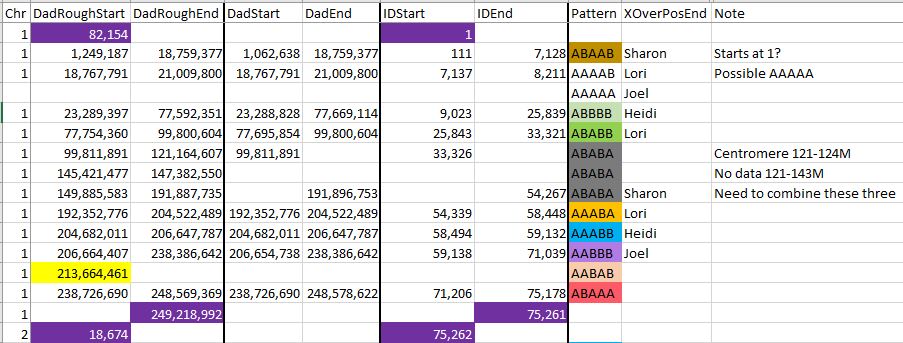
This time, I want to add ID’s to my patterns, so I’ll add two columns to my old Pattern Spreadsheet in Excel:

Rather than do formulae for each pattern again, I’ll just scroll through my table to see if I can finesse the Pattern boundaries and add Position IDs.

Finessing Pattern Boundaries

Here is an example at Chromosome 1 in the 77M range. There I had a change from ABBBB to ABABB. In my previous query, I only looked at Dad patterns where all the alleles were filled in. However, in the original pattern, we can infer the pattern even when alleles are missing.

Previously, I had the change at the top row where there is a full pattern. However, in going from ABBBB to ABABB, we only need the first three positions to identify the pattern. And actually, we only need position 2 and 3 to identify ABABB. At ID 25839, there is an AGG??? Pattern. This has to be in the form of ABBBB. Then 4 lines later, is ?AG??. This has to be an ABABB Pattern. Here is how I noted the change in the 77M range on my Excel Dad Pattern Spreadsheet:

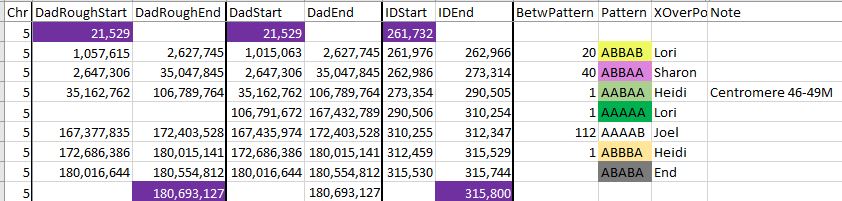
The DadStart and DadEnd columns have the refined Position numbers.

Refined Chromosome 1

  • I had noted previously a possible AAAAA Pattern between AAAAB and ABBBB. It turns out that that is required. This is because to go from AAAAB (same as BBBBA) to ABBBB would require two changes. Only one change is allowed at a time. I will need to fill in the Positions and IDs.
  • The three ABABA Pattern areas need to be combined into one. They occur in a Centromere and in an excess IBD area. The Genealogy Junkie has a good Blog on that topic. I downloaded a file she had with the exact areas.
  • I added the IDs for the start and stop of the Chromosome as tested as well as the start of the next Chromosome. These are highlighted in dark purple.
  • Only 22 chromosomes to go.
Chromosome 2 Refined

Here I added a new column. This is the number of IDs or SNP positions between patterns. Note that there is a negative 4 in one case. This was an odd case where the two patterns at the crossover were inverted. I didn’t know what to do there, so I left it as is. There is a Centromere from 92-95M, so I will combine the two AAAAB Patterns that I have when I create the clean version of this table.

Chromosome 4 refined

Here I had to add a green AAAAA Pattern to make this work. Note that I am getting fewer crossovers.

Chromosome 5

Here is another case where an AAAAA Pattern is needed:

The pattern is needed between AABAA and AAAAB for two reasons. For one, there is a large gap between the end of AABAA and the beginning of AAAAB. Also, to go from AABAA and AAAAB requires two changes and only one is allowed. That requires an intermediary step of AAAAA between these two patterns [AABAA > AAAAA > AAAAB].

Here is Chromosome 5 completed:

The addition of the AAAAA Pattern results in the addition of two crossovers. Another note is that I could have had the first pattern start at the beginning of the Chromosome and have the last pattern end at the end of the chromosome. That is because there is not much room there for other crossovers.

a chromosome 8 Decision

The issue here is the two AAAAB Patterns in a row. Should they be combined or should I add an AAAAA Pattern between the two AAAAB’s? I’m going with combining. The reason is that if I put an AAAAA between the two, that would give Lori two paternal crossovers in a fairly short span. This does not happen in nature – at least in the middle of a chromosome. This would be like inheriting a 2 cM segment from a grandparent.

Chromosome 9 decision

Lori has two crossovers in a row, which is not ideal. Then there are two ABAAA patterns in a row. I decided to combine these. This is because when I look at the table, there is a centromere in there and a lot of missing SNPs. If I did create an AAAAA pattern, that would result in two close crossover for Sharon.

Here is the cleaned up version with the rogue SNPs taken out:

Missing Pattern Chromosome 10

There is a missing pattern between Lori and Jonathan’s first crossovers. AABAA > ABAAA is two changes, so I need to insert an AAAAA Pattern between the two. This will result in two new crossovers: one for Heidi and one for Sharon.

Chromosome 11 – Halfway?

The good news is that I’m at about 2/3 of the way. I have over 900,000 locations and Chromosome 11 brings us past the 600,000 mark. Note again the need for an AAAAA Pattern between the last two patterns. That will add a Lori crossover and a Jonthathan crossover, so they won’t be left out.

Chromosome 12 patterns

Chromosome 12 looks like it is missing a lot betwee ABBBB and AABAA. However, it is just missing an AAAAA. That is because ABBBB is the same as BAAAA. The progress goes BAAAA > AAAAA > AABAA. As it turns out the crossovers that have to do with transposing relate to me (Joel). The extra crossovers go to me and Heidi.

Here are the numbers filled in for Chromosome 12:

Sketchy Chromosome 13

I note that Chromosome 13 is a bit sketchy, with no identified sibling crossovers. It appears that AAAAA Patterns are needed here also.  There is about a 4M space where there is room for an AAAAA Pattern between 24M and 28M. There is also room after the AAAAB Pattern which would give Lori another Paternal crossover. This last crossover is shown in Gedmatch:

These are matches of my father’s first cousin to myself and four other siblings. This shows Lori’s crossover on the bottom match. As all siblings match to the end of the Chromosome, that would be the AAAAA Pattern.

Here is the finished Chromosome 13:

Lori’s crossover as shown in Gedmatch shows on my table at about 90M. Keep in mind that Gedmatch uses Build 36 and my table is in Build 37.

Chromosome 21: Refinement Example

Here is an example of a refinement. In my initial query, I was looking for patterns that were filled. However, in going from AABBA to ABAAB (which defines my crossover), it is the same as going from BBAAB to ABAAB. The only change in pattern is in the first three letters: BBA to ABA. We can see that change here even though the last three letters are missing:

Chromosome 22: Extra AAAAA needed

On Chromosome 22, there is a lot of room at the beginning of the Chromosome to put in an AAAAA Pattern:

There are about 5M SNPs between the start of the Chromosome (16M) to where the AAABA Pattern starts at 21M. I have 4 of my siblings mapped out using visual phasing:

This shows on the paternal side (Frazer) that there is an AAAAA Pattern. That is represented above at the start of the Chromosome in blue. I am just missing Lori. Without looking at all her results, I see she has a full match with Heidi at the beginning of the Chromosome:

And here is the last Paternal Chromosome finished:

It was a lot of work, but now I have what should be the start and stop points for all the Paternal segments for me and my four siblings.

Summary

  • I needed sequential IDs for my Access Queries to fill in missing alleles
  • To do this I needed to go back to the beginning and re-import the raw data for six people
  • I created a table for five siblings showing where they got their paternal and maternal alleles based on three principals.
  • I went back to my Paternal Pattern Table and refined what I had already done
  • I also added IDs to my Paternal Pattern Table
  • Next up is to look at the Maternal Pattern Table and start filling in blanks using MS Access


Part 4 – Raw DNA From 5 Siblings and a Mother – A Problem with Filling in the Blanks

In my last Blog, I looked at Maternal and Paternal Patterns created by initial phasing of my raw DNA. The Paternal side patterns were pretty complete, but I didn’t have much on the Maternal side. I summarized the patterns I found in a spreadsheet. I added siblings’ crossovers where found and added start and end positions on each chromosome where found.

Filling in the Blanks

  • First I made copies of my Mom and Dad Spreadsheets
  • Then I cleaned them up, taking out the Patterns that were only at one location (one SNP)
  • Then I used a filter to get the patterns.

The AAAAB Pattern filter on the Paternal Patterns spreadsheet looks like this:

On the Maternal Table, it looks like this:


I’ll start with the maternal Patterns as it will be easier. First I copied that Table I was working on to create a new Fillin Table called tblFillinStep1.

Here is what I portion of the Chromosome 10 AAAAB Maternal Pattern looks like:


In my previous analyses before I had 5 siblings tested, I had sequential ID’s. This made things easier in choosing patterns. Now, however, I am having trouble getting the ID’s sequential. This is probably due to my adding the extra alleles. My options now are to update the missing alleles by hand or create queries to update them.

Just Like Starting Over – a New Access Database

I decided to try importing all the raw DNA files into a new Access Database. This time I won’t let Access assign the key data field. I’ll use the rsid as the key data field. Perhaps then I can assign a new ID that will apply to the merged V1/V2 AncestryDNA dataset.

One problem that I’ve noted with the AncestryDNA downloads is that they only give you a date on the filesname. There is no indication in the file or in the file name of who the data is for. That means that it is important to rename your files. I uploaded my sister Heidi’s results to Gedmatch on 26 April 2015, so that is a clue. I see an AncestryDNA zip file from 25 April 2015, so that is a clue. I guess I’ll add her name to the file now!

The Clean start

Here is the Access Database with just 5 tables:

Here’s my Query to create an AncestryDNA V1 Raw Data Table:

I see in my results, I got more lines than last time. I checked and I forgot to only include Chromosome 1-23. I corrected that and got the 700,153 lines as before. I did and analogous query for Jon and Lori and got 666,532 rows.

All V1 Results plus the v2 results where they are they match v1

Next, I’ll create a Query between the two tables I just made.

This will have a right hand join. As stated above, it will produce all the V1 data and only those records from V2 where they equal V1. That brings in Jonathan and Lori into the V1 results. I made this data into a new table.

Finding v2 data not in v1

Next I want to add only the V2 part that isn’t in V1. When I get this, I can add this to my query to get all the results. This is the query that I couldn’t remember how to do last time. I put V2 on the left, with a right hand query.

This gives everything from V2 plus the V2 that equals V1. However, the trick is that I set V1 to ‘Is Null’ which takes out the V1. That should give only the right section of the peach colored circle below.

For some reason, my new number for the right entire circle is 666,532. The new query results is the right hand circle minus the overlapping data which is 242,494. I’ll append this query to the table I made with my previous Query. I renamed this table as tblV1andV2 and it has 942, 647 rows.

Next, I want to sort the table and add an ID.  I copied the structure of the table to a new table. Then I added a Position ID (Pos ID) with an autonumber. Then I made a query to append the old data to the new table with the autonumbered Pos ID. This gave me what I wanted but not in the right order. So then I used the sort function to get the table in the shape I wanted:

I can tell the table is right by going to the last record:

Before the last record would include the V2 alleles that were added but they weren’t sorted. This long process gives me a sorted ID in the same relative position as the sorted Chromosome positions. The reason I need that is to describe my patterns  in a simpler way than by Chromosome start and stop.

Summary and Next Steps

  • Going down the road of filling in patterns, I found something that I needed to correct in an earlier step
  • This caused me to start afresh with cleaner tables.
  • I was able to add a unique ordered Position ID to the combined V1/V2 table
  • This position ID will be used to identify each Pattern for filling in missing alleles
  • However, I have to re-do the patterns. This time, I will include the Position ID in the start and end of each pattern in my summary of Mom and Dad Patterns.


Another DNA Tested Dicks Descendant

I was recently contacted by Eric who told me about another Dicks descendant named Clayton. Clayton tells me his grandfather was Leslie Dicks from Harbour Buffet. That is good news as my wife’s Dicks ancestors must have come from Harbour Buffet also.

Here is the match between Clayton and my wife’s 1/2 Great Aunt Esther:

Next, I checked to see if Clayton matched my mother in law. He didn’t. Esther and my mother in law, Joan match on Esther’s paternal side. The fact that Clayton and Joan don’t match could mean that Clayton matches Esther on her maternal side:

Here is where it gets a bit tricky as Esther has Dicks on both sides. I am leaning toward Clayton matching on the Jane Ann Dicks side.

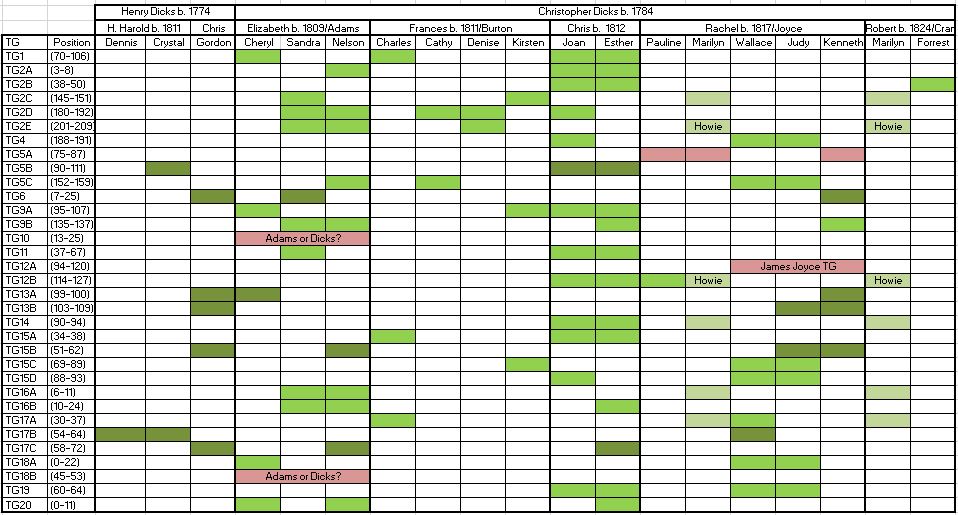
Here is the existing summary of Dicks Triangulation Groups:

I note that Clayton’s matches are in places other than identified Dicks Triangulation Groups (TGs). That doesn’t mean that he doesn’t match. That just means that I can’t prove that he does match based on existing TGs.

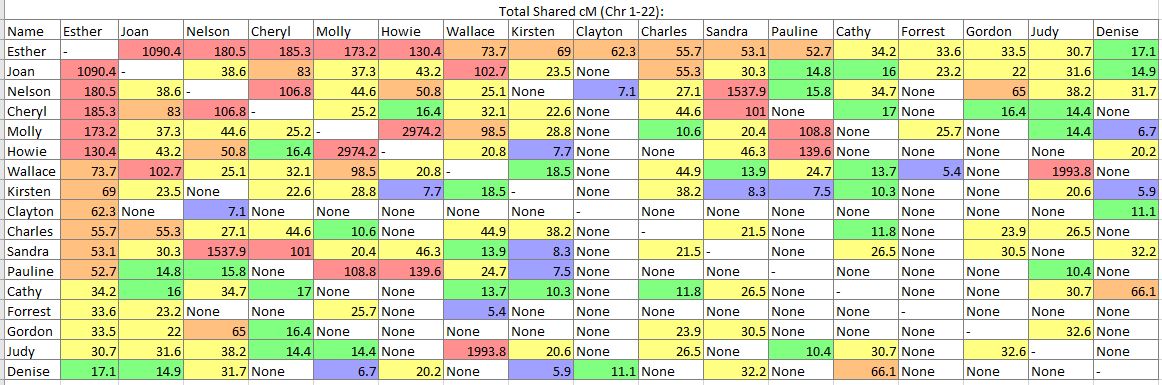
Next, I compared Clayton with other Dicks descendants in the 3D viewer at Gedmatch:

Look at all the ‘None’s under Clayton. This tells me either that his match with Esther is on the non-Dicks side, or that he matches a Dicks line that has not been identified well.

Clayton’s Genealogy

From my emails, I get this sketch of Clayton’s ancestors:

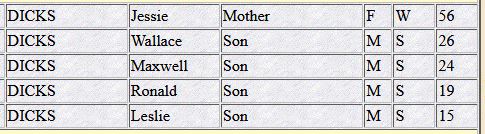
Clayton says that John at the top was supplied by Eric. One of the best places for Newfoundland research is called Newfoundland’s Grand Banks Genealogical and Historical Data. At that site, I found a 1945 Census of Harbour Buffet with a Leslie Dicks:

Going back to 1935 shows about the same information:

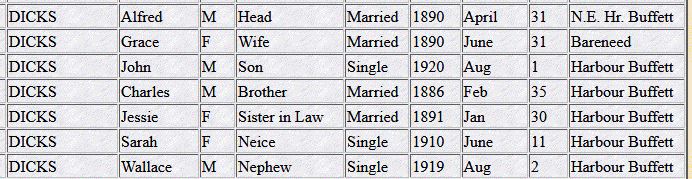
The only difference being that Ronald is no longer with the family. Also the ages don’t seem to add up all the time. Let’s go back to the 1921 North East Harbour Buffett Census:

This is quite helpful as it gives more relationships, month and year of birth and place of birth. And we finally find Charles.  Here we see that Charles is the brother of Alfred. The two families apparently lived in the same house that year.

Next, I was able to find a marriage record for Charles near the end of 1908:

The best I can figure is that Delilah and Jessie are the same person. I note that one of the witnesses was Elsie Kirby. Esther has Kirby ancestors.

Second Cousins, Twice Removed?

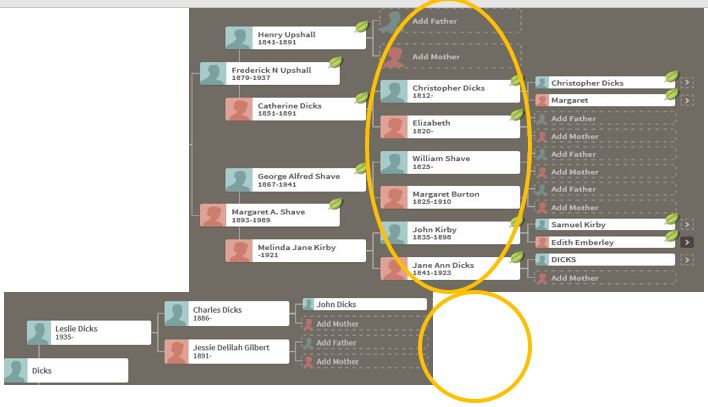
What I notice when doing the genealogy is that Clayton is off by two generations from Esther:

If Clayton and Esther are 2nd cousins twice removed, then the yellow circles indicate where the match could be. Unfortunately, for Clayton, that is in the area of eight unidentified 3rd great grandparents. Actually one of Clayton’s 3rd great grandparents is a Dicks, but the DNA match is not leaning toward that name, from what I can tell. Due to a lack of match with my mother in law, and lack of matches with other Dicks descendants, the match would most likely be on the Shave, Burton or Kirby Lines. In my spreadsheet of matches for Esther, I note that Esther’s matches with Clayton seem to coincide with her Pafford matches. I have noted that the Paffords have Shave ancestors. That may be something to look into. This all confirms the inter-relatedness of Harbour Buffet people.

Summary

  • Esther and Clayton match by DNA and both have Dicks ancestors
  • Analysis of the DNA match show that the match is not likely on the Dicks Line
  • Esther and Clayton also share ancestors from Harbour Buffett
  • Esther and Clayton share matches with the Pafford Line
  • Further investigation of common Pafford matches coupled with further research into Clayton’s ancestry may result in a common ancestor.
  • Also common ancestors along Clayton’s Gilbert Line need to be explored
  • Autosomal DNA can and will come from any ancestor, so all ancestors need to be evaluated.

Addendum

After posting this Blog, I had a few comments. Here is an update from Eric:

I found some of the Charles Dicks data on various trees from ancestry.com.    They indicate he was married to Jessie Trowbridge  (this could be a variation of Strowbridge).    The Delilah Gilbert marriage seems to be a new discovery.    I dug a bit more and I think only Sarah from 1910 was a child of Delilah.    Delilah dies 5 Feb 1917 of TB.   Charles marries Jessie on 29 Nov 1918.

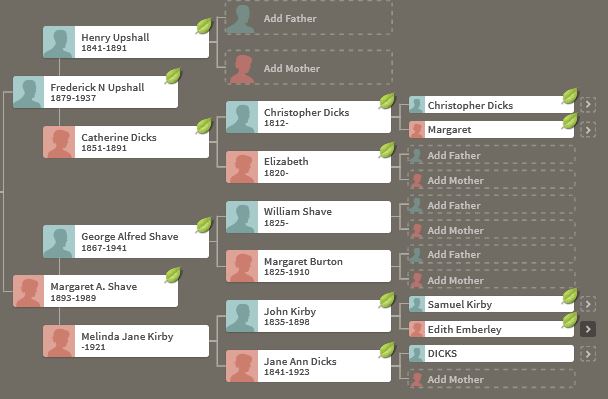
 Just based on the ancestry trees without further research, it appears that the father of Charles was John and John was of Christopher 1829.    That should make John the brother of Catherine who married Henry Upshall.    Because John Dicks apparently married Mary Ellen Shave, Esther could very well be related in more than one way.   The common DNA on chromosome 1 seems to triangulate with A144898 Tracey Crann.

His comment fits well with Molly’s comment:

In reference to the Gilberts, Delilah’s mother is Sarah Jane Kirby who married Thomas Gilbert. Delilah is a sister to my husband’s grandmother, Mary

It looks like I had a 50/50 chance of guessing right on Delilah and Jessie and guessed wrong. Here is a quick fix on the small Ancestry Tree I made for Clayton:

Here is Charles’ 2nd marriage, with Charles listed as [W]idower:


Part 3 – Raw DNA From 5 Siblings and a Mother – Patterns

In my previous Blog, I looked at Whit Athey’s Principle 3 for my mom, my 4 siblings and myself. Based on that Priniciple and the previous 2, I phased our DNA up to a point. The next step in the phasing has to do with patterns.

Patterns

The patterns I am talking about are the patterns that the five siblings receive from either their mother or father.  For example, an AAAAB pattern means that the first 4 siblings received the same allele and the fifth sibling received a different one. I had mentioned previously that the patterns should be in this form:

  • AAAAA
  • AAAAB
  • AAABA
  • AAABB
  • AABAA
  • AABAB
  • AABBB
  • ABAAA
  • ABAAB
  • ABABB
  • ABBBB

The first situation is a special case as this situation can happen within the other patterns ‘by accident’ as Athey puts it.

AAAAB Dad pattern

First I’ll look at a query to find an AAAAB pattern.

That Query results in this:

Except there are actually over 8,000 lines. I summarized the rough starts and stops in an Excel Spreadsheet:

This part can get a bit tedious. In Chromosome 2, I noted a possible break between 89 and 96M, so I’ll need to keep an eye on that. Highlighted in yellow are single patterns which may or may not be significant.

quality check

I took my AAAAB Query results and put them into an Excel spreadsheet. Then I subtracted the previous position number from the current position number to see where there were gaps. Then I filtered the gap to 1,000,000 or more positions:


This is my gap analysis. I highlighted the 7 million position gap where I put in an extra segment on the AAAAB pattern. This points out some of the single AAAAB patterns also.

mapping the initial results

Let’s look at Chromosome 13 between 28 and 87M. With an AAAAB pattern, that means that Joel, Sharon, Heidi and Jon match the same paternal grandparent. Lori matches a different one. However, we don’t know which paternal grandparent without a reference cousin. Fortunately, I have one. He is my dad’s first cousin. He would match on my paternal grandfather’s side. That grandfather is James Hartley, b. 1891:

Paternal cousin Jim matches the 5 siblings here:

As you may guess, Lori is on the bottom (#5). She has a crossover at about 85.5M according to Gedmatch. That means that before 85.5M she is matching on my father’s mother’s side: Marion Frazer. So, if I wanted to, I could start to map Chromosome 13. From 28 to 87M, I could say that 4 siblings got their DNA from their paternal Hartley grandfather and one sibling, Lori got hers from her paternal Frazer grandmother.

Further, I would expect an AAAAA pattern starting at 87M based on the gedmatch browser results above. The bad thing about an AAAAA pattern is that there is some missing DNA for the other grandparent. In this case, the Frazer DNA is lost on the right side of the map below. Another point is that these patterns change one letter at a time. So it makes sense that an AAAAB would go to an AAAAA. For example, an AAAAA would never go directly to an ABABA.

Here is a paternal only map of Chromosome 13 based on our very initial results:

aaaab Mom pattern

I notice that the formula that I used to find the AAAAB Dad pattern, I can move over to the mom side. So I might as well do this while I’m thinking of AAAAB pattenrs and put the results in Excel.

I randomly used Heidi as the ‘A’. So Lori not matching Heidi becomes the ‘B’. The results for this maternal query was much smaller with only 189 lines.


This was a lot easier. The Mom and Dad Patterns don’t interrelate with each other, so I have them on separate worksheets. Note that there is the same AAAAB pattern in the same starting place on Chromosome 13 as there was on the paternal side. This is a coincidence and the starting spot is a coincidence. This is just a rough number now and may be refined later. I could make a map of this also.

Here is a cousin on my mom’s father’s side:

Here she matches Joel, Sharon, Heidi and Lori from about 74-99M. Here is a map drawn on the Gedmatch browser and raw data phasing:


This shows what a AAAAB pattern looks like that is both paternal and maternal between 28 and 45M. I also show two crossovers for Lori: (Frazer to Hartley) and (Rathfelder to Lentz). In addition, Jon has to have a crossover from Rathfelder to Lentz and Lori has to have another crossover from Lentz to Rathfelder somewhere in the white spaces. There is a reason that I could tell the maternal A’s of the AAAAB pattern were Rathfelder even though our cousin match did not overlap that area. It is because the patterns do not change that fast as I explained above.

Now that I know which sibling has one of the paternal crossovers I can mark it on the Dad Pattern Spreadsheet:

I name the crossover column in the spreadsheet for the end of the pattern position, so it will be clear where it is. This is the ultimate goal of the process: to find the crossover locations and assign them to the siblings. Once this is done a map may be drawn for all the siblings.

The Next Step

In the next step, I could fill in the missing alleles between the Start and End positions of the AAAAB patterns. Here is how that will be done:

The highlighted row is where the AAAAB Pattern starts. Basically, what will happen is if there is at least one Allele in the first four positions, I will be able to fill in any of the other alleles in those first four positions with the same allele. However, in the last row, for example, there is just one G in the last position. We don’t know if the other four alleles will be a G or another letter. The row that has TTT??. We know that we can fill in the fourth T to TTTT?. However, the last allele we don’t know if it will be a T again or a different alelle. So we also need to leave that space blank.

However, I want to make sure I have all my patterns right, so I will look at all the patterns first and reconcile them.

AAABA Pattern

If I drew my map correctly above, I will be expecting Lori to have a maternal AAABA pattern on Chromosome 13. This should change to an AAABB pattern at about position 95M. I’m already on a maternal query, so I’ll start there.


I used Heidi again as the A. Now Jon is the B that is different than Heidi. I was surprised with the results as I only had this maternal pattern in Chromosome 1 and 23:


My prediction of a Chromosome 13 AAABA Pattern did not come true. I wonder what went wrong?

Paternal AAABA Pattern

Here is a partial summary of the Paternal AAABA Pattern:


On Chromosome 11, we see the AAABA pattern twice with an AAAAB pattern in-between. To go from an AAAAB to AAABA there has to be a transition pattern: either AAAAA or AAABB. Hopefully this prediction will be correct! That leads me to the AAABB pattern.

AAABB

This pattern requires a slight modification of my previous query:


This pattern is adjacent to the AAABA Pattern, so I will be able to assign some crossovers:


These crossovers belong to Jon and Lori as Jon is in the next to the last position of the patterns and Lori is in the last position of the patterns. Note that in Chromosome 19, Lori goes from an AAABA to an AAABB at about 5M. However, there is a rogue AAABB in the AAABA pattern at around 3M. That could be due to a misread or a mutation. I’m not sure. Jon has a crossover on Chromosome 8. These are all Lori and Jon crossovers, due to the positions of the pattern changes we are looking at. The changes are all in the last two positions.

AAABB Maternal

I’m still getting very few crossovers here. I’m not sure why:


I’m not sure why the maternal side is not keeping up with the paternal. I have no crossovers here yet.

AABAA

Following my alphabetical reasoning, AABAA is my next pattern. I’ll start with the maternal:


I changed to having my [Joel’s] allele the ‘A’ in the Pattern. The results look right:


It seemed like there was a break in Chromosome 5 between 46 and 50M.

AABAA Paternal


On Chromosome 5, there was a gap similar to the one on the Maternal side.

Centromeres

According to ISOGG, these are the Build 37 Centromeres:

This is good information to have. I assume that the Centromere is not counted, so I will ignore the Chromosome 5 missing area and make a note that the centromere is there. This also makes a difference on all the results.

AABAB: Are We There Yet?


Here are Heidi’s first crossovers. I’ve also heard of crossovers referred to as cut points. I am noting where the centromere is – though not quite spelling it correctly above.

Here is the Maternal AABAB. I am still annoyed that there are so few patterns. They seem to be missing for some reason:


I suppose, if this trend continues, I could do the project over and add in my mother’s and my FTDNA raw DNA results.

AABBA

I didn’t find any AABBA Patterns on the maternal side. However, that was with a query using my results as A. However, from my previous Blog, I recall this chart:


This showed that on the Mom side, Jon and Lori had the most alleles. I’ll run the query again this way:
 

Still no patterns.

Here are some more Dad Patterns:


However, there are a few problems. Chromosome 17 is missing a pattern. I can solve this by looking at the original table.


Here the pattern is AABAA.

The next problem is that there are two patterns in one spot on Chromosome 22. I ran pattern AAABA again and see it should have ended earlier:


Here is the right answer below that also shows a Heidi crossover at that location:


AABBB

Paternal


Maternal side

Still nothing.

ABAAA

Maternal side


Paternal

This side had more patterns.

ABAAB

Had several of ABAAB Patterns on the dad side, but only one on the mom side. I think that there is a fill-in step that fills in the mom side from the dad side that may correct this later.

ABABA, ABABB, ABBAA

I did notice a Dad Pattern discrepancy on Chromosome 6:


There are three single patterns, I figured were discrepancies. However, there appeared to be a longer AAABB Pattern within the ABBAA Pattern. This is where it helps to look at the raw data.


The blue section is the start of the AAABB rogue pattern that I had. However, a closer examination reveals that this pattern is not continuous from position 30514810 to 30594827. Between those two there are a lot of ABBAA patterns. This is clear at position 30544401. However, this is also clear wherever the first 2 alleles are different. For example, on the last line, I see GT???. This will be filled in with GTTAA as this is within the ABBAA Pattern area. So what happened was that there were two single AAABB patterns. When I did the query for these, it looked like the pattern was continuous, but it was not. Based on the above, I’ve modified my Dad Pattern Spreadsheet to show two single discrepancies:


I won’t overwrite this information, but I will keep it in mind for later in case it is important. If this was a real crossover, it would be mine. However, crossovers in the middle of a chromosome don’t change that fast for one person on one copy of their chromosome.

Some of the Dad Pattern Crossovers are starting to fill in:


Starts and Ends of Chromosomes

At some point, it is important to know where the Chromosomes start and end. The testing companies don’t always start at the beginning positions of each chromosome. The ends are different also based on the lengths of the chromosomes.

I was able to find what I was looking for using a min/max Query in Access. I took my table with the 900,000 plus alleles and made a query that looks like this:


When I run the Query, I get this helpful table:

This tells me the start and end locations for each of the chromosomes that I am looking at.

I put this into Excel and highlighted the information in purple. Then I sorted it into my mom and dad pattern spreadsheets:


Now, I can tell that I am near the beginning and the end of Chromosome 20 with the pattern locations. However, on Chromosomes 21 and 22, there is still room for more at the beginning of those Chromosomes. As the Chromosome 20 patterns are complete, this also tells me that my sister Lori has no paternal crossover on Chromosome 20.

ABBAB, ABBBA, and ABBBB

These are the last three patterns, not counting AAAAA. I finally have one crossover on the maternal side. It is on the X Chromosome:


I have a mess to clean up on Paternal Chromosome 2 :


There appear to be two patterns occupying the same space between 123 and 128M, which is not good. I’ll take a look at my Table: It appears that the AAAAB at 127,841,390 is a one-time occurrence. Here is my correction:


Note that there is still a gap at AAAAB. There may be an AAAAA Pattern stuck in there.

Lessons Learned and Next Up

  • It is good to document the process in case something goes wrong
  • The start and end points are needed for each chromosome
  • The start and end for each centromere is needed also
  • Attention is needed for the location of each crossover and who it goes to as this is a main point of all the work.
  • Changes along each copy of the chromosome are gradual. They happen one at a time and those one at a time changes correspond to siblings.
  • Next up is filling in the blanks. That was discussed briefly in this Blog.

Raw DNA From 5 Siblings and a Mother: Part 2

In my previous Blog, I started to phase 5 siblings based on their raw data and the raw DNA data from their mom. I looked at homozygous results. That is, when each sibling had the same allele, it meant that they got one of each of those same alleles from each parent. Also when my Mom had homozygous results, say GG, she had to have given one of those G’s to each of her children in that location.

I am using an Athey paper on Phasing from 2010. I looked at his first 2 principles in my previous Blog. Here is Principle 3:

Principle 3 — A final phasing principle is almost trivial, but it is normally not useful because there is usually no way to satisfy its conditions: If a child is heter
ozygous at a particular SNP, and if it is possible to determine which parent contributed one of the bases, then the other parent necessarily contributed the other (or alternate) base.
Heterozygous is a fancy term meaning two different alleles. This principle also lends itself to MS Access, but it requires a few more steps. In my case, the known contributor is my Mom. So in the case where my Allele 1 is different from my Allele 2 and I have an allele from mom. My allele from dad will be my other allele. I just have to make a formula out of that. It sounds like a high school math word problem.
First, I copy my homozyous allele from mom table to a new table. This is in case I make a mistake and have to go back to my previous table. I’ll call my new table, ‘tbl5SiblsHeteroMomtoDad’. Again, I’ll use an Update Query, to update the table with the new ‘from Dad’ alleles. There shouldn’t be an allele from Dad in any of these situations, as we have only put those in where the children were homozygous.
I used the Access Expression Builder to get my heterozygous results:
Here is the second part of the criteria:
This part says that where I’m heterozygous, and my allele from mom was allele1, put allele2 in as from Dad. Before I run this, I presently have 485,834 alleles from Dad. When I go to run the Update Query, I get this message:
After I run the Update Query, I now have 533,517 results. This is the same as 485,834 plus 47,683, so I assume that I am on the right track. I next have to run this one more time for myself for the case when my allele from Mom is allele2 and my allele from Dad would then be allele1. Then I will run this eight times for my four siblings.
5 Phased Sibs Update: V1 and V2

I did all my Principle 3 phasing and here is the update:

What is a little surprising is that Jon and Lori who were tested as AncestryDNA V2 had more Mom-phased alleles. I did mention above that they were getting extra phasing on SNPs that they hadn’t tested from their mom, but I didn’t realize how much.

I mentioned in my previous blog that the combined number of SNPs tested between V1 and V2 is 942,269. That number represents the merging of V1 and V2.

Also some of the specifics are a bit off. For example, my numbers include phased results for myself from my dad (16,536) on the X Chromosome. Well, I didn’t get an X from my dad. This means that the JoelfromDad and JonfromDad numbers above are a bit high.

Next up: DNA patterns


Playing With Raw DNA Data From 5 Siblings and a Mother: Part 1

In many past Blogs, I have written about the raw DNA data of my siblings and my mother. They can be searched in my Blogs under “Raw DNA Data”. First, I looked at three siblings compared with our mom. Next I looked at the results of four siblings. Now I have a 5th sibling tested.

Phasing With Raw DNA Data

The reference I use is Whit Athey’s 2010 paper called, Phasing the Chromosomes of a Family Group When One Parent is Missing.

Basically, Whit uses certain rules and iterative processes to fill in blanks of what the parent’s alleles would be as passed down to their children. From these lists of alleles one can see patterns. From the patterns, one can see where the maternal and paternal crossovers would be. The process is similar to the visual phasing process developed by Kathy Johnston. However, Kathy’s version does not require the use of a parent. Also Kathy’s version does not require looking at hundreds of thousands of alleles.

Lori’s raw data

The fifth sibling in my family to have an autosomal DNA test is Lori. She tested at Ancestry DNA. First I unzipped her results. They open in notepad. I then opened those results in Excel, so all the data would align in columns.


The columns are a SNP ID, the Chromosome, the position on the Chromosome in Build 37 and allele 1 and 2. I added Lori to the allele columns, so I could distinguish between siblings when comparing. One quirk is that when I convert from text to Excel, the blanks in the allele columns go to zeros. I then have to search for all zero’s in those columns and replace them with blanks. The blanks are no-calls.

This data shows Lori’s alleles unsorted. We do know that where she has a C and a C, that one is from her dad and one from her mom. However, where she has an A and G on Line 380436, we don’t know which is from her dad and which is from her mom.

Lori’s DNA in MS Access

I didn’t realize I could upgrade my old computer to Windows 10. It was just new enough to do that. When I did that, I rented Office 365 which includes Access. Access is good for comparing large amounts of data. Lori has 666,531 lines of data. There are 2 alleles for each position. So with six sets of data, that is a lot of alleles. I figure about 8 million. However, the crossovers occur at a distinct point. Finding crossovers is like finding a needle in a haystack.

First I import Lori’s Excel File into Access. It looks pretty much the same there. Except that Access adds an extra ID to keep track of things. Next I want to make an Access Query based on Athey’s Principal 1:

Principle 1If a person is “homozygous” at a location that is, having the same base on each of the two chromosomes of a pair, then obviously at that location it is possible to know with certainty that both chromosomes of the pair have that base at that location, but this is an almost trivial form of phasing.

Principle 1 in Access Query form

Here is Lori’s first query in design view:

It’s a bit small. All I did is put all of Lori’s imported raw data into a query. Then in the last columns I created a field called Lorifromdad. Then there is a formula that says if Lori’s allele1 is the same as her allele2, then put in allele 2. When I run that query, I get this:

Next, I want Lori from mom, which will look the same as Lori from dad. This is easy. I can just copy the same formula and give it a different name:

Also, I forgot that Ancestry has other DNA information in the raw data that I don’t need so I need to restrict the data to Chromosomes 1-23:

It’s nice to check the results to make sure you are getting what you want. This looks pretty simple, but Access does this operation over 600,000 times, so it saves a lot of time.

Next I add Jon:

I have the same kind of formula to Jon’s homozygous results from his mom and dad. I made an equal join in the query above. Note that Jon and Lori both tested with AncestryDNA V2. That means that they have the same SNPs tested. My 2 sisters, my mom and I all tested with V1. So we have to be careful with these joins. If I was to have used an equal join between a V1 and a V2 test, I would only get the results which were common to both.

When I view the query above, it looks like this:

Note that on the third line, Lori has homozyzous results and Jon does not.

Adding AncestryDNA V1 and V2 raw results

The next step is that I would like to carefully add the V1 homozgous results to the V2 homozygous results. Also I would like to make a large table out of what I get.

  • On my existing V1 Homozygous Table, I have 700,153 rows
  • On my new V2 Homozygous Table, I have 666,153 rows
  • The V1 SNPs that are the same as the V2 SNPs are 424037 rows or results

That means that I would like to have a table that has the V1 results plus the V2 results, minus the results in common, so that should be 942269 rows. Somehow I ended up with such a table. I know that’s not very scientifically reproducible, but that is what happened. I’m not sure how important it is to have the V2 results as they won’t phase with my mom. However, I’ll have them in case I need them.

The results of the query left the two V2 siblings’ results on the bottom of the table, but they can easily be sorted:

Principle 2

According to the Athey paper:

Principle 2 — If data from one of the parents are available, and that parent is homozygous at a SNP location, then another almost trivial phasing is possible
since obviously that parent had to send the only type of base s/he had at that location to the child.


This principle lends itself to Access. Basically, I want to tell Access that if Mom has the same two alleles, then show that each child got that allele from her. However, there are a few considerations. If mom has no-reads and the child doesn’t, then we don’t want to overwrite a good read with a bad one. The other consideration is, if mom had an incorrect read and the children had a correct one, we wouldn’t want to overwrite that either. However, I don’t know how rare that is. I guess it is pretty rare. I did a query to check and didn’t find any such instance. So that is one less thing to worry about.

Principle 2 in access

I want to say if mom has two non-null alleles that are the same, put that allele in as from her for all her children. Looking at my old queries, it looks like I need an Update Query. First, I copy my previous table of results to a new table called tbl5sibsMomHomozygous. I’ll try this query:

Before I update, I’ll take a view:


If I take out the ‘And is not null’ statement, I get the same results. I then changed the syntax to ‘Is not Null’ first and got one less record: 481977. It makes me wonder what that record is? I’ll use my second wording as it may be more accurate. Next I hit the !Run button and it updates the table I recently made.

This will give V1 mom alleles to Lori and Jon even when they weren’t tested for them. Here is an updated table view of just the alleles from Dad and the alleles from Mom:

I picked these results at random about halfway down the table. It looks like about half the alleles are filled in already. So now my siblings are more than half phased. The first 5 rows are alleles from Dad for each of the 5 siblings. The 2nd five rows are alleles from Mom for those same siblings.

a pattern preview

The highlighted row shows a pattern from Dad and one from Mom. The first row also shows the same pattern. This is what we will be looking at later in more detail to determine crossovers on the maternal and paternal side. This is what I’ll call the ABABA pattern for both. Here it is coincidental that both the Dad and Mom patterns are the same. Obviously with 5 siblings, there will be a lot of different types of patterns:

  • AAAAA
  • AAAAB
  • AAABA
  • AAABB
  • AABAA
  • AABAB
  • AABBB
  • ABAAA
  • ABAAB
  • ABABB
  • ABBBB

Those are the combinations that I can think of right now. AAAAA is a special case. This could mean that all five siblings could share the same grandparent or sometimes an AAAAA pattern is that way by coincidence. Where the maternal or paternal pattern changes is where the crossover is. This pattern should be gradual. That is, only one letter should change in a pattern change. For example, ABABA may change to ABABB or AAABB. There are many possibilities but only one letter will change. The placement of the letter represents one sibling. So that sibling will own that crossover. For example, a maternal ABABA to ABABB change would represent a maternal crossover for Lori as she is in the last position on my table. The place where the A goes to a B is the location of the crossover.

Next Up

Next up is Athey’s Principal 3 as it applies to 5 siblings and a Mom.


Chasing Down More Rooney Connections

In my previous Blog on the Rooneys, I looked at how my wife’s Rooney ancestors may be connected to another Rooney line by DNA and genealogy. I came up with a proposed genealogy/dna chart that looked like this:

Triangulation With the Rooney DNA Match

Triangulation is when three or more people all match each other on an overlapping segment of the Chromosome. This happens on Chromosome 14. Here are the Rooney DNA match’s matches with my father in law Richard (1), his sister Lorraine (2) and Gaby (3):

A Triangulation Group (TG) indicates a common ancestor. In this case, I believe the common ancestor to be Timothy Rooney:

Jenny’s Rooney Connection

There is another Rooney connection. Jenny doesn’t match my wife’s family as strongly as the Rooney match in purple above does.

It looks like Jenny has also tested her brother. The above chart shows that Jenny is a second cousin to the Rooney match discussed in my previous Blog.

Virginia and Richard match Jenny on Chromosome 11 from about 118 to 124M on the Chromosome Browser:

The DNA I have mapped for Virginia and Richard corresponds to their Kerivan grandparent:

This Kerivan mapped grandparent is the same one shown in green on the genealogy/dna chart above. It represents Lilly Kerivan, daughter of Alice Rooney.

Just so we don’t leave out Jenny’s brother, here are some of his matches with my wife’s family on Chromosome 3:

These matches are with Richard, Virginia and John. In my opinion, each match between my wife’s side and Jenny would represent DNA from Timothy Rooney born about 1807.

Here is Richard and Virginia’s Chromosome 3 mapped out.

The Rooney match would be in a Kerivan segment. That means that the dark red segment is probably Kerivan. The blue and purple above are on my father in law’s mother’s French Canadian side.

More Rooney Genealogy: Are Timothy and Terrence the Same?

Jenny and and her 2nd cousin Daniel have in their trees as their first Rooney ancestor Terrence Rooney. That is not surprising considering the marriage record of their great great grandfather, John Rooney:

Above are the listed parents for John Rooney and his wife. The date of the record is May 19, 1851. The record is for the Intentions of Marriage, so this would have been soon before the couple was married. Here is a marriage record for a John A and Mary Rooney:

The date of marriage was listed as May 9, 1851. Here quite a few things seem off. The wife is now Mary Rooney rather than McDermott and both parents are Patrick. They are listed as being in Boston rather than Dorchester although both places are very close. Note that John is a mason here. After a bit of digging, it appears that there were two John Rooneys of about the same age that married two Mary’s of about the same age. Isn’t that confusing!

A proposed sketch of Timothy Rooney

My thought is that Timothy Rooney, son of John Rooney and Ann was born in County Leitrim around 1807. He married Margaret Ann Gorman around 1828. Around 1830, he had a son that he named after his father John. Timothy’s first wife likely died and he then married Ann Nancy Lilly probably around 1832. She had about 10 children between 1834 and 1851.  John took off for Boston not too long before he married in 1851. Timothy landed in Boston in 1858 with his wife and some of his children in June 1858:

The 1860 Census shows Tim and family in Waltham:

Timothy died in Newton at the age of 74 in 1881. His occupation was listed as mason.

Summary and Conclusion

  • The DNA leads me to think that Terence and Timothy Rooney are the same person.
  • If they were the same person, the timing would seem to fit in. He would have had time to have two wives giving birth to the children that we know of.
  • The fact that Jenny, John and Gaby have matches seem to reinforce that the DNA that these two families share focus in on Timothy or Terrence Rooney.
  • I can’t prove that Terrence and Timothy Rooney by either the genealogy or the DNA. However, the DNA does point to a common ancestor. Why couldn’t that ancestor be Timothy or Terrence?


Hartley YDNA and STR Tree: New Results

This Blog follows on my previous Blog on the subject.  In that Blog, I drew a two person 111 STR Hartley Z17911 Tree. Hartleys that are fairly close to me are assumed to be positive for the SNP Z17911 which was my terminal SNP.

When I look at the new Hartley results, I get the following Hartley Z17911 111 STR signature:

A few points from this new signature:

  • Previously, I was not able to have a 111 STR Hartley Mode. Now with three testers, that is possible. I fudged the mode for 576 as there were three different results: 17, 18 and 19.
  • The first Hartley on the list above is what I was calling the Bradford, West Yorkshire Hartley in the previous Blog
  • The second is the new tester with ancestor William Shepherd Hartley from Manchester, England.
  • The third on the list is me.

A New Hartley SNP

Previously, my terminal SNP was Z17911. Now there is a new shared Hartley SNP called A11132. Here is the SNP tree from the R-Z16357 Project web site:

Thanks to testing by another Hartley with Quaker Pennsylvania and NE Lancashire roots, I have moved down the tree past A11138 to A11132. I am guessing that other Hartleys that am related to by STRs will share this SNP. That means that the Hartley STR Mode I mention above, will also likely be the A11132 Mode.

Some Genealogy For the Newly Tested Hartley

This is part of what I was given for the ancestors of the New Hartley:

William was born in about 1851 in England. (1), Lancashire to be exact (2). His parents were Thomas Hartley and Hannah Shepherd (2).
I was able to find William’s Birth:
From there I found the 1851 Census:
This was a big deal as it shows that the father Thomas was born in the little village of Wray, Lancashire in the Northwest of Lancashire. Thomas’ wedding record was helpful in giving a middle name.
Name: Thomas Townson Hartley
Gender: Male
Marriage Date: 27 Mar 1826
Marriage Place: Manchester, Lancashire, England
Spouse: Hannah Shepherd
FHL Film Number: 1545585
Reference ID: pg152 ln456
From there I searched using the Lancashire Online Parish Search:
Baptism: 26 Aug 1804 St Margaret, Hornby, Lancashire, England
Thos. Townson Heartley – Son of Christopr. Smith Heartley & Mary
Born: 11 Aug
Abode: Wray
Occupation: Hatter
Register: Baptisms 1790 – 1805, Page 47, Entry 5
Source: LDS Film 1526204
Further searching lead to another Christopher Hartley ancestor:
Baptism: 3 Jul 1774 St Wilfrid, Melling, Lancashire, England
Christopher Smith Hartley – Son of Christopher Hartley & Alice
Abode: Wray
Performed at: Hornby Chapel
Register: Baptisms 1752 – 1781, Page 49, Entry 5
Source: LDS Film 1849660
Here is Wray and Hornby in NW Lancashire:

Here is where the Smith name comes in:

Marriage: 16 Dec 1752 St Wilfrid, Melling in Lonsdale, Lancashire, England
Christopher Hartley – Wray in this Parish
Ann Smith – Hornby in this Parish
Notes: X [in left margin]
Register: Marriages 1752 – 1754, Page 1, Entry 6
Source: LDS Film 1849660

Actually, the Bishop’s Transcripts show that Ann may have been Alice:

This is where my easy searching stopped. I did get further than I did on my own Hartley line. We now have a Christopher Hartley for our new YDNA tester probably born around 1725 who lived in Wray, Lancashire in 1752

The reason I go through all the genealogy is that it is interesting to match up the historic Hartley homelands with the DNA. Here is a map with our three testers:

To the upper left of the map shows a circle around Hornby for our new tester. My ancestors were just south of Colne and the other 111 Hartley STR tester had ancestors in Thornton, near Bradford. The distance between Thornton and Wray is probably no more than 35 miles as the crow flies.

Back To the DNA

With my new Hartley 111 STR Signature, I get this tree:

  • Again, it seems obvious to split the two groups by the 455 STR. 455 mutates 0.16 times every one thousand generations. I don’t know about you, but to me that seems like a pretty rare thing. My thinking it that this just happened once.
  • The next three slowest STRs are 540, 1B07 and 445. I had all those mutations, so that puts me by myself. Those three STRs are in the 111 panel, so I won’t be able to check those against other Hartleys until more Z17911 Hartleys test to 111 markers.
  • This groups Thornton and Wray together even though they are further away from each other geographically.
  • How could this tree be dated? If we take the Hartley Mode date to be the beginning of surnames, this could be around 1300 or 1400. A wild guess would be the that the Wray/Thornton ancestor could be about 100 years after that.

A New 67 STR Z179111 Hartley Tree

I say Z17911 Hartley Tree, because there are other Hartleys in other SNP groups that would not be closely enough related to be in a STR tree. First, we need a new 67 STR signature. This signature should be more accurate than the STR signature up to 67 STRs that was done for the 111 STR Tree. This is because there are more Hartleys that have tested 67 STRs.

  • I kept the Hartley mode for 455 as 11 even though it is technically 12. This is because at the low mutation rate, I didn’t think that it could have mutated up and down again in the time frame we are looking at. If I am interpreting the mutation rate correctly, there would be a 16% chance of this STR mutating in about 3,000 years.
  • In the previous analysis, I was the furthest away from the Hartley 111 STR mode. Here, I am the closest. This is because a lot of my differences were in the 111 STR Panel.
  • My inclination is still to separate the two groups of Hartleys by the slow moving 455 STR.

Here is the new 67 STR Hartley Tree:

  • What I was calling the Lancashire and West Yorkshire Hartleys, I’m now calling the Hartley 1 Line and the Hartley 2 Line.
  • I had already grouped Bradford, West Yorkshire and Hartley #3 by 449 and 576. Now I’m grouping our new tester with the West Yorkshire, William based on 389b and CDYb.
  • The Wray, Lancs Hartley and the W Yorks Hartley would be quite a ways apart from each other geographically. Yet they seem to be related by YDNA. Perhaps the Wray, Lancs Hartleys had their roots in West Yorkshire.
  • Joel and Quaker Hartley are the two that have taken the big Y tests. They are both also identified by the A11132 SNP.

Summary and Conclusions

  • Hartley YDNA has been in its infancy but is starting to grow. This is thanks to those Hartleys that have had Big Y tests and STR tests.
  • It would be interesting to see if all the Hartleys in this study have the Z11132 SNP. It is possible that this could be the Hartley SNP. However, this is based on only two Hartleys testing positive for it so far.
  • The 455 STR marker seems to be important in splitting the two Hartley branches. It will be interesting to see if that marker also corresponds to a specific SNP.


Sadie’s Nicholson DNA

Recently, I’ve been in touch with a new DNA relative on my mom’s Nicholson side. Sadie showed up at AncestryDNA as many matches do. Sadie, however, also showed up as a Shared Ancestor Hint. These are good. As long as the genealogy on both sides is good, this shows how you connect to your DNA match by common ancestors.

Emma above is my grandmother and Martha is Sadie’s great grandmother. That makes us third cousins once removed to each other. Speaking of Emma, I found a photo of her online that I hadn’t seen before. My cousin Judy in the chart below had posted it:

Emma is holding her Lentz niece. However, they are both Nicholson descendants. The niece was born in 1918.

Here is how Sadie fits in with some of the other Nicholson DNA-tested relatives:

I’ve chopped off some of my unrelated Rathfelder ancestors on the left. Sadie descends from Sarah who represents a new daughter of William Nicholson and Martha Ellis. Actually Sarah Nicholson is new to this DNA project and the eldest child of William and Martha Nicholson.

Sadie’s Nicholson DNA

Sadie matches me and my 4 siblings as well as my mom by DNA. She matches my cousin Rusty. She doesn’t match Judy and Joshua. She matches Joan and Joan’s sister Linda. She matches Carolyn but not Nigel. The largest Nicholson match that Sadie has is on Chromosome 6:

Here she matches:

  1. Joan
  2. Me
  3. My mom
  4. My sister Heidi
  5. My sister Sharon
  6. My Brother Jonathan
  7. Another Nicholson relative that hasn’t gotten back to me
  8. My cousin Rusty
  9. My sister Lori

It looks like a lot of people, but it could be reduced to Joan, my mom, the other Nicholson relative and my cousin Rusty. That is because my siblings and I got all our Nicholson DNA from our mom. These matches form a Triangulation Group:

The theory says that these four people got their specific matching DNA from either William Nicholson or Martha Ellis. However, because we don’t know which, I’ve circled them both. This doesn’t mean that the other people that didn’t match on Chromosome 6 don’t descend from William and Martha. However, it does give solid evidence that the ones that do match do descend from the couple.

A Chromosome Mapping Side Trip

In Sadie’s matches, I noticed that Sadie had a shorter match with my sister Lori who is #9

This means that Lori likely has a crossover where her match stops around 56M. Here is Lori’s match with Sadie:

It looks like chromosome mapping would go beyond the scope of this Blog, so I’ll address this later. My assumption is that Lori’s maternal Chromosome 6 switches from her Lentz grandmother (whose mother was a Nicholson) to her Rathfelder grandfather at about position 56M.

Sadie’s Nicholson X Chromosome Matches

The important rule about the X Chromosome is that it doesn’t travel down from father to son. That means if there are two males in a line going up from a DNA tester to a common ancestor, then there can’t be an X Chromosome match there. This applies to only Nigel in my chart. Nigel is from a long line of Nicholson males.

Here are Sadie’s top three X matches:

The first match is Joan. I don’t know who the second match is. Probably a non-Nicholson match. The third match is to Judy in the chart above. The pink zero means that Judy shares no autosomal DNA (Chromosomes 1-22) with Sadie but does share a sizeable X Chromosome match. Here are Sadie’s X matches with these two Nicholson cousins on the Gedmatch Chromosome Browser:

#1 is Sadie’s match with Joan and #2 is her match with Judy. Again, we can’t know if this DNA is from William Nicholson or Martha Ellis. This is because Sadie, Joan and Judy descend from daughters of William and Martha. If one of them had descended from a son, then we would know that the X Chromosome they got would have to be from Martha Ellis.

My Chromosome Map

I almost forgot to update my Chromosome Map based on Sadie. This is the one based on all my identified cousins that match by DNA. Kitty Munson developed the software for this:

Sadie shows up on my map as maroon on Chromosome 2 and 6. The 2 is important as I had no maternal match on that large Chromosome prior to the match with Sadie. Here are the specifics of my match with Sadie:


Chasing Down My Wife’s Rooney Connections

My wife’s father is half Irish and half French Canadian. On the French Canadian side there seems to be  a lot of genealogy and a lot of DNA matches. On the Irish side, there is a not so much genealogy and a lot less identified DNA matches.

Mapping the French Canadian and Irish In Laws

I have used a method to map out my father in law’s DNA that he got from his four grandparents. To do this, I compared him to his two sisters, Lorraine and Virginia. Here is their Chromosome 14.

The good news was that I could map the Chromosomes by looking at the DNA results of the three siblings compared to each other. Then I could find many matches to reference the French Canadian side. That got me the LeFevre and Pouliot grandparents above. The problem was that I couldn’t find enough matches to reference the Irish side.

Gaby to the rescue

However, on AncestryDNA I found my wife’s 2nd cousin on the Irish side. Because of Gaby, I can now tell which of my father in law’s grandparents are Irish.

Any DNA matches that Gaby has in common with Lorraine, Richard or Virginia are Irish. Gaby and my wife Marie, share the same Butler and Kerivan Irish ancestors. The next problem is that we can’t tell whether these matches are Kerivan or Butler.

Working Gedmatch To Get Kerivan and/or Butler Matches

In order to separate the Butlers from the Kerivans, we need to find matches that are further out. To find these I looked at DNA matches at Gedmatch that matched both Gaby and Lorraine. I used Lorraine because she was tested at AncestryDNA. The matches would be on the Irish side. That was the first cut. Next, I hoped that some of these matches would have trees at Ancestry that would match my in-law’s tree.

For example, here is someone that matched both Lorraine and Gaby on our example Chromosome 14.

The above image shows how Lorraine matches someone with a Rooney name (#1) and Gaby (#2). This tells me that this Rooney match is on the paternal side or Irish side, so that is also good. The other good thing is that my father in law’s grandmother’s mother was a Rooney:

All I have to show is that the match indicated in yellow above with the Rooney name is related to Alice Mary Rooney above. There were other common surnames, so the match didn’t have to be a Rooney. However, I noticed that there were some Rooneys in Massachusetts which is where my wife’s Rooney ancestors lived. Based on that, I thought that it would be a good idea to start with Rooney.

Doing the Rooney Genealogy

Lorraine’s Rooney AncestryDNA match that is also at Gedmatch and matches with Gaby at Chromosome has a Rooney Tree:

However, these two trees seem a little out of whack. Maybe Timothy Rooney in my wife’s tree could be a brother of Terrance Rooney in the Rooney tree?

A third Rooney Tree

I found another Rooney tree as an Ancestry Hint. It looks like this in a different view:

This tree shows that Timothy Rooney had two wives. It appears that Margaret Gorman was the first wife and had a John Rooney born 1827. Apparently Ann Nancy Lilley was the second wife and had Alice Mary Rooney. That could explain why the two trees didn’t match up. This tree shows the Terrence Rooney from the Rooney Tree as the same Timothy Rooney from my tree.

Putting the rooney trees together

Assuming that the Rooney Tree reconciliation was correct, the Rooney DNA match on the bottom right in purple would be a 1/2 third cousin once removed to my father in law Richard and his two sisters.

Back to the Chromosome 14 Map

That looks better. We now have the paternal side thanks to Gaby and a Rooney match. When I check the Rooney match, he matches Lorraine and Richard, but not Virginia.

The yellow matches on the Gedmatch Chromosome browser correspond with the green in the Chromosome 14 map above. The crossover for Richard at 54M also shows up.

The other good thing about the new Chromosome map is that it shows where the Butler matches would be. This is like a spy glass looking into the past. A match on the Butler side is like a match with Virginia’s grandfather who was born in 1875. Matches to these grandparents should be helpful in straightening out my wife’s Irish genealogy.

Summary

  • Use a paternal cousin to find other paternal cousin matches that are more distant
  • Connect that further out cousin to a known ancestor
  • Use that further out cousin match to complete a Chromosome map
  • Use that completed Chromosome map to identify other cousins as they match in identified areas of the Chromosome map representing grandparents of my father in law.
  • Use those identified matches to focus on further genealogy and break down former research barriers.
  • This method works best with people that have DNA testing results at both Gedmatch and Ancestry.